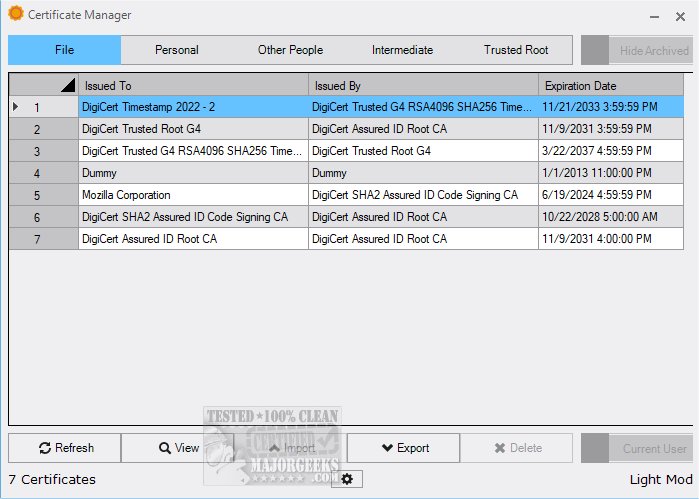
The latest release of Certificate Manager 19.5 enhances the way users manage their digital certificates by providing a comprehensive overview of current certificates, complete with easy access to detailed information. This tool not only allows users to view certificates but also offers functionalities for importing and exporting certificates, greatly improving overall certificate management.
Understanding the Importance of Certificate Management
For many end-users, app certificates are often overlooked until a problem arises, such as during app installation. However, for developers, ensuring that their software is properly signed is critical. Certificate Manager is designed to assist users in navigating the complexities of certificate management, making it an invaluable resource.
Features of Certificate Manager
Upon accessing the application, users can view personal certificates linked to user profiles on their systems. By simply double-clicking on a certificate, one can access detailed information about the issuer, validity period, and other technical specifications. The interface organizes certificates into distinct sections, including Intermediate and Trusted Root certificates, allowing users to easily monitor expiration dates and issuers at a glance.
User Experience
The user-friendly design of Certificate Manager makes it straightforward to manage digital certificates efficiently. Users can seamlessly navigate the application, making tasks such as viewing, importing, and exporting certificates simple and enjoyable. Overall, Certificate Manager simplifies the often intricate process of certificate management.
Conclusion and Future Enhancements
With its intuitive interface and robust functionalities, Certificate Manager 19.5 proves to be an exceptional tool for users needing to manage digital certificates effectively. As digital security continues to evolve, future updates to Certificate Manager could include features such as automated renewal reminders, enhanced security protocols, and integration with other security tools to further streamline the process. Download Certificate Manager today to experience its powerful features firsthand and stay ahead in the realm of digital certificate management
Understanding the Importance of Certificate Management
For many end-users, app certificates are often overlooked until a problem arises, such as during app installation. However, for developers, ensuring that their software is properly signed is critical. Certificate Manager is designed to assist users in navigating the complexities of certificate management, making it an invaluable resource.
Features of Certificate Manager
Upon accessing the application, users can view personal certificates linked to user profiles on their systems. By simply double-clicking on a certificate, one can access detailed information about the issuer, validity period, and other technical specifications. The interface organizes certificates into distinct sections, including Intermediate and Trusted Root certificates, allowing users to easily monitor expiration dates and issuers at a glance.
User Experience
The user-friendly design of Certificate Manager makes it straightforward to manage digital certificates efficiently. Users can seamlessly navigate the application, making tasks such as viewing, importing, and exporting certificates simple and enjoyable. Overall, Certificate Manager simplifies the often intricate process of certificate management.
Conclusion and Future Enhancements
With its intuitive interface and robust functionalities, Certificate Manager 19.5 proves to be an exceptional tool for users needing to manage digital certificates effectively. As digital security continues to evolve, future updates to Certificate Manager could include features such as automated renewal reminders, enhanced security protocols, and integration with other security tools to further streamline the process. Download Certificate Manager today to experience its powerful features firsthand and stay ahead in the realm of digital certificate management
Certificate Manager 19.5 released
Certificate Manager offers an in-depth overview of your current certificates, enabling you to access detailed information with ease.