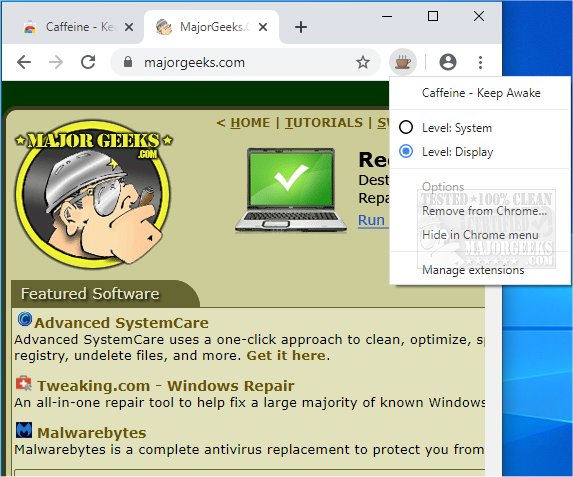
The browser extension Caffeine - Keep Awake for Chrome and Edge has released version 0.3.0. This tool is designed to prevent your computer from entering sleep or hibernation mode, ensuring continuous operation during critical tasks. The extension features a straightforward interface, indicated by a colored coffee cup icon that signifies its active state. Users can easily toggle the awake state on or off through a right-click context menu on the toolbar button. The awake state can be adjusted at either the system or desktop level, depending on user preferences.
Caffeine proves useful in various scenarios, such as during lengthy downloads, presentations, or while reading eBooks, where uninterrupted access to the screen is essential. The extension operates without a complex visual interface, making it user-friendly and efficient for maintaining system activity.
In addition to its main functionality, users may find related features and tips helpful. For instance, instructions on how to automatically lock a computer in Windows 10 and 11, manage sleep settings through power options, or understand the differences between sleep, hibernate, and shutdown modes can enhance the overall user experience.
Looking ahead, future updates could include additional features such as customizable settings for specific applications or tasks, enhanced user notifications, or integration with other productivity tools to further streamline the user experience. Overall, Caffeine is a practical tool for those looking to maintain an active session on their browser without interruption
Caffeine proves useful in various scenarios, such as during lengthy downloads, presentations, or while reading eBooks, where uninterrupted access to the screen is essential. The extension operates without a complex visual interface, making it user-friendly and efficient for maintaining system activity.
In addition to its main functionality, users may find related features and tips helpful. For instance, instructions on how to automatically lock a computer in Windows 10 and 11, manage sleep settings through power options, or understand the differences between sleep, hibernate, and shutdown modes can enhance the overall user experience.
Looking ahead, future updates could include additional features such as customizable settings for specific applications or tasks, enhanced user notifications, or integration with other productivity tools to further streamline the user experience. Overall, Caffeine is a practical tool for those looking to maintain an active session on their browser without interruption
Caffeine - Keep Awake for Chrome and Edge 0.3.0 released
Caffeine - Keep Awake for Chrome and Edge is a browser extension that prevents your system from going to sleep/hibernate.
Caffeine - Keep Awake for Chrome and Edge 0.3.0 released @ MajorGeeks