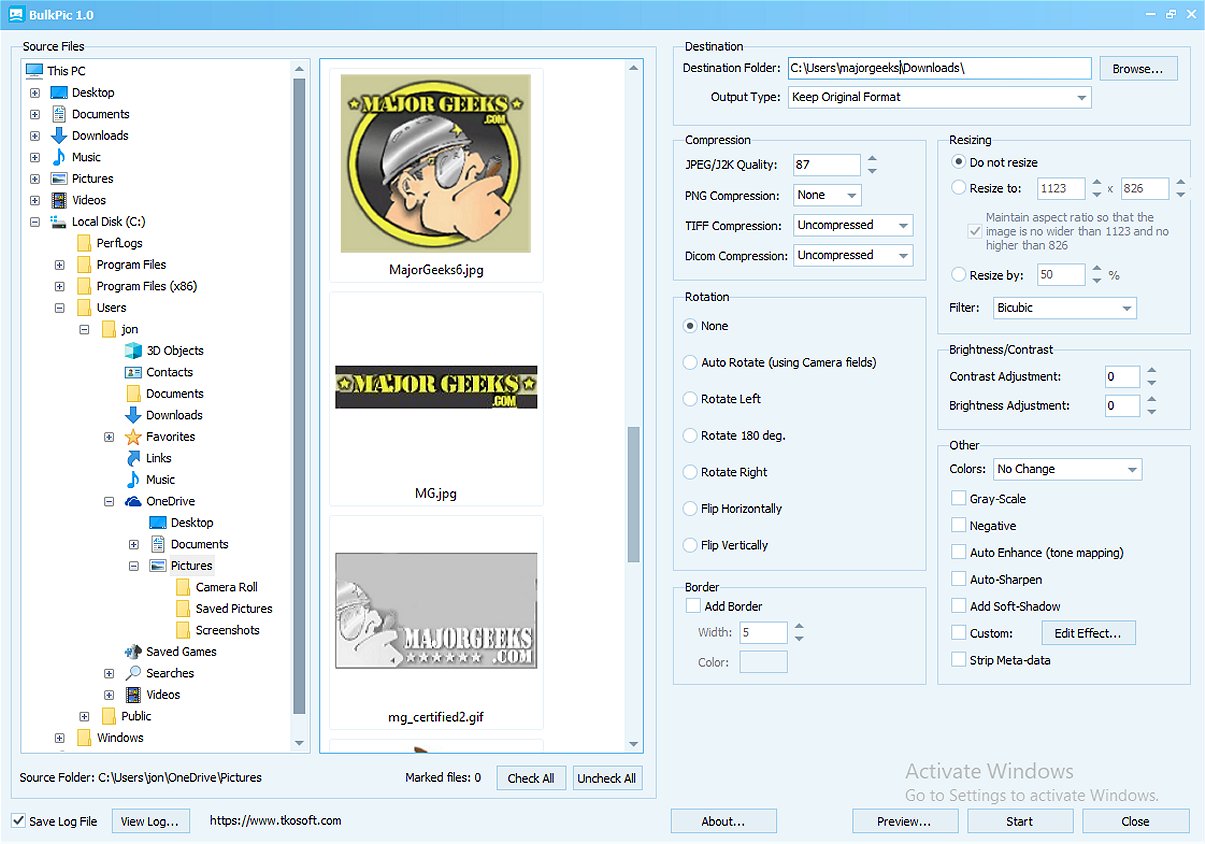
BulkPic 2.2 is now available, enhancing its reputation as a versatile and user-friendly batch image converter and editor. This software is designed to meet the needs of both individuals and professionals who require efficient management of large volumes of images without compromising quality.
Key Features of BulkPic
With BulkPic, users can quickly convert images in bulk to a wide array of popular formats, such as JPG, PNG, BMP, TIFF, GIF, TGA, PSD, ICO, JPEG 2000, and more. The software also allows users to retain the original image format, offering flexibility in image management.
Advanced Resizing and Filters
BulkPic boasts a powerful resizing feature that enables precision adjustments, whether by specifying exact dimensions or scaling images by percentage. It employs various advanced resizing filters, ensuring that image quality is maintained even after modifications.
Image Manipulation and Enhancement Tools
Users can manipulate their photos with ease, utilizing features to rotate, flip, or crop images. The program can also automatically adjust images based on camera orientation, streamlining the editing process. For enhancing image quality, BulkPic offers options to adjust brightness, contrast, gamma, and RGB channels, alongside sophisticated correction tools like Color Curve and Levels.
In addition to enhancing images, BulkPic allows users to apply effects in bulk, including sharpening, smoothing, and converting images into grayscale or sepia tones. Advanced color correction methods are also available, enhancing visual appeal.
Output Control Features
BulkPic provides users with output control options, allowing customization of quality and compression settings across various formats. Users can adjust color depth and remove metadata, resulting in cleaner and smaller files, which is particularly beneficial for web usage or storage.
Conclusion
In summary, BulkPic 2.2 emerges as an all-in-one solution for efficient and effective batch image processing. Its extensive features make it a valuable tool for anyone involved in image editing, especially given that it is available for free. This release continues to position BulkPic as a go-to software for comprehensive image management tasks.
Further Reading:
- Tips for Restoring Windows Photo Viewer on Windows 10 & 11
- How to Customize 'Edit With Photos' Context Menu in Windows 10 & 11
- Modifying 'Edit With Paint 3D' Context Menu in Windows 10 & 11
As technology continues to evolve, future updates to BulkPic are anticipated to introduce even more features, enhancing its capabilities for image processing and editing
Key Features of BulkPic
With BulkPic, users can quickly convert images in bulk to a wide array of popular formats, such as JPG, PNG, BMP, TIFF, GIF, TGA, PSD, ICO, JPEG 2000, and more. The software also allows users to retain the original image format, offering flexibility in image management.
Advanced Resizing and Filters
BulkPic boasts a powerful resizing feature that enables precision adjustments, whether by specifying exact dimensions or scaling images by percentage. It employs various advanced resizing filters, ensuring that image quality is maintained even after modifications.
Image Manipulation and Enhancement Tools
Users can manipulate their photos with ease, utilizing features to rotate, flip, or crop images. The program can also automatically adjust images based on camera orientation, streamlining the editing process. For enhancing image quality, BulkPic offers options to adjust brightness, contrast, gamma, and RGB channels, alongside sophisticated correction tools like Color Curve and Levels.
In addition to enhancing images, BulkPic allows users to apply effects in bulk, including sharpening, smoothing, and converting images into grayscale or sepia tones. Advanced color correction methods are also available, enhancing visual appeal.
Output Control Features
BulkPic provides users with output control options, allowing customization of quality and compression settings across various formats. Users can adjust color depth and remove metadata, resulting in cleaner and smaller files, which is particularly beneficial for web usage or storage.
Conclusion
In summary, BulkPic 2.2 emerges as an all-in-one solution for efficient and effective batch image processing. Its extensive features make it a valuable tool for anyone involved in image editing, especially given that it is available for free. This release continues to position BulkPic as a go-to software for comprehensive image management tasks.
Further Reading:
- Tips for Restoring Windows Photo Viewer on Windows 10 & 11
- How to Customize 'Edit With Photos' Context Menu in Windows 10 & 11
- Modifying 'Edit With Paint 3D' Context Menu in Windows 10 & 11
As technology continues to evolve, future updates to BulkPic are anticipated to introduce even more features, enhancing its capabilities for image processing and editing
BulkPic 2.2 released
BulkPic is a versatile, user-friendly batch image converter and editor. It is ideal for individuals and professionals alike who need to handle large volumes of images efficiently without sacrificing quality.