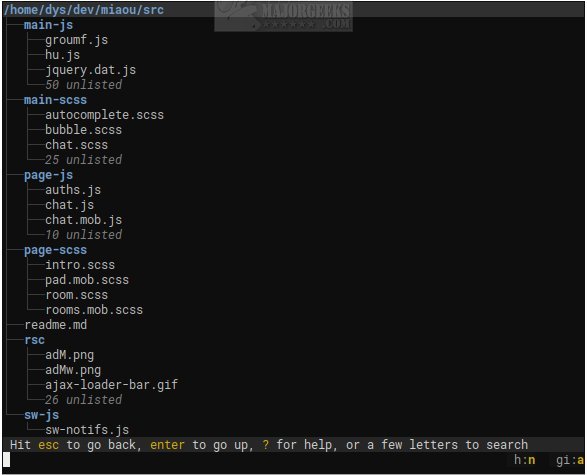
Broot version 1.58.0 has been released, enhancing the experience of navigating directory trees via the command line. This open-source command-line file manager transforms terminal navigation into a more efficient and enjoyable task. Unlike traditional methods that require users to switch between various commands like ls, cd, and find, Broot offers a dynamic, searchable tree view that updates in real-time as you type.
Designed for terminal enthusiasts, Broot prioritizes speed and simplicity over complexity, avoiding the clutter of bloated text user interfaces (TUIs) with excessive panels and intricate key combinations. Users can easily access the entire folder structure and navigate directly to their desired files or directories with minimal keystrokes, even if they cannot recall the exact location.
Notably, Broot allows for file searching, the creation of custom shortcuts, and file manipulation while maintaining the integrity of the folder hierarchy. However, it requires the setup of a br shell function for proper execution, which may necessitate administrative privileges. Its performance remains robust, handling searches on large, slow disks without blocking; any new keystroke can interrupt the ongoing search to initiate a new one.
For optimal usage, users are encouraged to visit the author's website and consult the usage guide. As Broot continues to evolve, it positions itself as a vital tool for anyone looking to streamline their command-line file management experience.
In addition to Broot, users may also find interest in resources like "The Ultimate List of Every Known Command Prompt and PowerShell Commands" and guides on resetting folder view settings in Windows 10 and 11, which can further enhance their command-line proficiency and overall file management skills
Designed for terminal enthusiasts, Broot prioritizes speed and simplicity over complexity, avoiding the clutter of bloated text user interfaces (TUIs) with excessive panels and intricate key combinations. Users can easily access the entire folder structure and navigate directly to their desired files or directories with minimal keystrokes, even if they cannot recall the exact location.
Notably, Broot allows for file searching, the creation of custom shortcuts, and file manipulation while maintaining the integrity of the folder hierarchy. However, it requires the setup of a br shell function for proper execution, which may necessitate administrative privileges. Its performance remains robust, handling searches on large, slow disks without blocking; any new keystroke can interrupt the ongoing search to initiate a new one.
For optimal usage, users are encouraged to visit the author's website and consult the usage guide. As Broot continues to evolve, it positions itself as a vital tool for anyone looking to streamline their command-line file management experience.
In addition to Broot, users may also find interest in resources like "The Ultimate List of Every Known Command Prompt and PowerShell Commands" and guides on resetting folder view settings in Windows 10 and 11, which can further enhance their command-line proficiency and overall file management skills
Broot 1.58.0 released
Broot is an Open Source way to view and navigate any size directory trees through the command line.