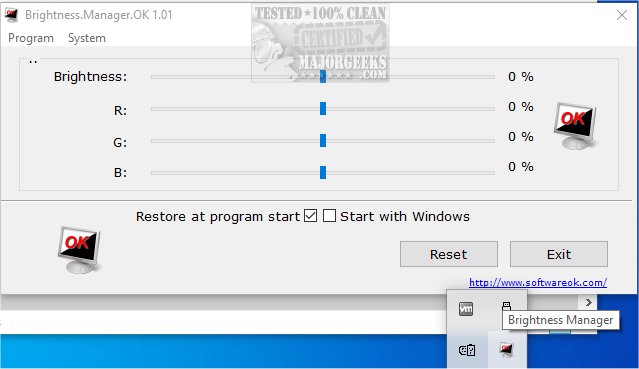
Brightness.Manager.OK is a newly released application that serves as an alternative solution for managing screen brightness when standard controls are ineffective. This program allows users to set their desired brightness levels, which can be automatically applied upon launching the application or logging into Windows, offering convenience and consistency.
Key features of Brightness.Manager.OK include a user-friendly interface with sliders that enable quick adjustments to screen brightness. For users with older monitors that may display color distortions (such as red, blue, green, or yellow tints), the software provides the option to fine-tune brightness in the RGB color space, allowing for a more personalized and precise visual experience.
In addition to brightness control, Brightness.Manager.OK integrates seamlessly with several Windows features, including the screensaver, power options, and the mobility center, enhancing overall user convenience. Exiting the application is straightforward via the Exit button; however, using ALT + F4 or the Close button minimizes the program to the notification area of the Windows taskbar, allowing it to run in the background. Users should be aware that Windows may reset the brightness values upon restarting the machine.
This update not only improves the functionality of screen brightness control but also enhances the user experience with its intuitive design and additional features.
Further Developments and Future Enhancements
As technology evolves, so too does the need for effective display management tools. Future updates to Brightness.Manager.OK could include features like:
1. Custom Profiles: Users could save multiple brightness settings for different scenarios, such as work, gaming, or watching movies, easily switching between profiles as needed.
2. Scheduling: The ability to schedule brightness adjustments based on the time of day, automating changes to align with natural lighting conditions.
3. Integration with Ambient Light Sensors: If compatible, the software could adjust brightness automatically based on ambient light levels, providing optimal viewing experiences in varying light conditions.
4. Accessibility Features: Enhancements could be made to support users with visual impairments, ensuring that brightness adjustments are easy to navigate for all users.
Overall, Brightness.Manager.OK 1.91 represents a significant step forward in screen brightness control, offering users greater flexibility and customization while addressing common issues with default system controls
Brightness.Manager.OK 1.91 released
Brightness.Manager.OK provides a stand-in option to control screen brightness when default controls cease to work.