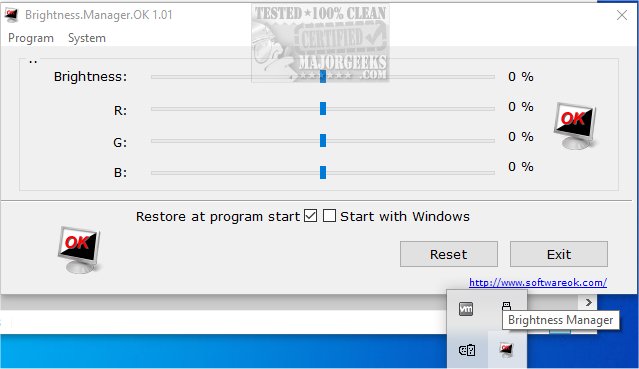
The latest version of Brightness.Manager.OK, 1.44, introduces a reliable alternative for managing screen brightness, particularly when default controls fail to function properly. This software allows users to set their preferred brightness levels, which can be automatically applied at program launch or upon logging into Windows, providing a seamless user experience.
A standout feature of Brightness.Manager.OK is its ability to fine-tune brightness settings in older monitors that may display color tints like red, blue, green, or yellow. Users can adjust RGB values for a more customized and accurate display, ensuring the screen visuals align with personal preferences.
The user interface of Brightness.Manager.OK is designed for ease of use, featuring sliders that facilitate quick adjustments to brightness levels. Additionally, the program integrates with various Windows functionalities, including screensaver settings, power options, and the mobility center, which enhances accessibility and convenience for users.
To exit the application, users can click the Exit button, although using ALT + F4 or the Close button will minimize the program to the notification area of the Windows taskbar. Users have the option to run Brightness.Manager.OK in the background, but it’s important to note that Windows will reset brightness values upon a restart.
Extended Features:
In addition to the existing functionalities, future updates could explore features such as:
- Custom Profiles: Allowing users to create profiles for different lighting environments (e.g., night mode, work mode) that can be switched easily.
- Scheduling: Enabling automatic brightness adjustments based on the time of day or specific events.
- Integration with External Sensors: Linking the application with ambient light sensors to automatically adjust brightness based on surrounding light conditions.
- Accessibility Options: Implementing voice commands or keyboard shortcuts for users with disabilities to enhance usability.
Overall, Brightness.Manager.OK 1.44 is a valuable tool for anyone seeking greater control over their screen brightness, especially for those facing issues with default settings
A standout feature of Brightness.Manager.OK is its ability to fine-tune brightness settings in older monitors that may display color tints like red, blue, green, or yellow. Users can adjust RGB values for a more customized and accurate display, ensuring the screen visuals align with personal preferences.
The user interface of Brightness.Manager.OK is designed for ease of use, featuring sliders that facilitate quick adjustments to brightness levels. Additionally, the program integrates with various Windows functionalities, including screensaver settings, power options, and the mobility center, which enhances accessibility and convenience for users.
To exit the application, users can click the Exit button, although using ALT + F4 or the Close button will minimize the program to the notification area of the Windows taskbar. Users have the option to run Brightness.Manager.OK in the background, but it’s important to note that Windows will reset brightness values upon a restart.
Extended Features:
In addition to the existing functionalities, future updates could explore features such as:
- Custom Profiles: Allowing users to create profiles for different lighting environments (e.g., night mode, work mode) that can be switched easily.
- Scheduling: Enabling automatic brightness adjustments based on the time of day or specific events.
- Integration with External Sensors: Linking the application with ambient light sensors to automatically adjust brightness based on surrounding light conditions.
- Accessibility Options: Implementing voice commands or keyboard shortcuts for users with disabilities to enhance usability.
Overall, Brightness.Manager.OK 1.44 is a valuable tool for anyone seeking greater control over their screen brightness, especially for those facing issues with default settings
Brightness.Manager.OK 1.44 released
Brightness.Manager.OK provides a stand-in option to control screen brightness when default controls cease to work.