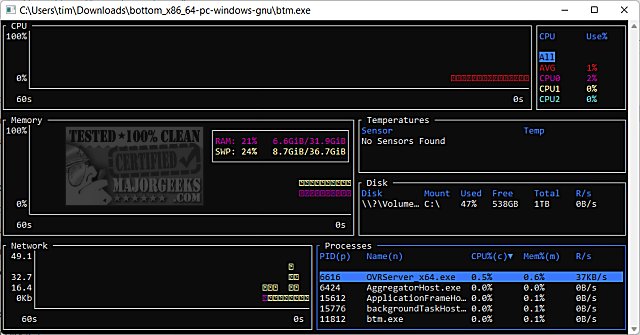
The latest release of bottom (btm) version 0.14.5 has introduced several enhancements to this cross-platform monitoring application. Bottom provides users with graphical visualization widgets that track various system metrics over time, including:
- CPU usage, both overall and on a per-core basis
- RAM and swap memory usage
- Network I/O performance
The application allows users to zoom in and out on these metrics, with the current time interval displayed for easy reference. Additionally, bottom features widgets that provide information on:
- Disk capacity and usage
- Temperature sensor readings
- Battery usage levels
One of the standout features of bottom is its process widget, which enables users to view, sort, and search for processes actively running on their system. This widget also supports functionalities such as issuing kill signals and displaying processes in a tree mode for better hierarchical visualization.
For users seeking more information on system diagnostics, bottom provides helpful links to articles that guide them on checking memory speed, identifying hard drive types, understanding CPU core counts, and determining the specifications of Intel processors and motherboards in Windows 10 and 11.
As technology evolves, the demand for efficient system monitoring tools continues to grow. Future updates of bottom may include even more features, such as enhanced integration with cloud services for remote monitoring, support for additional operating systems, or customizable alerts for specific system thresholds. Such advancements would further solidify bottom's position as a comprehensive tool for users looking to optimize their system performance
- CPU usage, both overall and on a per-core basis
- RAM and swap memory usage
- Network I/O performance
The application allows users to zoom in and out on these metrics, with the current time interval displayed for easy reference. Additionally, bottom features widgets that provide information on:
- Disk capacity and usage
- Temperature sensor readings
- Battery usage levels
One of the standout features of bottom is its process widget, which enables users to view, sort, and search for processes actively running on their system. This widget also supports functionalities such as issuing kill signals and displaying processes in a tree mode for better hierarchical visualization.
For users seeking more information on system diagnostics, bottom provides helpful links to articles that guide them on checking memory speed, identifying hard drive types, understanding CPU core counts, and determining the specifications of Intel processors and motherboards in Windows 10 and 11.
As technology evolves, the demand for efficient system monitoring tools continues to grow. Future updates of bottom may include even more features, such as enhanced integration with cloud services for remote monitoring, support for additional operating systems, or customizable alerts for specific system thresholds. Such advancements would further solidify bottom's position as a comprehensive tool for users looking to optimize their system performance
bottom (btm) 0.14.5 released
bottom (btm) is a cross-platform monitoring app.