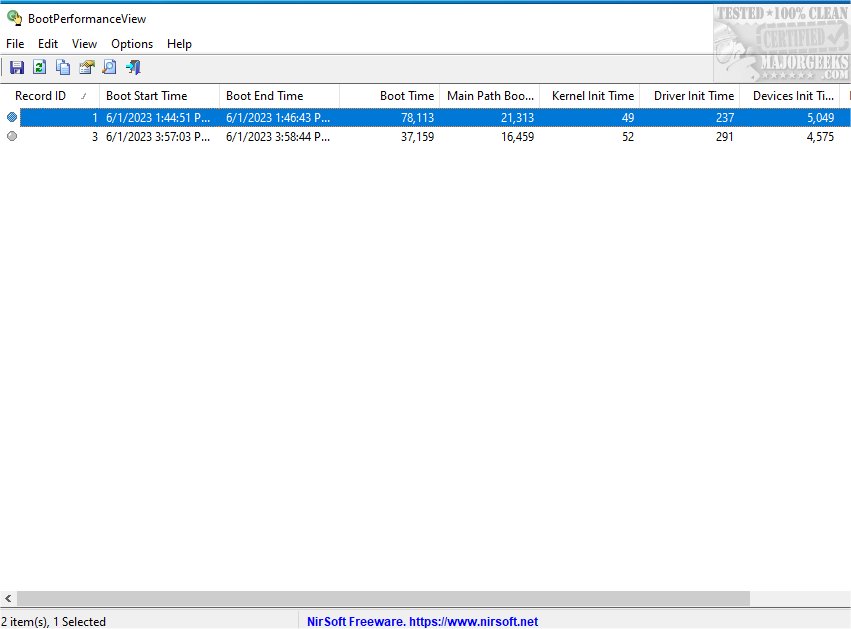
BootPerformanceView is a powerful tool that provides deep insights into your system’s boot process, allowing users to evaluate and improve startup efficiency. By extracting data from the Microsoft-Windows-Diagnostics-Performance/Operational event log, BootPerformanceView helps diagnose boot-related issues effectively.
Key Features of BootPerformanceView:
- Comprehensive Metrics: The tool offers detailed metrics for each boot event, including:
- Boot Start Time: When the boot process begins.
- Boot End Time: When the boot process finishes.
- Boot Time: Total time taken to boot, measured in milliseconds.
- Main Path Boot Time: Duration for critical OS components to load.
- Kernel Init Time: Time for the Windows kernel initialization.
- Driver Init Time: Duration for device drivers to load.
- Devices Init Time: Time taken for connected devices to initialize.
- Smss Init Time: Duration for initializing the Session Manager Subsystem.
- User Profile Processing Time: Time for loading user-specific settings.
Accessibility and Usability:
BootPerformanceView is designed for ease of use, allowing users to access boot performance data from local systems, remote computers, or external event log files. Its portable nature means it requires no installation, simply run BootPerformanceView.exe to start analyzing the boot performance of your system.
Command-Line Functionality:
For advanced users, BootPerformanceView supports command-line operations with various options for saving data in different formats including text, CSV, HTML, XML, and JSON. Users can also sort the saved records by specific columns and customize their display preferences.
Conclusion:
For those seeking a straightforward yet effective way to gain insights into their system's boot performance, BootPerformanceView serves as an invaluable tool. Its comprehensive metrics and user-friendly interface make it ideal for IT professionals and system administrators focused on optimizing startup processes.
Further Context:
With the release of BootPerformanceView 1.05, users can expect enhanced functionality and continued support for boot performance analysis. The insights gained can significantly aid in troubleshooting and improving system efficiency. As technology evolves, tools like BootPerformanceView become essential for maintaining optimal system performance and ensuring user satisfaction.
In addition to BootPerformanceView, users may explore related topics such as managing startup applications in Windows 10 and 11, utilizing Storage Sense for automatic file management, and comparing drive cleaning software to maintain system health
Key Features of BootPerformanceView:
- Comprehensive Metrics: The tool offers detailed metrics for each boot event, including:
- Boot Start Time: When the boot process begins.
- Boot End Time: When the boot process finishes.
- Boot Time: Total time taken to boot, measured in milliseconds.
- Main Path Boot Time: Duration for critical OS components to load.
- Kernel Init Time: Time for the Windows kernel initialization.
- Driver Init Time: Duration for device drivers to load.
- Devices Init Time: Time taken for connected devices to initialize.
- Smss Init Time: Duration for initializing the Session Manager Subsystem.
- User Profile Processing Time: Time for loading user-specific settings.
Accessibility and Usability:
BootPerformanceView is designed for ease of use, allowing users to access boot performance data from local systems, remote computers, or external event log files. Its portable nature means it requires no installation, simply run BootPerformanceView.exe to start analyzing the boot performance of your system.
Command-Line Functionality:
For advanced users, BootPerformanceView supports command-line operations with various options for saving data in different formats including text, CSV, HTML, XML, and JSON. Users can also sort the saved records by specific columns and customize their display preferences.
Conclusion:
For those seeking a straightforward yet effective way to gain insights into their system's boot performance, BootPerformanceView serves as an invaluable tool. Its comprehensive metrics and user-friendly interface make it ideal for IT professionals and system administrators focused on optimizing startup processes.
Further Context:
With the release of BootPerformanceView 1.05, users can expect enhanced functionality and continued support for boot performance analysis. The insights gained can significantly aid in troubleshooting and improving system efficiency. As technology evolves, tools like BootPerformanceView become essential for maintaining optimal system performance and ensuring user satisfaction.
In addition to BootPerformanceView, users may explore related topics such as managing startup applications in Windows 10 and 11, utilizing Storage Sense for automatic file management, and comparing drive cleaning software to maintain system health
BootPerformanceView 1.05 released
BootPerformanceView offers detailed insights into the performance of your system's boot process, enabling you to analyze and monitor various metrics related to startup efficiency.