The newly released version 0.2.0.15 of Bookmarks Backuper for Chrome provides users with a reliable solution to safeguard their bookmarks, preventing potential data loss by allowing backups to Google Drive. This extension ensures that users can access their bookmarks even in the event of a local device failure or loss, offering peace of mind about the security of their important links.
User-Friendly Interface and Automatic Backups
Bookmarks Backuper for Chrome is designed with user convenience in mind. The extension is straightforward to use and can be configured to perform automatic backups at regular intervals. This feature allows users to maintain an up-to-date collection of bookmarks without having to remember to back them up manually, reinforcing the security of their online resources.
Access Options for Bookmark Management
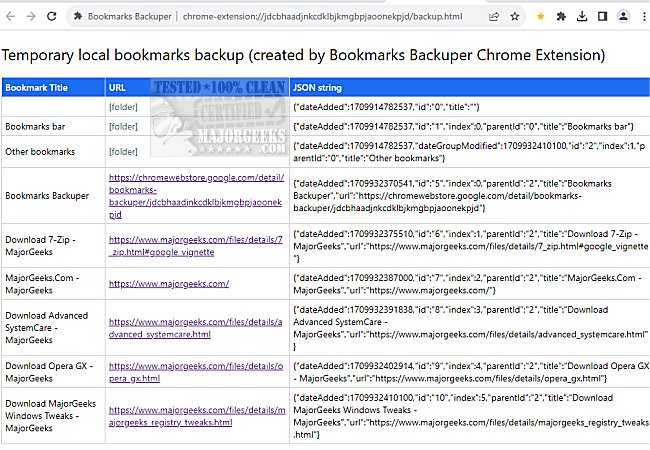
Users have two primary options for accessing their bookmarks: either through Google Drive or temporary local storage. After installing the extension, users can click the yellow star icon (which needs to be pinned for easy access) to choose between the two options. If selecting local storage, a new tab will display bookmarks along with pertinent details such as title, URL, and the date of addition, although the latter is presented in a JSON format.
Integration with Google Drive
The synchronization feature with Google Drive allows users to manage their bookmarks in a familiar format. When accessed through Google Drive, bookmarks appear as an Excel spreadsheet, retaining the essential information from local storage. This integration ensures that users can view and manage their bookmarks easily from any device, including mobile platforms.
Conclusion and Additional Resources
While Bookmarks Backuper for Chrome may not introduce any revolutionary features, it significantly simplifies the process of backing up bookmarks, making it easier for users to keep their online resources organized and accessible. For those looking to maximize their bookmark management experience, similar tools such as exporting or importing Google Chrome bookmarks to HTML, creating desktop shortcuts for bookmarks, or transferring Firefox bookmarks to Chrome can offer additional functionalities.
Overall, Bookmarks Backuper for Chrome is a practical tool for anyone looking to secure their browsing history and maintain easy access to their favorite online resources
User-Friendly Interface and Automatic Backups
Bookmarks Backuper for Chrome is designed with user convenience in mind. The extension is straightforward to use and can be configured to perform automatic backups at regular intervals. This feature allows users to maintain an up-to-date collection of bookmarks without having to remember to back them up manually, reinforcing the security of their online resources.
Access Options for Bookmark Management
Users have two primary options for accessing their bookmarks: either through Google Drive or temporary local storage. After installing the extension, users can click the yellow star icon (which needs to be pinned for easy access) to choose between the two options. If selecting local storage, a new tab will display bookmarks along with pertinent details such as title, URL, and the date of addition, although the latter is presented in a JSON format.
Integration with Google Drive
The synchronization feature with Google Drive allows users to manage their bookmarks in a familiar format. When accessed through Google Drive, bookmarks appear as an Excel spreadsheet, retaining the essential information from local storage. This integration ensures that users can view and manage their bookmarks easily from any device, including mobile platforms.
Conclusion and Additional Resources
While Bookmarks Backuper for Chrome may not introduce any revolutionary features, it significantly simplifies the process of backing up bookmarks, making it easier for users to keep their online resources organized and accessible. For those looking to maximize their bookmark management experience, similar tools such as exporting or importing Google Chrome bookmarks to HTML, creating desktop shortcuts for bookmarks, or transferring Firefox bookmarks to Chrome can offer additional functionalities.
Overall, Bookmarks Backuper for Chrome is a practical tool for anyone looking to secure their browsing history and maintain easy access to their favorite online resources
Bookmarks Backuper for Chrome 0.2.0.15 released
Bookmarks Backuper for Chrome lets you safeguard your bookmarks and prevent data loss by backing them up to Google Drive.
Bookmarks Backuper for Chrome 0.2.0.15 released @ MajorGeeks