The BNTP: Bookmarks in New Tab Page for Chrome has released version 3.5.2, bringing an innovative approach to managing bookmarks and frequently visited sites directly from the New Tab page. This extension allows users to customize their browsing experience by displaying bookmarks in a visually organized manner, enhancing productivity and efficiency. Users can quickly access their favorite websites without the hassle of searching for them manually.
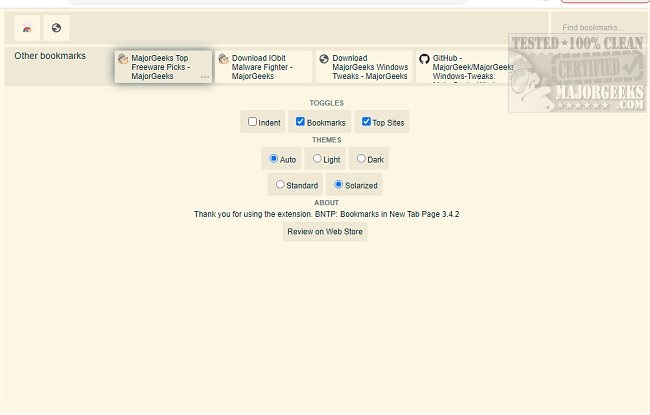
With BNTP, users can easily add, edit, and manage bookmarks, organizing them into folders within the extension's interface. The extension boasts a sleek, modern design that seamlessly integrates with Chrome, offering a smooth user experience. In terms of customization, BNTP provides options for theme selection, including Light and Dark modes, each with Standard and Solarized variations. The Solarized themes significantly change the color palette, adding distinctive tints for both modes.
Key features of BNTP include the ability to list bookmarks by folders, collapse folders, drag and drop bookmarks for easy organization, edit bookmarks, automatic dark mode, and syncing preferences across devices. It is an essential tool for anyone looking to enhance their browsing efficiency.
In addition to BNTP, users may find other productivity-related extensions useful. For example, tools to restore accidentally closed browser tabs, mute tabs in various browsers, and optimize browser performance can complement the functionality provided by BNTP. Overall, BNTP: Bookmarks in New Tab Page is an invaluable extension for those seeking a streamlined and efficient browsing experience
With BNTP, users can easily add, edit, and manage bookmarks, organizing them into folders within the extension's interface. The extension boasts a sleek, modern design that seamlessly integrates with Chrome, offering a smooth user experience. In terms of customization, BNTP provides options for theme selection, including Light and Dark modes, each with Standard and Solarized variations. The Solarized themes significantly change the color palette, adding distinctive tints for both modes.
Key features of BNTP include the ability to list bookmarks by folders, collapse folders, drag and drop bookmarks for easy organization, edit bookmarks, automatic dark mode, and syncing preferences across devices. It is an essential tool for anyone looking to enhance their browsing efficiency.
In addition to BNTP, users may find other productivity-related extensions useful. For example, tools to restore accidentally closed browser tabs, mute tabs in various browsers, and optimize browser performance can complement the functionality provided by BNTP. Overall, BNTP: Bookmarks in New Tab Page is an invaluable extension for those seeking a streamlined and efficient browsing experience
BNTP: Bookmarks in New Tab Page for Chrome 3.5.2 released
BNTP: Bookmarks in New Tab Page for Chrome provides an innovative way to access and view your bookmarks and most visited sites.
BNTP: Bookmarks in New Tab Page for Chrome 3.5.2 released @ MajorGeeks