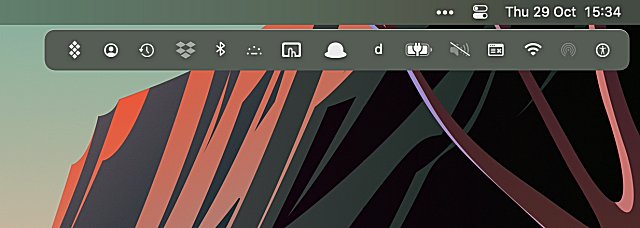
Bartender 6 has been officially released, enhancing the functionality of the macOS menu bar and offering users unprecedented control over their menu bar items. This award-winning application allows users to customize which items appear and when, ensuring that only the necessary items are visible at any given time.
One of the standout features of Bartender 6 is the Quick Reveal function, which provides instant access to hidden menu bar items by simply moving the mouse to the menu bar or clicking it. The Bartender Bar has also made a return, allowing users to access hidden items conveniently situated below the menu bar, thus freeing up space for more applications.
In addition, Bartender 6 offers improved menu bar item spacing, giving users the option to reduce the space between items for a more compact layout reminiscent of earlier macOS versions. The Quick Search feature introduces a new level of efficiency, allowing users to swiftly locate and activate menu bar items directly from the keyboard.
The introduction of Triggers further enhances the app's functionality, enabling users to set specific conditions under which menu bar items are displayed. This includes options for showing items based on changes, icon matching, or executing scripts, allowing for a more tailored experience.
Overall, Bartender 6 not only improves workflow and organization but also adapts to the individual needs of users, making it an essential tool for anyone looking to optimize their macOS menu bar experience. As the app continues to evolve, users can expect even more innovative features and enhancements in future updates
One of the standout features of Bartender 6 is the Quick Reveal function, which provides instant access to hidden menu bar items by simply moving the mouse to the menu bar or clicking it. The Bartender Bar has also made a return, allowing users to access hidden items conveniently situated below the menu bar, thus freeing up space for more applications.
In addition, Bartender 6 offers improved menu bar item spacing, giving users the option to reduce the space between items for a more compact layout reminiscent of earlier macOS versions. The Quick Search feature introduces a new level of efficiency, allowing users to swiftly locate and activate menu bar items directly from the keyboard.
The introduction of Triggers further enhances the app's functionality, enabling users to set specific conditions under which menu bar items are displayed. This includes options for showing items based on changes, icon matching, or executing scripts, allowing for a more tailored experience.
Overall, Bartender 6 not only improves workflow and organization but also adapts to the individual needs of users, making it an essential tool for anyone looking to optimize their macOS menu bar experience. As the app continues to evolve, users can expect even more innovative features and enhancements in future updates
Bartender 6 released
Bartender is an award-winning app for macOS that superpowers your menu bar, giving you total control over your menu bar items, what's displayed, and when, with menu bar items only showing when you need them.