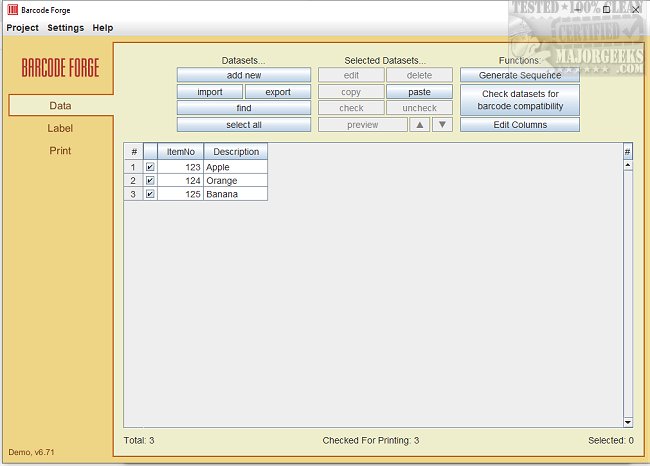
Barcode Forge has released version 7.52, enhancing its capabilities as a robust and intuitive software that empowers users to create and print barcodes seamlessly. Compatible with various printers, including both desktop and label printers, Barcode Forge supports the printing of continuous roll labels and label sheets with multiple peel-off labels on A4 pages.
The software comes equipped with a plethora of pre-loaded templates designed for labels and stickers from renowned manufacturers like Avery, Brother, and Dymo. This feature ensures that users can maintain consistency and achieve high-quality printing. Whether for a small business or a large corporation, Barcode Forge is an indispensable tool for generating barcodes for products, inventory management, and a myriad of other applications.
Barcode Forge supports a wide range of barcode formats, including standard 1D barcodes (e.g., Code 128, EAN) and 2D barcodes (e.g., QR Code, DataMatrix). Additionally, users can conveniently import data from various sources, including Excel, Access, MS SQL, and CSV files, facilitating easy integration into existing workflows.
One of the standout features of Barcode Forge is its ability to ensure flawless label printing by automatically adjusting barcode lines to match the printer's resolution, which is particularly beneficial for lower-resolution printers. The software also supports both batch printing and an "On-Demand" print mode, allowing users to print specific datasets by entering key values via keyboard or barcode scanner.
For businesses looking to integrate Barcode Forge with their existing systems, the Developer Edition offers a Barcode Label API through an XML interface, streamlining the integration process with ERP software and inventory management systems. To further enhance accuracy, especially when using PDF printers, Barcode Forge includes a specialized PDF feature that maintains barcode line coordinates with six decimal places of precision, ensuring optimal printing quality regardless of the printer type.
Overall, Barcode Forge 7.52 is designed to elevate the barcode creation process, improving efficiency and reliability for users across various industries.
Extensions and Future Directions:
Looking ahead, the developers of Barcode Forge may consider expanding the software's features by including advanced customization options for barcode design, such as the ability to modify colors, shapes, and sizes. Additionally, incorporating cloud-based functionalities could enable users to access their barcode templates and data from any device, enhancing flexibility and collaboration. As businesses increasingly adopt automation, integrating machine learning algorithms to predict and suggest optimal barcode configurations based on user history might further streamline the barcode creation process. Such enhancements would position Barcode Forge as a leading solution in the barcode generation market
The software comes equipped with a plethora of pre-loaded templates designed for labels and stickers from renowned manufacturers like Avery, Brother, and Dymo. This feature ensures that users can maintain consistency and achieve high-quality printing. Whether for a small business or a large corporation, Barcode Forge is an indispensable tool for generating barcodes for products, inventory management, and a myriad of other applications.
Barcode Forge supports a wide range of barcode formats, including standard 1D barcodes (e.g., Code 128, EAN) and 2D barcodes (e.g., QR Code, DataMatrix). Additionally, users can conveniently import data from various sources, including Excel, Access, MS SQL, and CSV files, facilitating easy integration into existing workflows.
One of the standout features of Barcode Forge is its ability to ensure flawless label printing by automatically adjusting barcode lines to match the printer's resolution, which is particularly beneficial for lower-resolution printers. The software also supports both batch printing and an "On-Demand" print mode, allowing users to print specific datasets by entering key values via keyboard or barcode scanner.
For businesses looking to integrate Barcode Forge with their existing systems, the Developer Edition offers a Barcode Label API through an XML interface, streamlining the integration process with ERP software and inventory management systems. To further enhance accuracy, especially when using PDF printers, Barcode Forge includes a specialized PDF feature that maintains barcode line coordinates with six decimal places of precision, ensuring optimal printing quality regardless of the printer type.
Overall, Barcode Forge 7.52 is designed to elevate the barcode creation process, improving efficiency and reliability for users across various industries.
Extensions and Future Directions:
Looking ahead, the developers of Barcode Forge may consider expanding the software's features by including advanced customization options for barcode design, such as the ability to modify colors, shapes, and sizes. Additionally, incorporating cloud-based functionalities could enable users to access their barcode templates and data from any device, enhancing flexibility and collaboration. As businesses increasingly adopt automation, integrating machine learning algorithms to predict and suggest optimal barcode configurations based on user history might further streamline the barcode creation process. Such enhancements would position Barcode Forge as a leading solution in the barcode generation market
Barcode Forge 7.52 released
Barcode Forge is a powerful and user-friendly software that allows you to easily create and print barcodes on various printers, including desktop and label printers.