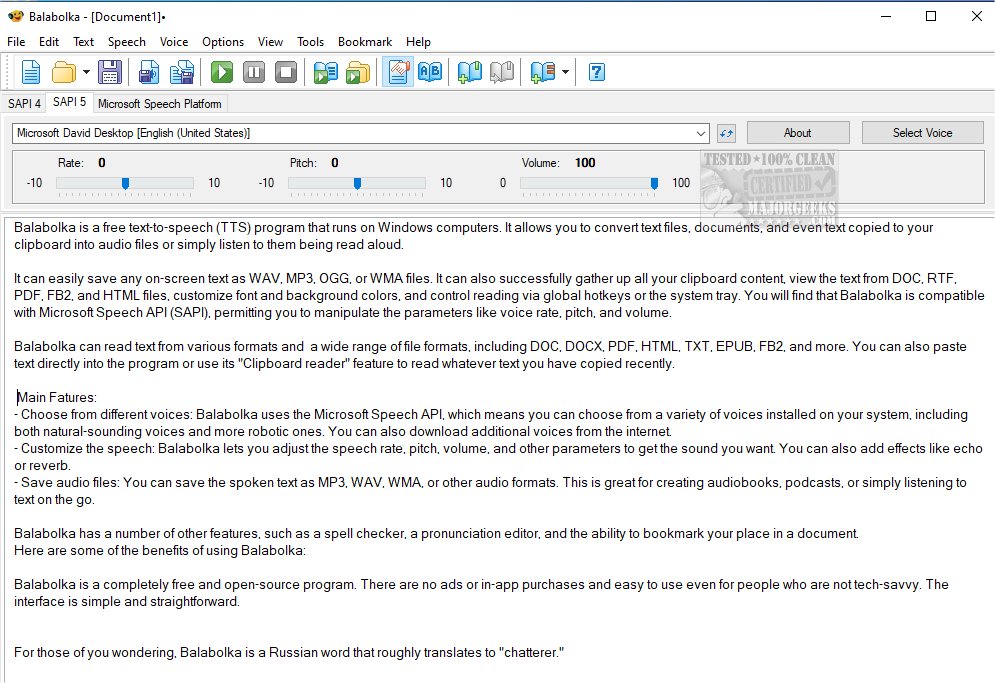
Balabolka 2.15.0.914 has been released, enhancing this customizable freeware text-to-speech (TTS) application that leverages all the installed voices on a Windows PC. Balabolka enables users to convert various text formats—including documents and clipboard content—into audio files or listen to them being read aloud in real-time. It supports saving audio in multiple formats such as WAV, MP3, OGG, and WMA, and can read text from diverse file types like DOC, RTF, PDF, FB2, and HTML.
The program features a user-friendly interface that allows for easy customization of font and background colors and supports global hotkeys for convenient control. Balabolka is compatible with the Microsoft Speech API (SAPI), enabling users to adjust parameters like voice rate, pitch, and volume to tailor their listening experience. Users can select from various voices available on their system, including the option to download additional voices from the internet.
Key features of Balabolka include:
- A variety of voice options, from natural-sounding to robotic.
- Customizable speech settings, including effects like echo or reverb.
- The capability to save spoken text as audio files for audiobooks or podcasts.
- Additional tools such as a spell checker, pronunciation editor, and bookmarking for easy navigation through documents.
Balabolka stands out as a completely free and open-source software without ads or in-app purchases, making it accessible for users of all technical skill levels. The name "Balabolka" translates from Russian to "chatterer," reflecting its primary function.
In addition to its core features, future updates could potentially introduce enhanced voice quality, more intuitive interface options, and greater support for additional languages and dialects. Users might also benefit from collaboration features that allow sharing of audio files or collaborative editing of text documents directly within the application. Overall, Balabolka remains a versatile and powerful tool for anyone looking to convert text to speech efficiently
The program features a user-friendly interface that allows for easy customization of font and background colors and supports global hotkeys for convenient control. Balabolka is compatible with the Microsoft Speech API (SAPI), enabling users to adjust parameters like voice rate, pitch, and volume to tailor their listening experience. Users can select from various voices available on their system, including the option to download additional voices from the internet.
Key features of Balabolka include:
- A variety of voice options, from natural-sounding to robotic.
- Customizable speech settings, including effects like echo or reverb.
- The capability to save spoken text as audio files for audiobooks or podcasts.
- Additional tools such as a spell checker, pronunciation editor, and bookmarking for easy navigation through documents.
Balabolka stands out as a completely free and open-source software without ads or in-app purchases, making it accessible for users of all technical skill levels. The name "Balabolka" translates from Russian to "chatterer," reflecting its primary function.
In addition to its core features, future updates could potentially introduce enhanced voice quality, more intuitive interface options, and greater support for additional languages and dialects. Users might also benefit from collaboration features that allow sharing of audio files or collaborative editing of text documents directly within the application. Overall, Balabolka remains a versatile and powerful tool for anyone looking to convert text to speech efficiently
Balabolka 2.15.0.914 released
Balabolka is a mildly customizable freeware text-to-speech application capable of utilizing all the installed computer voices on your PC.