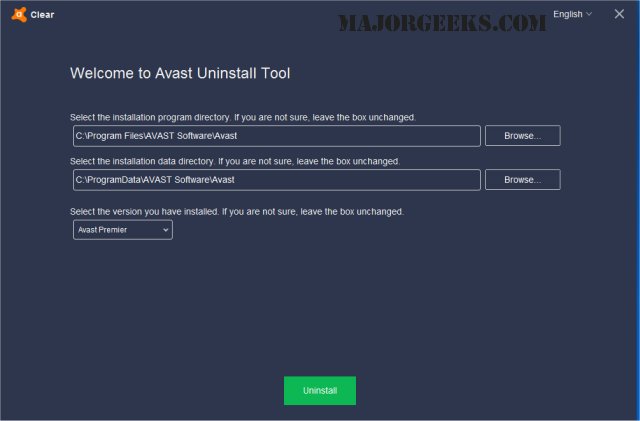
Avast Clear 26.3.10886 has been released as an effective tool for completely uninstalling Avast software, particularly when the conventional Add/Remove Programs feature fails to work properly. This utility is especially useful for users who are facing difficulties in removing Avast from their systems.
To uninstall Avast using Avast Clear, follow these steps:
1. Download aswclear.exe and save it on your desktop.
2. Boot your Windows computer into Safe Mode by rebooting and pressing F8.
3. Run the uninstall utility.
4. If you have installed Avast in a non-default directory, navigate to that folder (note that all contents of the chosen folder will be deleted).
5. Click the "REMOVE" button.
6. Restart your computer to complete the uninstallation process.
Additionally, users may find similar resources helpful, such as guides on installing Avast as a lightweight antivirus solution, managing expired Norton or McAfee antivirus subscriptions, distinguishing between actual viruses and false positives, and selecting the best anti-malware applications that can coexist with existing antivirus software.
To extend this information, it's important to note that maintaining a clean and efficient system often requires the removal of old or conflicting software. Utilizing tools like Avast Clear not only aids in effective uninstallation but also helps in preventing potential software conflicts that can degrade system performance. Users should regularly check for updates to their antivirus tools and consider periodic cleanups to ensure optimal protection against threats. Always back up important data before performing significant changes to software installations
To uninstall Avast using Avast Clear, follow these steps:
1. Download aswclear.exe and save it on your desktop.
2. Boot your Windows computer into Safe Mode by rebooting and pressing F8.
3. Run the uninstall utility.
4. If you have installed Avast in a non-default directory, navigate to that folder (note that all contents of the chosen folder will be deleted).
5. Click the "REMOVE" button.
6. Restart your computer to complete the uninstallation process.
Additionally, users may find similar resources helpful, such as guides on installing Avast as a lightweight antivirus solution, managing expired Norton or McAfee antivirus subscriptions, distinguishing between actual viruses and false positives, and selecting the best anti-malware applications that can coexist with existing antivirus software.
To extend this information, it's important to note that maintaining a clean and efficient system often requires the removal of old or conflicting software. Utilizing tools like Avast Clear not only aids in effective uninstallation but also helps in preventing potential software conflicts that can degrade system performance. Users should regularly check for updates to their antivirus tools and consider periodic cleanups to ensure optimal protection against threats. Always back up important data before performing significant changes to software installations
Avast Clear 26.3.10886 released
Avast Clear (Avast Software Uninstall Utility) can completely remove Avast when the Add/Remove programs option does not work properly.