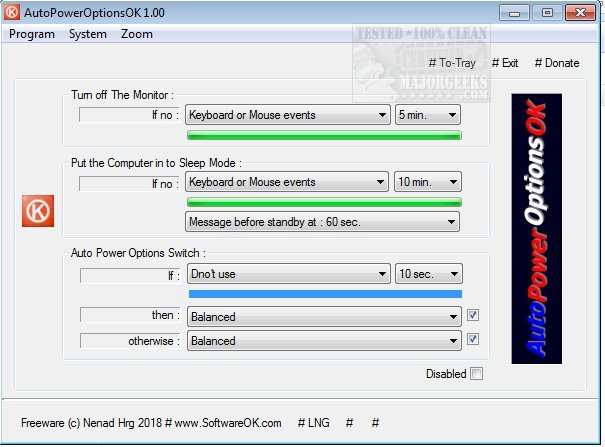
AutoPowerOptionsOK is a newly released version 6.41 of a free power management application designed to enhance energy efficiency on your computer. This application allows users to easily customize settings for monitor shutdown, adjust sleep timers, and switch between energy plans at specific times, all geared towards reducing energy consumption.
Upon launching AutoPowerOptionsOK, users are greeted with a user-friendly interface that showcases essential options including turning off the monitor, putting the computer into sleep mode, and automatically switching power options. This functionality is particularly beneficial for situations where the computer is inactive for a while and fails to detect keyboard or mouse activity. In such cases, the app seamlessly transitions the machine to a more energy-efficient power plan.
In addition to its power management capabilities, AutoPowerOptionsOK offers quick access to commonly used system information tools, such as Task Manager, System Information, and MSConfig. This makes the app not only a power-saving tool but also a valuable resource for system management, appealing to a wide range of users from network administrators to everyday home users looking to optimize their energy usage.
As energy efficiency becomes increasingly important, tools like AutoPowerOptionsOK can play a significant role in helping users manage their computer’s power settings effectively. For those interested in maximizing their system's performance while minimizing energy consumption, this application presents an effective solution.
Further Considerations:
- Users can explore additional functionalities such as scheduling specific power plans for different times of day, which can be particularly useful for those with varied usage patterns.
- It's worth noting that the application is compatible with various versions of Windows, making it accessible to a broader audience.
- For users seeking more in-depth management, it may be beneficial to explore related topics such as the differences between Sleep, Hibernate, and Shut Down modes, as well as customizing power plan settings in Windows 10 and 11
Upon launching AutoPowerOptionsOK, users are greeted with a user-friendly interface that showcases essential options including turning off the monitor, putting the computer into sleep mode, and automatically switching power options. This functionality is particularly beneficial for situations where the computer is inactive for a while and fails to detect keyboard or mouse activity. In such cases, the app seamlessly transitions the machine to a more energy-efficient power plan.
In addition to its power management capabilities, AutoPowerOptionsOK offers quick access to commonly used system information tools, such as Task Manager, System Information, and MSConfig. This makes the app not only a power-saving tool but also a valuable resource for system management, appealing to a wide range of users from network administrators to everyday home users looking to optimize their energy usage.
As energy efficiency becomes increasingly important, tools like AutoPowerOptionsOK can play a significant role in helping users manage their computer’s power settings effectively. For those interested in maximizing their system's performance while minimizing energy consumption, this application presents an effective solution.
Further Considerations:
- Users can explore additional functionalities such as scheduling specific power plans for different times of day, which can be particularly useful for those with varied usage patterns.
- It's worth noting that the application is compatible with various versions of Windows, making it accessible to a broader audience.
- For users seeking more in-depth management, it may be beneficial to explore related topics such as the differences between Sleep, Hibernate, and Shut Down modes, as well as customizing power plan settings in Windows 10 and 11
AutoPowerOptionsOK 6.41 released
AutoPowerOptionsOK is a free power management app that enables you to increase energy efficiency by providing quick access to customize monitor shutdown, the sleep timer, as well as toggling between energy plans at pre-determined times.