AutoClick version 1.5.0 has been released, providing users with a user-friendly application that automates mouse clicks to facilitate repetitive tasks. Its intuitive interface allows for easy customization of clicking speed and patterns, making it particularly beneficial for gamers, data entry, and other activities requiring frequent mouse interactions.
The app offers features such as setting specific time intervals and geographic coordinates for various clicking patterns, which can be especially advantageous in click-intensive games where rapid clicking is crucial. Additionally, AutoClick helps keep your computer from entering idle mode during lengthy tasks, thus ensuring uninterrupted workflow.
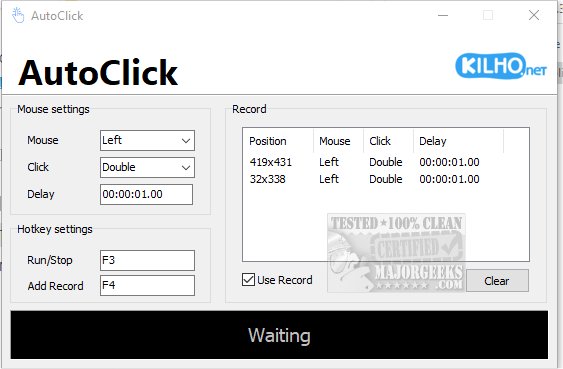
Using AutoClick is straightforward: users create a click sequence by specifying the series of clicks, their timing, and order. After positioning the cursor on the desired screen target and selecting the appropriate mouse button (left, right, or wheel), users can choose the type of click action (single, double, or wheel). A delay can also be set between actions for more precise execution. Once parameters are established, the process is initiated via a designated hotkey, and all recorded actions are displayed in an organized format for easy management.
However, a limitation is that users cannot save click profiles, which could enhance the app's functionality. Overall, AutoClick serves as an efficient tool for automating mouse clicks, appealing to users at various experience levels.
Looking ahead, future updates could include the ability to save and manage multiple click profiles, enhanced support for different operating systems, and integration with other productivity tools. Additional features like customizable hotkeys and advanced click patterns could further enhance user experience and broaden the application’s appeal across diverse use cases
The app offers features such as setting specific time intervals and geographic coordinates for various clicking patterns, which can be especially advantageous in click-intensive games where rapid clicking is crucial. Additionally, AutoClick helps keep your computer from entering idle mode during lengthy tasks, thus ensuring uninterrupted workflow.
Using AutoClick is straightforward: users create a click sequence by specifying the series of clicks, their timing, and order. After positioning the cursor on the desired screen target and selecting the appropriate mouse button (left, right, or wheel), users can choose the type of click action (single, double, or wheel). A delay can also be set between actions for more precise execution. Once parameters are established, the process is initiated via a designated hotkey, and all recorded actions are displayed in an organized format for easy management.
However, a limitation is that users cannot save click profiles, which could enhance the app's functionality. Overall, AutoClick serves as an efficient tool for automating mouse clicks, appealing to users at various experience levels.
Looking ahead, future updates could include the ability to save and manage multiple click profiles, enhanced support for different operating systems, and integration with other productivity tools. Additional features like customizable hotkeys and advanced click patterns could further enhance user experience and broaden the application’s appeal across diverse use cases
AutoClick 1.5.0 released
AutoClick is a straightforward app designed to automate mouse clicks, allowing you to perform repetitive clicking tasks effortlessly.