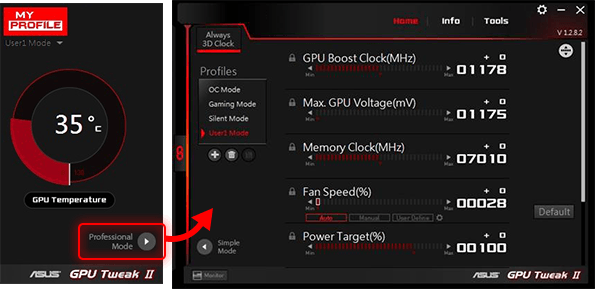
ASUS has released an update for its GPU Tweak III software, now available in versions 2.2.1.1 and 2.4.1.0. This tool is specifically designed to enhance the performance of ASUS graphics cards, allowing users to adjust settings and overclock their GPUs for optimal performance during gaming and other graphics-heavy tasks.
The latest iteration of ASUS GPU Tweak III features a significantly refined interface that improves user experience, making it easier to access essential functions. Key improvements include a streamlined VF Tuner for manual overclocking, the introduction of 0dB fan technology with automatic profile switching, and enhanced performance tracking through detailed logging of system monitoring sessions.
In terms of monitoring capabilities, the software now offers a plugin feature that allows users to personalize their interface with preferred backgrounds and color schemes. Users can choose between Standard and Advanced modes based on their experience level. The software also includes various operational modes, such as Overclock Mode for maximum performance, Gaming Mode for default settings, Silent Mode for uninterrupted media enjoyment, and My Profile for saving and switching between custom settings.
Beyond optimizing the graphics card, ASUS GPU Tweak III can also fine-tune other system components that may influence gaming performance. Users can disable Windows visual effects, adjust services or processes, and manage system memory more efficiently without closing applications.
In conclusion, ASUS GPU Tweak III has evolved remarkably, providing users with powerful tools to enhance their gaming experience through fine-tuning and overclocking capabilities. Future updates may focus on further improving user customization options and integrating additional monitoring features for even better performance tracking.
The latest iteration of ASUS GPU Tweak III features a significantly refined interface that improves user experience, making it easier to access essential functions. Key improvements include a streamlined VF Tuner for manual overclocking, the introduction of 0dB fan technology with automatic profile switching, and enhanced performance tracking through detailed logging of system monitoring sessions.
In terms of monitoring capabilities, the software now offers a plugin feature that allows users to personalize their interface with preferred backgrounds and color schemes. Users can choose between Standard and Advanced modes based on their experience level. The software also includes various operational modes, such as Overclock Mode for maximum performance, Gaming Mode for default settings, Silent Mode for uninterrupted media enjoyment, and My Profile for saving and switching between custom settings.
Beyond optimizing the graphics card, ASUS GPU Tweak III can also fine-tune other system components that may influence gaming performance. Users can disable Windows visual effects, adjust services or processes, and manage system memory more efficiently without closing applications.
In conclusion, ASUS GPU Tweak III has evolved remarkably, providing users with powerful tools to enhance their gaming experience through fine-tuning and overclocking capabilities. Future updates may focus on further improving user customization options and integrating additional monitoring features for even better performance tracking.
Additional Considerations
As users continue to demand higher performance from their gaming setups, ASUS GPU Tweak III may also consider incorporating AI-driven optimization features or machine learning algorithms that can automatically adjust settings based on user behavior or game requirements. Future versions could also explore compatibility with a wider range of ASUS hardware beyond GPUs, providing a more comprehensive suite for overall system optimizationASUS GPU Tweak III 2.2.1.1 / 2.4.1.0 Tweak II released
ASUS GPU Tweak III is a powerful tool designed to enhance and optimize the performance of your ASUS video cards. It enables users to adjust various settings and overclock their graphics cards, ensuring they achieve optimal performance in gaming and other graphics-intensive applications.
ASUS GPU Tweak III 2.2.1.1 / 2.4.1.0 Tweak II released @ MajorGeeks