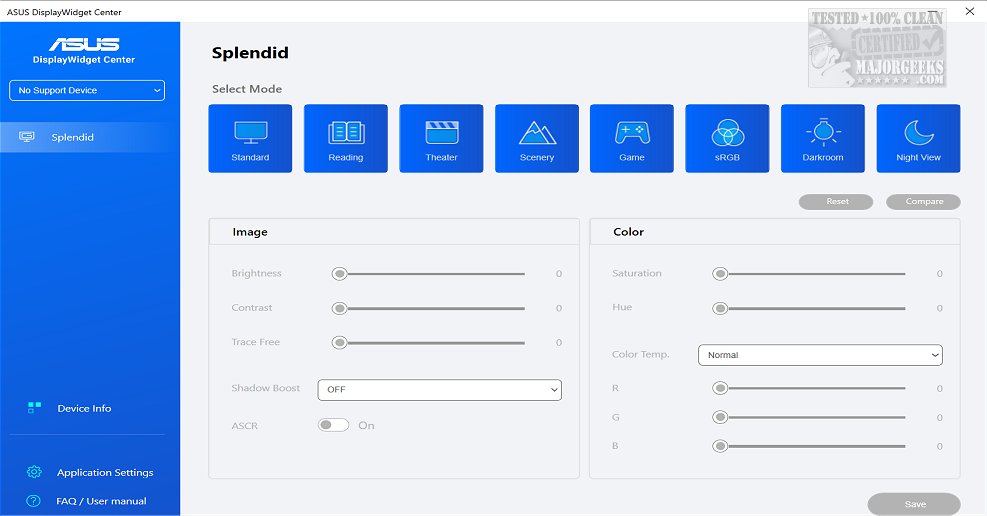
ASUS has released version 1.5.1.0 of the DisplayWidget Center, a sophisticated management tool designed specifically for ASUS monitors. This application provides users with the ability to optimize and personalize their display settings, including adjustments to screen brightness, contrast, and color temperature, which is particularly beneficial for designers, gamers, and anyone who spends long hours in front of a monitor.
The DisplayWidget Center features a user-friendly interface that simplifies the process of adjusting monitor settings, allowing for a tailored viewing experience. It includes a MultiScreen feature that streamlines workflows by providing customizable window layouts, enabling users to maximize productivity through efficient system control. The MultiFrame tool offers a variety of templates to help users optimize their screen real estate.
Additionally, the software supports advanced functionalities like Picture-in-Picture (PIP) and Picture-by-Picture (PBP), which allow users to manage multiple input sources simultaneously. The KVM (Keyboard, Video, Mouse) feature enhances productivity further by letting users control two systems with a single monitor, keyboard, and mouse, facilitating easy file transfers between devices.
The App Tweaker included in DisplayWidget Center allows users to customize their experience for various activities, such as optimizing settings for FPS games or enhancing their browser for cinema mode. Moreover, the software comes equipped with an OLED Care feature aimed at preserving OLED displays by managing pixel cleaning and maintaining consistent brightness levels, thus preventing burn-in and image retention.
Overall, ASUS DisplayWidget Center offers comprehensive tools to enhance the user experience for ASUS monitor owners, providing a high degree of control over display settings and workflow efficiency. With its intuitive design and versatile features, users can expect a significantly improved and personalized viewing experience.
The DisplayWidget Center features a user-friendly interface that simplifies the process of adjusting monitor settings, allowing for a tailored viewing experience. It includes a MultiScreen feature that streamlines workflows by providing customizable window layouts, enabling users to maximize productivity through efficient system control. The MultiFrame tool offers a variety of templates to help users optimize their screen real estate.
Additionally, the software supports advanced functionalities like Picture-in-Picture (PIP) and Picture-by-Picture (PBP), which allow users to manage multiple input sources simultaneously. The KVM (Keyboard, Video, Mouse) feature enhances productivity further by letting users control two systems with a single monitor, keyboard, and mouse, facilitating easy file transfers between devices.
The App Tweaker included in DisplayWidget Center allows users to customize their experience for various activities, such as optimizing settings for FPS games or enhancing their browser for cinema mode. Moreover, the software comes equipped with an OLED Care feature aimed at preserving OLED displays by managing pixel cleaning and maintaining consistent brightness levels, thus preventing burn-in and image retention.
Overall, ASUS DisplayWidget Center offers comprehensive tools to enhance the user experience for ASUS monitor owners, providing a high degree of control over display settings and workflow efficiency. With its intuitive design and versatile features, users can expect a significantly improved and personalized viewing experience.
Extension
Looking ahead, ASUS may consider expanding the capabilities of DisplayWidget Center through future updates. Potential enhancements could include integration with AI-driven tools to automatically adjust settings based on user habits, or cloud synchronization features that allow users to access their personalized settings across multiple devices. Furthermore, expanding compatibility with non-ASUS monitors could broaden the user base and appeal to a wider audience. The inclusion of advanced gaming features, such as dynamic refresh rate adjustments and enhanced support for virtual reality environments, could also elevate the software's utility for gamers. As display technology continues to evolve, ASUS DisplayWidget Center will likely adapt to meet the changing needs and preferences of its users, ensuring that they remain at the forefront of monitor management solutionsASUS DisplayWidget Center 1.5.1.0 released
ASUS DisplayWidget Center offers a comprehensive monitor management solution that allows you to optimize, personalize, and fully utilize your display to suit your needs and preferences.