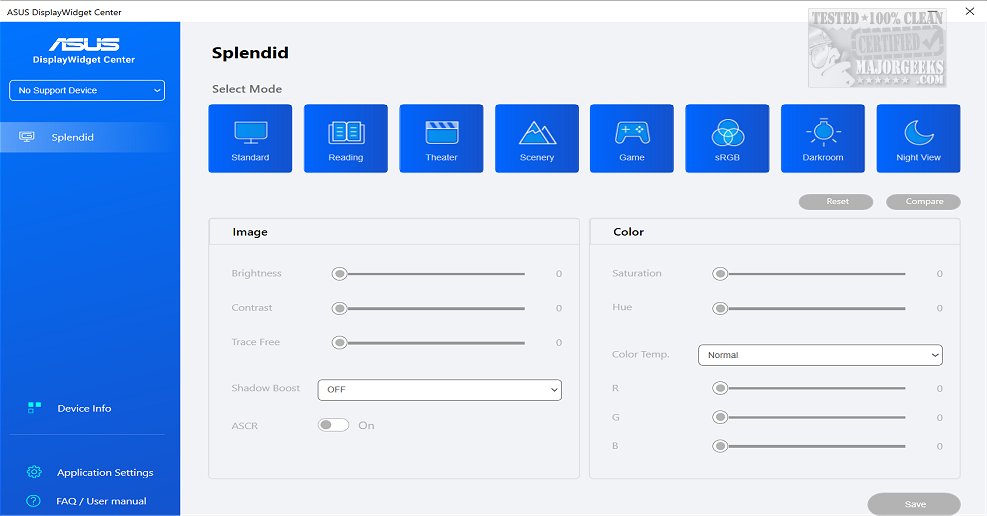
ASUS has released version 1.3.1.0 of its DisplayWidget Center, a robust monitor management application designed specifically for ASUS monitors. This software allows users to optimize and personalize their display settings, including brightness, contrast, and color temperature, making it particularly useful for designers, gamers, and anyone who spends long hours in front of a screen. The user-friendly interface ensures that even those with minimal technical knowledge can easily adjust their monitor settings to better suit their individual preferences.
One of the standout features of the DisplayWidget Center is the MultiScreen functionality, which streamlines workflow by providing customizable window layouts. This feature enhances productivity by allowing users to manage multiple applications and tasks simultaneously, making it easier to navigate between different projects. Additionally, the MultiFrame feature offers an expanded selection of layouts, enabling users to maximize their screen space effectively.
The application also supports Picture-in-Picture (PIP) and Picture-by-Picture (PBP) modes, allowing users to view multiple input sources at once. This is particularly beneficial for multitasking, as it lets users assign specific sources to different windows, facilitating a more efficient workflow.
Another significant feature is the KVM (Keyboard, Video, Mouse) capability, which enables users to control two systems with a single monitor, keyboard, and mouse. The Smart KVM functionality simplifies file transfers between the two systems, enhancing productivity for users who work across multiple devices.
The inclusion of an App Tweaker allows users to customize their viewing experience further by optimizing settings for different activities, such as browsing or gaming. Additionally, the OLED Care feature helps protect OLED monitors by facilitating pixel cleaning, maintaining uniform brightness, and providing reminders to prevent burn-in and image retention.
In summary, the ASUS DisplayWidget Center is an essential tool for ASUS monitor users, offering a range of features that enhance usability, productivity, and display longevity. With its intuitive controls, users can easily tailor their viewing experience to meet their specific needs. As technology continues to evolve, ASUS is likely to enhance this application further, potentially integrating AI-driven features for even smarter monitor management in future updates
One of the standout features of the DisplayWidget Center is the MultiScreen functionality, which streamlines workflow by providing customizable window layouts. This feature enhances productivity by allowing users to manage multiple applications and tasks simultaneously, making it easier to navigate between different projects. Additionally, the MultiFrame feature offers an expanded selection of layouts, enabling users to maximize their screen space effectively.
The application also supports Picture-in-Picture (PIP) and Picture-by-Picture (PBP) modes, allowing users to view multiple input sources at once. This is particularly beneficial for multitasking, as it lets users assign specific sources to different windows, facilitating a more efficient workflow.
Another significant feature is the KVM (Keyboard, Video, Mouse) capability, which enables users to control two systems with a single monitor, keyboard, and mouse. The Smart KVM functionality simplifies file transfers between the two systems, enhancing productivity for users who work across multiple devices.
The inclusion of an App Tweaker allows users to customize their viewing experience further by optimizing settings for different activities, such as browsing or gaming. Additionally, the OLED Care feature helps protect OLED monitors by facilitating pixel cleaning, maintaining uniform brightness, and providing reminders to prevent burn-in and image retention.
In summary, the ASUS DisplayWidget Center is an essential tool for ASUS monitor users, offering a range of features that enhance usability, productivity, and display longevity. With its intuitive controls, users can easily tailor their viewing experience to meet their specific needs. As technology continues to evolve, ASUS is likely to enhance this application further, potentially integrating AI-driven features for even smarter monitor management in future updates
ASUS DisplayWidget Center 1.3.1.0 released
ASUS DisplayWidget Center offers a comprehensive monitor management solution that allows you to optimize, personalize, and fully utilize your display to suit your needs and preferences.