ASCOMP Screencapt has launched its latest version, 3.000, offering users a robust and user-friendly screen recording experience. This software is adept at capturing a variety of screen activities and allows users to save their recordings in multiple formats, including MP4, AVI, and FLV.
Overview of ASCOMP Screencapt
ASCOMP Screencapt stands out as a versatile tool ideal for creating high-quality video content for various purposes such as tutorials, webinars, and gameplay documentation. Its intuitive interface simplifies the recording process, making it accessible for users of all skill levels.
Key Features and Functionalities
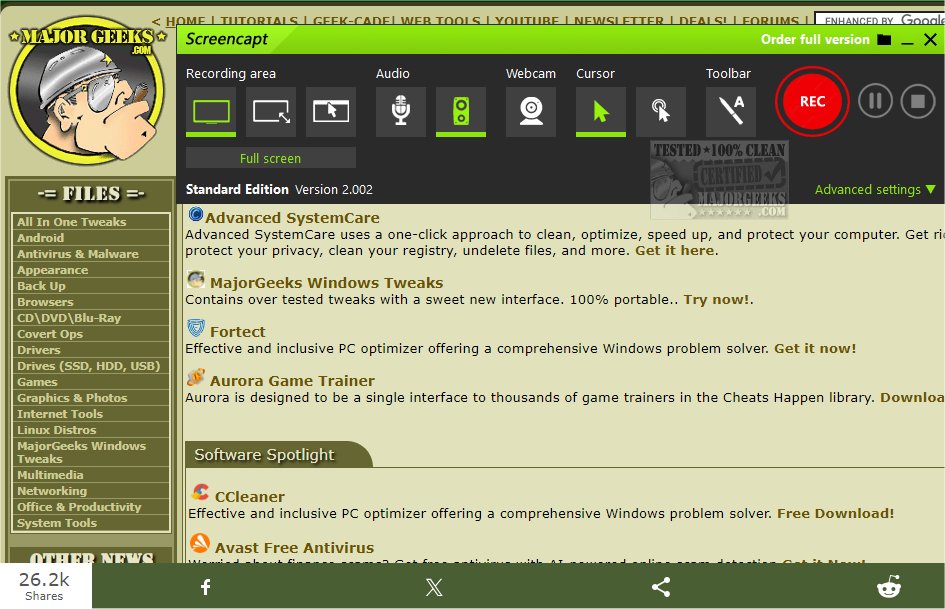
The software provides flexibility in recording options, enabling users to capture the entire screen, a selected area, or a specific application window. It also includes integrated audio recording capabilities, allowing users to add commentary or system sounds, which is particularly beneficial for instructional videos.
One of the standout features is the ability to add webcam overlays, allowing users to personalize their recordings by including their live reactions. Additionally, Screencapt enhances user experience with advanced cursor recording options, such as hiding the cursor or applying effects to highlight movements, which is essential for effective demonstrations.
ASCOMP Screencapt employs the H.264 codec for efficient compression without compromising on image quality. Users can customize compression levels to find a suitable balance between file size and visual clarity. The software supports recording at a maximum frame rate of 120 FPS, making it perfect for fast-paced content.
User Engagement Tools
During recording, users can draw directly on the screen and add annotations, which enhances viewer engagement and clarity in the final video product.
Conclusion
Overall, ASCOMP Screencapt 3.000 is a feature-rich screen recording solution that caters to a wide array of user needs, from educational content creation to gameplay capture. Its combination of flexibility, quality, and user-friendly design makes it a valuable tool for anyone looking to produce professional video content.
Future Developments
Looking ahead, ASCOMP may consider integrating more advanced editing features, cloud storage options for easy sharing, and enhanced collaboration tools to facilitate teamwork on video projects. Such enhancements could further solidify ASCOMP Screencapt's position as a leading screen recording tool in the market
Overview of ASCOMP Screencapt
ASCOMP Screencapt stands out as a versatile tool ideal for creating high-quality video content for various purposes such as tutorials, webinars, and gameplay documentation. Its intuitive interface simplifies the recording process, making it accessible for users of all skill levels.
Key Features and Functionalities
The software provides flexibility in recording options, enabling users to capture the entire screen, a selected area, or a specific application window. It also includes integrated audio recording capabilities, allowing users to add commentary or system sounds, which is particularly beneficial for instructional videos.
One of the standout features is the ability to add webcam overlays, allowing users to personalize their recordings by including their live reactions. Additionally, Screencapt enhances user experience with advanced cursor recording options, such as hiding the cursor or applying effects to highlight movements, which is essential for effective demonstrations.
ASCOMP Screencapt employs the H.264 codec for efficient compression without compromising on image quality. Users can customize compression levels to find a suitable balance between file size and visual clarity. The software supports recording at a maximum frame rate of 120 FPS, making it perfect for fast-paced content.
User Engagement Tools
During recording, users can draw directly on the screen and add annotations, which enhances viewer engagement and clarity in the final video product.
Conclusion
Overall, ASCOMP Screencapt 3.000 is a feature-rich screen recording solution that caters to a wide array of user needs, from educational content creation to gameplay capture. Its combination of flexibility, quality, and user-friendly design makes it a valuable tool for anyone looking to produce professional video content.
Future Developments
Looking ahead, ASCOMP may consider integrating more advanced editing features, cloud storage options for easy sharing, and enhanced collaboration tools to facilitate teamwork on video projects. Such enhancements could further solidify ASCOMP Screencapt's position as a leading screen recording tool in the market
ASCOMP Screencapt 3.000 released
ASCOMP Screencapt is a powerful screen recording tool designed to capture screen activity easily and save the recordings in various video formats, including MP4, AVI, and FLV.