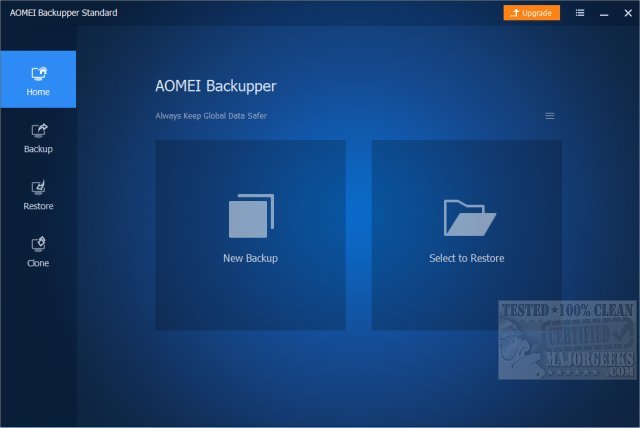
AOMEI Backupper Standard 8.3 has been released as a user-friendly backup software designed to safeguard your system and data. This free utility is especially beneficial for those who have experienced data loss, system crashes, or the need to reinstall Windows. AOMEI Backupper Standard caters to both casual users and those requiring more advanced backup options, including scheduled and incremental backups.
Unlike the built-in backup tools in Windows, which can be cumbersome and unreliable, AOMEI Backupper offers a more intuitive experience. Users can easily create system image backups, automate file backups, and clone disks without navigating through complicated menus. The software is ideal for various scenarios, such as backing up before system updates, setting up regular backups to protect against data loss, and cloning hard drives for upgrades.
The Standard version encompasses essential features like system, disk, and file backups, as well as incremental and differential backups, which optimize storage by only saving changes. However, users may encounter an upgrade prompt. For those looking for enhanced functionality, the Pro version, starting at $39.95, provides advanced capabilities such as faster backups, system cloning, and the Universal Restore feature. This allows users to restore backups to different hardware, making it particularly useful for those transitioning to new PCs.
The Pro version also includes tools like real-time sync, command-line backup options, encrypted backups for added security, and event-triggered backups for automation. Upgrading to Pro ensures faster restore speeds and access to technical support, which can be invaluable in urgent situations.
In conclusion, AOMEI Backupper Standard is a robust backup solution that balances ease of use with powerful features. Its clean interface and comprehensive functionalities make it a top choice for users seeking reliable backup options. While the Standard version is an excellent starting point, the Pro version offers significant advantages for those needing more control and security over their data. Regardless of the version chosen, having a backup solution is essential to avoid the pitfalls of data loss.
Extended Perspective: In today's digital age, where data is increasingly vulnerable to threats such as ransomware, hardware failures, and human error, maintaining a solid backup strategy is crucial. AOMEI Backupper's versatility makes it suitable for not just individual users, but also small businesses and IT professionals who require efficient data management and recovery solutions. The ability to schedule backups and automate the process ensures that users can focus on their primary tasks without the constant worry of data loss. Furthermore, as technology evolves, the need for backup solutions that can adapt and offer compatibility with various devices and operating systems becomes even more important. AOMEI Backupper's ongoing updates and enhancements will likely continue to meet these changing needs, ensuring that users remain protected against unforeseen data disasters
Unlike the built-in backup tools in Windows, which can be cumbersome and unreliable, AOMEI Backupper offers a more intuitive experience. Users can easily create system image backups, automate file backups, and clone disks without navigating through complicated menus. The software is ideal for various scenarios, such as backing up before system updates, setting up regular backups to protect against data loss, and cloning hard drives for upgrades.
The Standard version encompasses essential features like system, disk, and file backups, as well as incremental and differential backups, which optimize storage by only saving changes. However, users may encounter an upgrade prompt. For those looking for enhanced functionality, the Pro version, starting at $39.95, provides advanced capabilities such as faster backups, system cloning, and the Universal Restore feature. This allows users to restore backups to different hardware, making it particularly useful for those transitioning to new PCs.
The Pro version also includes tools like real-time sync, command-line backup options, encrypted backups for added security, and event-triggered backups for automation. Upgrading to Pro ensures faster restore speeds and access to technical support, which can be invaluable in urgent situations.
In conclusion, AOMEI Backupper Standard is a robust backup solution that balances ease of use with powerful features. Its clean interface and comprehensive functionalities make it a top choice for users seeking reliable backup options. While the Standard version is an excellent starting point, the Pro version offers significant advantages for those needing more control and security over their data. Regardless of the version chosen, having a backup solution is essential to avoid the pitfalls of data loss.
Extended Perspective: In today's digital age, where data is increasingly vulnerable to threats such as ransomware, hardware failures, and human error, maintaining a solid backup strategy is crucial. AOMEI Backupper's versatility makes it suitable for not just individual users, but also small businesses and IT professionals who require efficient data management and recovery solutions. The ability to schedule backups and automate the process ensures that users can focus on their primary tasks without the constant worry of data loss. Furthermore, as technology evolves, the need for backup solutions that can adapt and offer compatibility with various devices and operating systems becomes even more important. AOMEI Backupper's ongoing updates and enhancements will likely continue to meet these changing needs, ensuring that users remain protected against unforeseen data disasters
AOMEI Backupper Standard 8.3 released
AOMEI Backupper Standard is a straightforward backup software that includes basic and advanced features to ensure your system and data safety.