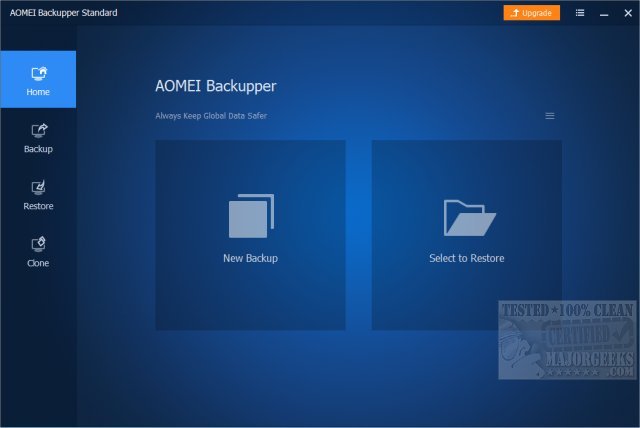
AOMEI has recently released version 8.2 of its backup software, AOMEI Backupper Standard, which offers both basic and advanced features aimed at safeguarding your system and data. This free and user-friendly utility is essential for anyone who has experienced data loss or system crashes, as it helps protect your system, disks, and files with ease.
Why Choose AOMEI Backupper?
While Windows offers its own backup solutions, they often come with limitations and complexity. AOMEI Backupper stands out with features such as one-click system image backup, automatic file backups, and disk cloning, all accessible without convoluted navigation. It caters to a wide range of users—from novices needing basic protection to advanced users requiring scheduled and incremental backups.
Key functionalities include:
- Full system backups prior to Windows updates or software installations
- Scheduled backups to mitigate data loss
- Seamless disk cloning for hardware upgrades
- Recovery options from ransomware or malware attacks
Target Audience
AOMEI Backupper is ideal for everyday users, tech enthusiasts, and small business owners. It allows for scheduled backups of critical documents, photos, and videos, ensuring peace of mind against accidental deletions. The disk cloning feature simplifies the transition from HDD to SSD, while the Pro version's Universal Restore functionality provides recovery across different systems, crucial for tech support professionals.
Standard vs. Pro: Feature Comparison
The Standard version of AOMEI Backupper is free and includes essential features such as disk, system, and file backups, as well as incremental and differential backups. However, it does include an upgrade prompt. The Pro version, available starting at $39.95, unlocks advanced functionalities, including faster backups, system cloning, and the Universal Restore feature. Additional tools like a command-line utility, PXE Boot Tool, and image deployment enhance backup management efficiency.
Pro version highlights include:
- Universal Restore for hardware migration
- Real-time Sync for instant file backups
- Command Line Backup for advanced users
- Encrypted Backups for heightened security
- Event-triggered Backups for automated processes
Upgrading to the Pro version also improves restore speeds and provides technical support, which can be invaluable during emergencies.
Conclusion
Backup software is indispensable in today's digital age, and AOMEI Backupper Standard offers a reliable, straightforward solution for users at all levels. Its intuitive interface and robust features make it an excellent choice, while the Pro version caters to those seeking enhanced control and security. Ultimately, having a reliable backup strategy is crucial, and AOMEI Backupper ensures that you won't find yourself wishing you had taken precautions when it's too late.
Additional Resources
For users looking to deepen their understanding or need assistance, consider exploring guides on resetting or reinstalling Windows 10 and 11 without losing files, which complement the backup processes outlined above
Why Choose AOMEI Backupper?
While Windows offers its own backup solutions, they often come with limitations and complexity. AOMEI Backupper stands out with features such as one-click system image backup, automatic file backups, and disk cloning, all accessible without convoluted navigation. It caters to a wide range of users—from novices needing basic protection to advanced users requiring scheduled and incremental backups.
Key functionalities include:
- Full system backups prior to Windows updates or software installations
- Scheduled backups to mitigate data loss
- Seamless disk cloning for hardware upgrades
- Recovery options from ransomware or malware attacks
Target Audience
AOMEI Backupper is ideal for everyday users, tech enthusiasts, and small business owners. It allows for scheduled backups of critical documents, photos, and videos, ensuring peace of mind against accidental deletions. The disk cloning feature simplifies the transition from HDD to SSD, while the Pro version's Universal Restore functionality provides recovery across different systems, crucial for tech support professionals.
Standard vs. Pro: Feature Comparison
The Standard version of AOMEI Backupper is free and includes essential features such as disk, system, and file backups, as well as incremental and differential backups. However, it does include an upgrade prompt. The Pro version, available starting at $39.95, unlocks advanced functionalities, including faster backups, system cloning, and the Universal Restore feature. Additional tools like a command-line utility, PXE Boot Tool, and image deployment enhance backup management efficiency.
Pro version highlights include:
- Universal Restore for hardware migration
- Real-time Sync for instant file backups
- Command Line Backup for advanced users
- Encrypted Backups for heightened security
- Event-triggered Backups for automated processes
Upgrading to the Pro version also improves restore speeds and provides technical support, which can be invaluable during emergencies.
Conclusion
Backup software is indispensable in today's digital age, and AOMEI Backupper Standard offers a reliable, straightforward solution for users at all levels. Its intuitive interface and robust features make it an excellent choice, while the Pro version caters to those seeking enhanced control and security. Ultimately, having a reliable backup strategy is crucial, and AOMEI Backupper ensures that you won't find yourself wishing you had taken precautions when it's too late.
Additional Resources
For users looking to deepen their understanding or need assistance, consider exploring guides on resetting or reinstalling Windows 10 and 11 without losing files, which complement the backup processes outlined above
AOMEI Backupper Standard 8.2 released
AOMEI Backupper Standard is a straightforward backup software that includes basic and advanced features to ensure your system and data safety.