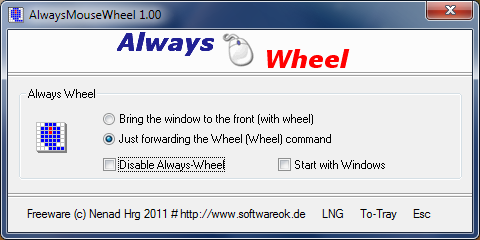
AlwaysMouseWheel version 6.61 has been released, enhancing user interaction by allowing the mouse wheel to scroll through any window, regardless of whether it is in the foreground. This functionality is particularly useful for multitasking, as it enables seamless navigation without needing to switch focus between different applications.
- Background Scrolling: Users can send scroll commands to background windows, improving workflow efficiency.
- Window Management: By holding [Alt] and using the left mouse button, users can easily drag and move windows. Similarly, [Alt] combined with the right mouse button allows for resizing windows.
- Volume Control: Users can adjust the system volume directly by scrolling the mouse wheel while hovering over the taskbar.
- Single Click to Open: Change the default double-click action to single-click for opening files and folders, streamlining navigation.
- Mouse Pointer Trails: Enable mouse pointer trails for easier tracking on the screen.
- Snap Pointer to Default Button: Learn how to enable or disable this feature for improved click accuracy.
- Precision Control: Adjust settings to enhance mouse pointer precision for better control while working.
- Mouse Troubleshooting: Guidance on addressing issues such as slow, lagging, or jumpy mouse performance.
Key Features of AlwaysMouseWheel:
- Foreground Activation: The ability to bring the desired window to the forefront with a simple mouse wheel action.- Background Scrolling: Users can send scroll commands to background windows, improving workflow efficiency.
- Window Management: By holding [Alt] and using the left mouse button, users can easily drag and move windows. Similarly, [Alt] combined with the right mouse button allows for resizing windows.
- Volume Control: Users can adjust the system volume directly by scrolling the mouse wheel while hovering over the taskbar.
Related Features and Tips:
In addition to the capabilities provided by AlwaysMouseWheel, users may also find these related features useful:- Single Click to Open: Change the default double-click action to single-click for opening files and folders, streamlining navigation.
- Mouse Pointer Trails: Enable mouse pointer trails for easier tracking on the screen.
- Snap Pointer to Default Button: Learn how to enable or disable this feature for improved click accuracy.
- Precision Control: Adjust settings to enhance mouse pointer precision for better control while working.
- Mouse Troubleshooting: Guidance on addressing issues such as slow, lagging, or jumpy mouse performance.
Conclusion
AlwaysMouseWheel 6.61 is a robust tool that enhances productivity by allowing users to interact with multiple applications fluidly. By utilizing its features alongside other helpful mouse settings, users can create a more efficient and personalized computing experienceAlwaysMouseWheel 6.61 released
AlwaysMouseWheel allows you to use the mouse wheel for scrolling over any windows, even if that window is not in the foreground.