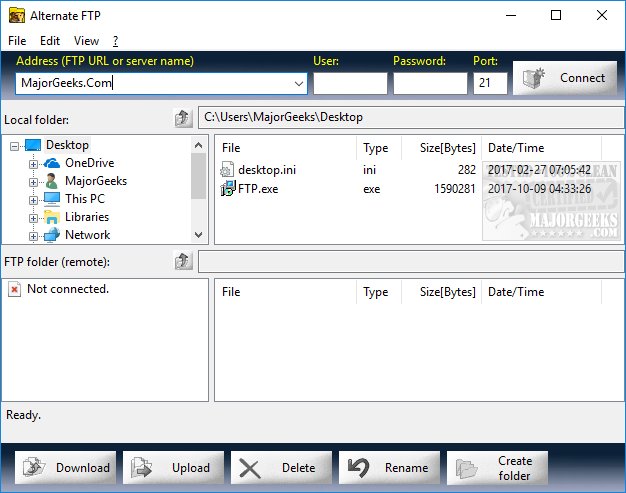
Alternate FTP version 3.290 has been released, offering users a straightforward and user-friendly freeware FTP program. The interface features four windows—two for local browsing and two for remote server access—allowing users to navigate easily in an Explorer-style manner. Each side displays the files in the current folder, showcasing essential details such as name, type, size, and date.
At the bottom of the interface, large buttons facilitate common actions like downloading, uploading, deleting, or renaming files. In addition to these basic functions, the menu includes options for refreshing, selecting all files, viewing settings, managing the log file, and handling recent connections. While a help file is provided, many users may find it unnecessary due to the program's intuitive design.
Users can also save and export their profile settings to streamline future access, and keyboard shortcuts are available for those who prefer them. While Alternate FTP does not boast the extensive features of commercial FTP clients, its primary goal is to simplify the FTP connection process for users of all skill levels.
In summary, Alternate FTP 3.290 is a practical tool for anyone needing to manage file transfers over FTP without the complexity that often accompanies more advanced software. Its ease of use, combined with essential features, makes it a valuable choice for both novice and experienced users.
Additionally, users looking to enhance their file management capabilities might consider exploring integration options with other software tools or cloud services that can complement the functionalities of Alternate FTP, further streamlining their workflow and improving productivity
At the bottom of the interface, large buttons facilitate common actions like downloading, uploading, deleting, or renaming files. In addition to these basic functions, the menu includes options for refreshing, selecting all files, viewing settings, managing the log file, and handling recent connections. While a help file is provided, many users may find it unnecessary due to the program's intuitive design.
Users can also save and export their profile settings to streamline future access, and keyboard shortcuts are available for those who prefer them. While Alternate FTP does not boast the extensive features of commercial FTP clients, its primary goal is to simplify the FTP connection process for users of all skill levels.
In summary, Alternate FTP 3.290 is a practical tool for anyone needing to manage file transfers over FTP without the complexity that often accompanies more advanced software. Its ease of use, combined with essential features, makes it a valuable choice for both novice and experienced users.
Additionally, users looking to enhance their file management capabilities might consider exploring integration options with other software tools or cloud services that can complement the functionalities of Alternate FTP, further streamlining their workflow and improving productivity
Alternate FTP 3.290 released
Alternate FTP is a freeware FTP program that is designed to be simple to use.