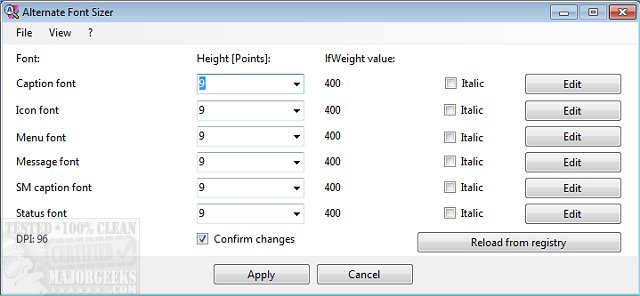
The release of Alternate Font Sizer version 1.630 provides users with a practical tool for customizing font sizes on their Windows 10 desktops without affecting the overall display scaling. This utility addresses certain limitations of Windows 10, particularly the automatic scaling that occurs when font sizes are adjusted. With an intuitive interface, users can easily modify various font attributes including caption height, DPI font, icon size, menu options, and small caption settings, among others.
Additionally, the software allows users to view their display's DPI and apply italicization to text. It offers extensive editing capabilities, enabling adjustments to font width, strikeout styles, character set, orientation, and much more. After making the desired changes, users can simply click the apply button, confirm their adjustments, and reboot the system for the modifications to take effect.
It's important to note that while there is no built-in option to restore default settings, Alternate Font Sizer allows users to save their configuration settings. It is advisable to create a backup of the default settings file to facilitate easy reversion in case the new changes are not satisfactory.
In summary, Alternate Font Sizer 1.630 is a valuable tool for Windows 10 users seeking greater control over their desktop font settings, providing a straightforward solution to enhance readability and personalization without the complications of display scaling. Users are encouraged to explore the full range of features offered by the application in order to optimize their visual experience on their devices
Additionally, the software allows users to view their display's DPI and apply italicization to text. It offers extensive editing capabilities, enabling adjustments to font width, strikeout styles, character set, orientation, and much more. After making the desired changes, users can simply click the apply button, confirm their adjustments, and reboot the system for the modifications to take effect.
It's important to note that while there is no built-in option to restore default settings, Alternate Font Sizer allows users to save their configuration settings. It is advisable to create a backup of the default settings file to facilitate easy reversion in case the new changes are not satisfactory.
In summary, Alternate Font Sizer 1.630 is a valuable tool for Windows 10 users seeking greater control over their desktop font settings, providing a straightforward solution to enhance readability and personalization without the complications of display scaling. Users are encouraged to explore the full range of features offered by the application in order to optimize their visual experience on their devices
Alternate Font Sizer 1.630 released
Alternate Font Sizer permits you to adjust Windows 10 desktop font sizes without scaling the display.