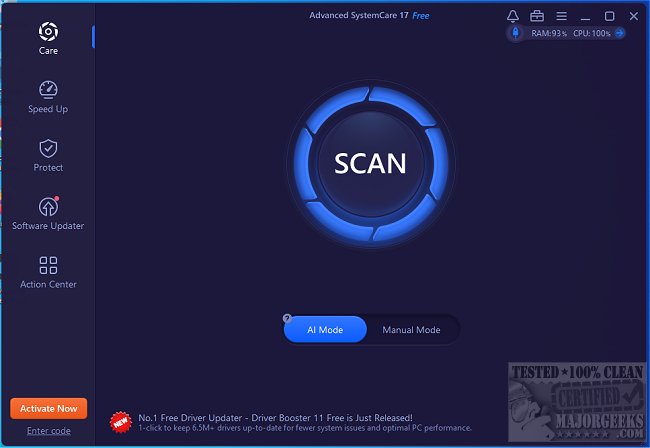
Advanced SystemCare, a highly regarded all-in-one utility designed to enhance computer performance, has released version 19.1.0.176. This software offers a range of features aimed at cleaning, optimizing, speeding up, and protecting your PC. A video tutorial is also available for users to familiarize themselves with the software's capabilities.
Why Choose Advanced SystemCare?
Over time, computers can become slow and cluttered due to accumulated junk files, excessive startup programs, and various system inefficiencies. Advanced SystemCare automates the optimization process, allowing users to restore their PC's functionality with minimal effort. It performs one-click optimizations to clean junk files, improve startup speeds, rectify registry issues, and enhance privacy settings.
Key Features of Advanced SystemCare:
1. Performance Boost: The software can terminate unnecessary background processes and free up RAM, significantly improving overall speed.
2. Junk File Cleanup: It removes unwanted system clutter, temporary files, and remnants of uninstalled software.
3. Startup Optimization: By managing startup applications, Advanced SystemCare reduces boot times, enhancing the user experience.
4. System Error Repair: Registry issues that lead to crashes or sluggishness are addressed, ensuring smoother operation.
5. Real-Time Monitoring: The tool tracks CPU, RAM, and disk usage to identify and prevent slowdowns effectively.
6. Privacy Protection: Users can easily clear browsing history, block tracking attempts, and safeguard their data against unauthorized access.
7. Turbo Boost Mode: This feature is particularly beneficial for gamers and professionals, as it maximizes system resources for improved performance during intensive tasks.
When to Use Advanced SystemCare:
- If your PC has a slow startup.
- When you are running out of storage space.
- If applications are lagging or freezing.
- To enhance gaming performance.
- For privacy concerns regarding data tracking.
- When you prefer a hassle-free optimization experience.
Pros and Cons:
Pros:
- Simplified one-click cleanup and performance enhancement.
- Effective for both casual and intensive computer usage.
- Integrated privacy and security features.
Cons:
- Certain advanced functionalities may require a Pro version.
- May prompt the installation of additional IObit software.
Conclusion:
After years of utilizing Advanced SystemCare, it's evident that this software offers a straightforward solution for users seeking to optimize their PCs. Whether addressing slow startup times, managing disk space, or improving overall performance, Advanced SystemCare automates the process, making it a valuable tool for any computer user.
Additional Resources:
For users looking to further enhance their PC's performance, consider exploring topics such as managing startup applications, improving wireless network performance, and optimizing internet speed on Windows 10 and 11
Why Choose Advanced SystemCare?
Over time, computers can become slow and cluttered due to accumulated junk files, excessive startup programs, and various system inefficiencies. Advanced SystemCare automates the optimization process, allowing users to restore their PC's functionality with minimal effort. It performs one-click optimizations to clean junk files, improve startup speeds, rectify registry issues, and enhance privacy settings.
Key Features of Advanced SystemCare:
1. Performance Boost: The software can terminate unnecessary background processes and free up RAM, significantly improving overall speed.
2. Junk File Cleanup: It removes unwanted system clutter, temporary files, and remnants of uninstalled software.
3. Startup Optimization: By managing startup applications, Advanced SystemCare reduces boot times, enhancing the user experience.
4. System Error Repair: Registry issues that lead to crashes or sluggishness are addressed, ensuring smoother operation.
5. Real-Time Monitoring: The tool tracks CPU, RAM, and disk usage to identify and prevent slowdowns effectively.
6. Privacy Protection: Users can easily clear browsing history, block tracking attempts, and safeguard their data against unauthorized access.
7. Turbo Boost Mode: This feature is particularly beneficial for gamers and professionals, as it maximizes system resources for improved performance during intensive tasks.
When to Use Advanced SystemCare:
- If your PC has a slow startup.
- When you are running out of storage space.
- If applications are lagging or freezing.
- To enhance gaming performance.
- For privacy concerns regarding data tracking.
- When you prefer a hassle-free optimization experience.
Pros and Cons:
Pros:
- Simplified one-click cleanup and performance enhancement.
- Effective for both casual and intensive computer usage.
- Integrated privacy and security features.
Cons:
- Certain advanced functionalities may require a Pro version.
- May prompt the installation of additional IObit software.
Conclusion:
After years of utilizing Advanced SystemCare, it's evident that this software offers a straightforward solution for users seeking to optimize their PCs. Whether addressing slow startup times, managing disk space, or improving overall performance, Advanced SystemCare automates the process, making it a valuable tool for any computer user.
Additional Resources:
For users looking to further enhance their PC's performance, consider exploring topics such as managing startup applications, improving wireless network performance, and optimizing internet speed on Windows 10 and 11
Advanced SystemCare 19.1.0.176 released
Advanced SystemCare is a popular and efficient all-in-one computer tweaker that will help clean, optimize, speed up, and protect your computer. Video tutorial available.