The Advanced BAT to EXE Converter has been updated to version 4.70, enhancing its capabilities for users looking to convert batch files (.bat, .cmd) into standalone executable (.exe) files efficiently. This tool simplifies the conversion process, allowing users to customize their output by incorporating application icons, adding version information, embedding additional files, and even setting password protection for the final executable.
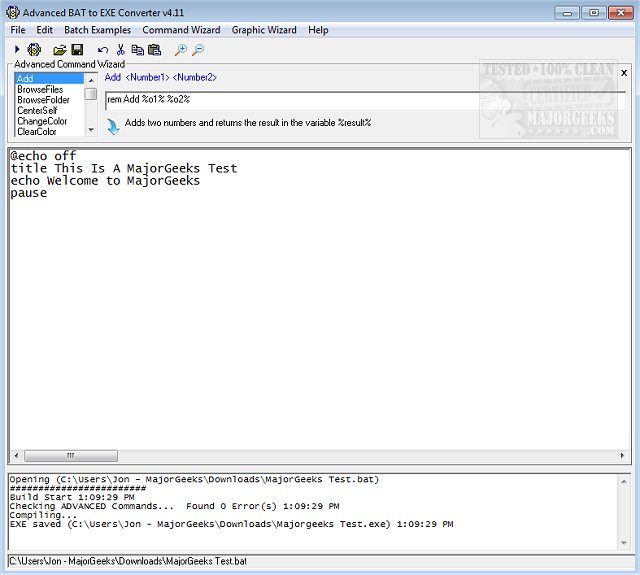
In addition to conversion, the software features a fully functional editor equipped with syntax highlighting, which facilitates editing existing scripts and creating new batch files. It supports standard Windows commands and introduces various advanced commands that extend the functionality beyond traditional batch programming. Users can leverage these advanced commands for tasks such as folder and file browsing, creating clickable hotspots, and generating printing boxes.
The user interface is designed to be intuitive, making it easy to navigate and set up conversions. Users benefit from an array of helpful resources, including batch examples and graphic command wizards that guide them through the process. During testing, the software demonstrated a straightforward and rapid performance, ensuring a smooth user experience.
To further enhance its utility, the Advanced BAT to EXE Converter could potentially introduce features such as cloud integration for easy access to scripts and conversions from multiple devices, enhanced debugging tools for troubleshooting scripts, or the ability to compile scripts for different operating systems. Moreover, a community forum could be established to provide users with a platform to share tips, tricks, and best practices for using the converter effectively
In addition to conversion, the software features a fully functional editor equipped with syntax highlighting, which facilitates editing existing scripts and creating new batch files. It supports standard Windows commands and introduces various advanced commands that extend the functionality beyond traditional batch programming. Users can leverage these advanced commands for tasks such as folder and file browsing, creating clickable hotspots, and generating printing boxes.
The user interface is designed to be intuitive, making it easy to navigate and set up conversions. Users benefit from an array of helpful resources, including batch examples and graphic command wizards that guide them through the process. During testing, the software demonstrated a straightforward and rapid performance, ensuring a smooth user experience.
To further enhance its utility, the Advanced BAT to EXE Converter could potentially introduce features such as cloud integration for easy access to scripts and conversions from multiple devices, enhanced debugging tools for troubleshooting scripts, or the ability to compile scripts for different operating systems. Moreover, a community forum could be established to provide users with a platform to share tips, tricks, and best practices for using the converter effectively
Advanced BAT to EXE Converter 4.70 released
Advanced BAT to EXE Converter allows you to convert and compile batch files (.bat, .cmd) to standalone EXE format in a straightforward fashion.