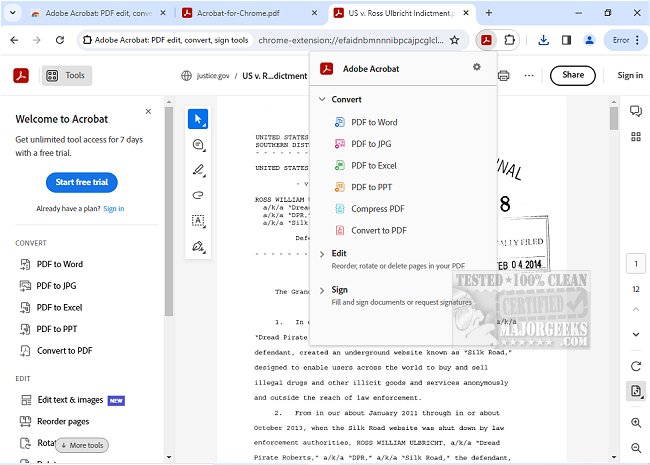
Adobe has released version 26.3.2.0 of Adobe Acrobat for Chrome, which empowers users with a variety of PDF tools directly within their browser. This extension allows users to view, fill out, comment on, sign, convert, and compress PDF documents efficiently. With Adobe Acrobat’s robust features, users can enhance their PDF interactions, making it easier to add comments, sticky notes, highlights, and more without any cost.
For those who require more advanced functionalities, the extension provides additional tools to export to and from PDF formats, create new PDFs, merge multiple documents, organize PDFs, and reduce file sizes. The installation process is straightforward: simply add the extension, pin it for easy access, open a PDF in Chrome, and select the desired tool.
Adobe Acrobat for Chrome promises an optimized PDF viewing experience through its reader capabilities, allowing for quick downloads or printing options. Users can also sign in to store their files online for easy access from any location. The extension supports adding notes, text, and comments on PDFs, and users can utilize editor features to write directly on documents by incorporating text or drawings. Furthermore, PDFs can be opened in Adobe Acrobat Reader to fill out and sign forms on a desktop, leveraging the form filler feature for seamless completion.
In summary, Adobe Acrobat for Chrome is a powerful tool that simplifies various PDF tasks, enhances workflow efficiency, and provides access to premium features, making it an indispensable resource for anyone working with PDF documents.
Extension:
As Adobe continues to innovate, future updates to Adobe Acrobat for Chrome may introduce new features such as improved collaboration tools for teams, advanced security options for sensitive documents, and enhanced integration with other Adobe services. This would provide users with an even more comprehensive toolkit for managing their PDF files, whether for personal use, business applications, or educational purposes. Additionally, the potential for mobile compatibility and cross-platform functionality could further streamline user access to PDF tools, emphasizing Adobe's commitment to meeting the evolving needs of its users
For those who require more advanced functionalities, the extension provides additional tools to export to and from PDF formats, create new PDFs, merge multiple documents, organize PDFs, and reduce file sizes. The installation process is straightforward: simply add the extension, pin it for easy access, open a PDF in Chrome, and select the desired tool.
Adobe Acrobat for Chrome promises an optimized PDF viewing experience through its reader capabilities, allowing for quick downloads or printing options. Users can also sign in to store their files online for easy access from any location. The extension supports adding notes, text, and comments on PDFs, and users can utilize editor features to write directly on documents by incorporating text or drawings. Furthermore, PDFs can be opened in Adobe Acrobat Reader to fill out and sign forms on a desktop, leveraging the form filler feature for seamless completion.
In summary, Adobe Acrobat for Chrome is a powerful tool that simplifies various PDF tasks, enhances workflow efficiency, and provides access to premium features, making it an indispensable resource for anyone working with PDF documents.
Extension:
As Adobe continues to innovate, future updates to Adobe Acrobat for Chrome may introduce new features such as improved collaboration tools for teams, advanced security options for sensitive documents, and enhanced integration with other Adobe services. This would provide users with an even more comprehensive toolkit for managing their PDF files, whether for personal use, business applications, or educational purposes. Additionally, the potential for mobile compatibility and cross-platform functionality could further streamline user access to PDF tools, emphasizing Adobe's commitment to meeting the evolving needs of its users
Adobe Acrobat for Chrome 26.3.2.0 released
Access Adobe Acrobat PDF tools in Chrome; view, fill, comment, sign, convert, and compress tools available.