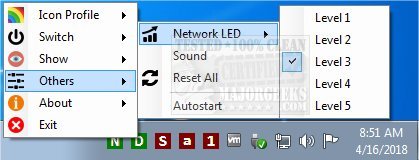
The latest release of addLEDs, version 1.3.0.7, introduces enhancements to this compact systray indicator, which allows users to monitor various keyboard states such as scroll lock, number lock, and caps lock at a glance. Beyond basic key indicators, addLEDs offers additional features including flashing indicators for network activity, which can be adjusted across five sensitivity levels, and disk activity monitoring. A notable functionality is the ability to toggle scroll, number, and caps locks using the mouse, an invaluable option for users with malfunctioning keyboards.
In addition to its core functionalities, addLEDs allows for mild customization, enabling users to change the colors of the indicators and adjust their transparency to better fit their desktop aesthetics. This flexibility ensures that users can maintain productivity even when faced with hardware issues, all while enjoying a visually appealing interface.
Future updates could further enhance user experience by incorporating more customization options, such as different shapes or animations for the indicators, or even the ability to set specific alerts or notifications based on certain activities, providing users with a more tailored and interactive experience
In addition to its core functionalities, addLEDs allows for mild customization, enabling users to change the colors of the indicators and adjust their transparency to better fit their desktop aesthetics. This flexibility ensures that users can maintain productivity even when faced with hardware issues, all while enjoying a visually appealing interface.
Future updates could further enhance user experience by incorporating more customization options, such as different shapes or animations for the indicators, or even the ability to set specific alerts or notifications based on certain activities, providing users with a more tailored and interactive experience
addLEDs 1.3.0.7 released
addLEDs is a tiny systray indicator that provides at-a-glance views for scroll, number, caps lock and more.