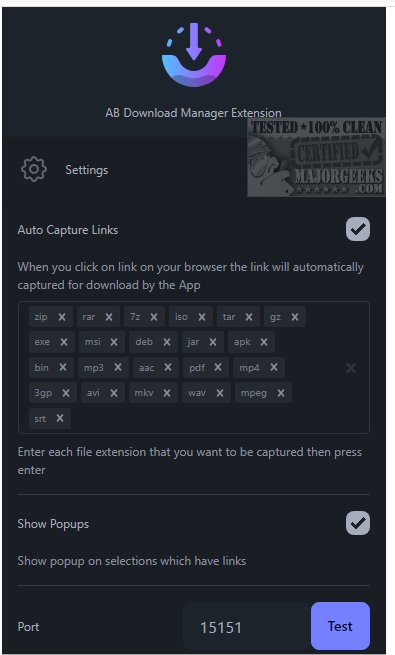
AB Download Manager has released version 1.8.0, a user-friendly application designed to facilitate the efficient downloading of files from various online sources. This tool caters to diverse needs, enabling users to download documents, images, videos, and software seamlessly. With an intuitive interface, AB Download Manager enhances the downloading process, making it quick and accessible from any location.
1. User-Friendly Interface: The application boasts a sleek dark mode, which not only enhances visual appeal but also reduces eye strain during prolonged use, especially in dim environments.
2. Fast Downloading Capabilities: Utilizing multiple connections, AB Download Manager can significantly boost download speeds—up to 500% faster than conventional methods—allowing users to manage and organize their downloads efficiently.
3. Download Queue Management: Users can create and manage download queues, facilitating the sequential processing of multiple files without interruptions. This feature is particularly useful for handling large data downloads or simultaneous file transfers.
4. Download Scheduling: The built-in scheduler allows users to specify times for when download queues should begin and end. This flexibility helps optimize download activities, especially to take advantage of off-peak internet hours.
5. Speed Limit Settings: Users can set download speed limits to prevent their activities from affecting the internet experience of others sharing the same network. This feature ensures a balanced performance across all connected devices.
6. Context Menu Integration: The application adds an option to the browser context menu, allowing for easy access to download links directly, and automatically captures download links to streamline the process further.
AB Download Manager 1.8.0 is an indispensable tool for anyone looking to enhance their downloading experience. With its combination of speed, organization, and user control, it addresses common frustrations associated with file downloads. Whether you are downloading large files or multiple items, AB Download Manager optimizes performance and simplifies the process. Make it a vital part of your digital toolkit and enjoy a smoother, more efficient downloading experience.
Key Features of AB Download Manager:
1. User-Friendly Interface: The application boasts a sleek dark mode, which not only enhances visual appeal but also reduces eye strain during prolonged use, especially in dim environments.
2. Fast Downloading Capabilities: Utilizing multiple connections, AB Download Manager can significantly boost download speeds—up to 500% faster than conventional methods—allowing users to manage and organize their downloads efficiently.
3. Download Queue Management: Users can create and manage download queues, facilitating the sequential processing of multiple files without interruptions. This feature is particularly useful for handling large data downloads or simultaneous file transfers.
4. Download Scheduling: The built-in scheduler allows users to specify times for when download queues should begin and end. This flexibility helps optimize download activities, especially to take advantage of off-peak internet hours.
5. Speed Limit Settings: Users can set download speed limits to prevent their activities from affecting the internet experience of others sharing the same network. This feature ensures a balanced performance across all connected devices.
6. Context Menu Integration: The application adds an option to the browser context menu, allowing for easy access to download links directly, and automatically captures download links to streamline the process further.
Conclusion
AB Download Manager 1.8.0 is an indispensable tool for anyone looking to enhance their downloading experience. With its combination of speed, organization, and user control, it addresses common frustrations associated with file downloads. Whether you are downloading large files or multiple items, AB Download Manager optimizes performance and simplifies the process. Make it a vital part of your digital toolkit and enjoy a smoother, more efficient downloading experience.
Additional Resources
For further insights on optimizing your internet experience, consider exploring topics such as the benefits of a download manager, how to display internet usage on your taskbar, improving wireless network performance, and troubleshooting slow internet on Windows 10 and 11AB Download Manager 1.8.0 released
AB Download Manager provides a user-friendly tool designed to help you efficiently download files from various sources on the internet.