Zero Install, an Open Source application, has released version 2.28.2. This innovative tool allows users to download, update, run, and synchronize their favorite programs from a single interface, eliminating the need for traditional installations. Its user-friendly design is complemented by a tutorial video that guides users during their first experience with the application.
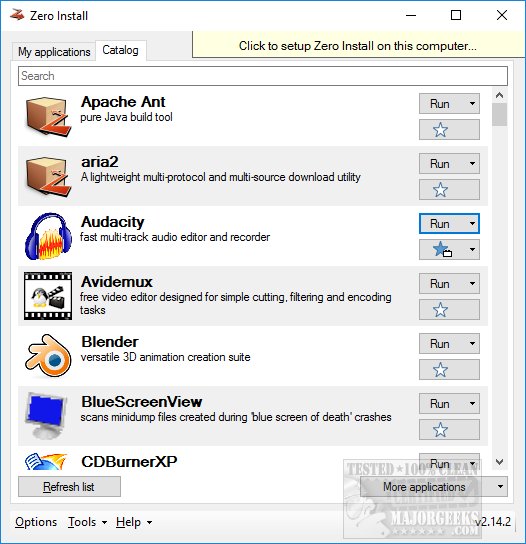
The software features a default list of popular apps, while also providing the flexibility to conduct keyword searches, enter news feeds, URLs, or create new feeds. Users can navigate through two main tabs: "Catalog" for browsing applications and "My Applications" for quick access to frequently used programs. This separation facilitates an organized approach to managing applications.
In addition to standard functionalities, Zero Install allows users to run applications, set up integration, and access a command-line interface if preferred. The application also offers customizable options such as cache management, portable creator, and command-line links, enhancing usability.
Zero Install is particularly beneficial for users who frequently use multiple applications, as it avoids the clutter associated with traditional software installations, such as a disorganized desktop, a bloated registry, and various startup items. Furthermore, it provides a safe and straightforward method to test new software without the commitment of installation.
Looking forward, there is a desire for enhanced capabilities, such as integrating feeds from websites like MajorGeeks to discover new and updated software. Although there may be alternative approaches to these features, Zero Install has established itself as a reliable solution for software management.
Future Enhancements and Community Engagement
As Zero Install continues to evolve, potential enhancements could include improved support for a wider range of operating systems, better integration with cloud services, and more robust security features to safeguard user data. Engaging with the community for feedback and suggestions could also guide future updates, ensuring the software meets the diverse needs of its users.
Moreover, expanding the catalog of available applications and integrating user reviews or ratings could help users make more informed choices about the software they choose to run. Additionally, offering more extensive customization options for the user interface could enhance the user experience further.
In conclusion, Zero Install's 2.28.2 release marks a significant step in application management, offering a streamlined, efficient, and user-friendly solution for managing software without the hassle of traditional installations. As the platform grows, continued innovation and responsiveness to user feedback will be crucial in maintaining its relevance in the ever-evolving tech landscape
The software features a default list of popular apps, while also providing the flexibility to conduct keyword searches, enter news feeds, URLs, or create new feeds. Users can navigate through two main tabs: "Catalog" for browsing applications and "My Applications" for quick access to frequently used programs. This separation facilitates an organized approach to managing applications.
In addition to standard functionalities, Zero Install allows users to run applications, set up integration, and access a command-line interface if preferred. The application also offers customizable options such as cache management, portable creator, and command-line links, enhancing usability.
Zero Install is particularly beneficial for users who frequently use multiple applications, as it avoids the clutter associated with traditional software installations, such as a disorganized desktop, a bloated registry, and various startup items. Furthermore, it provides a safe and straightforward method to test new software without the commitment of installation.
Looking forward, there is a desire for enhanced capabilities, such as integrating feeds from websites like MajorGeeks to discover new and updated software. Although there may be alternative approaches to these features, Zero Install has established itself as a reliable solution for software management.
Future Enhancements and Community Engagement
As Zero Install continues to evolve, potential enhancements could include improved support for a wider range of operating systems, better integration with cloud services, and more robust security features to safeguard user data. Engaging with the community for feedback and suggestions could also guide future updates, ensuring the software meets the diverse needs of its users.
Moreover, expanding the catalog of available applications and integrating user reviews or ratings could help users make more informed choices about the software they choose to run. Additionally, offering more extensive customization options for the user interface could enhance the user experience further.
In conclusion, Zero Install's 2.28.2 release marks a significant step in application management, offering a streamlined, efficient, and user-friendly solution for managing software without the hassle of traditional installations. As the platform grows, continued innovation and responsiveness to user feedback will be crucial in maintaining its relevance in the ever-evolving tech landscape
Zero Install 2.28.2 released
Zero Install is and Open Source app designed to download, update, run, synchronize all your favorite programs from one interface without installing them.