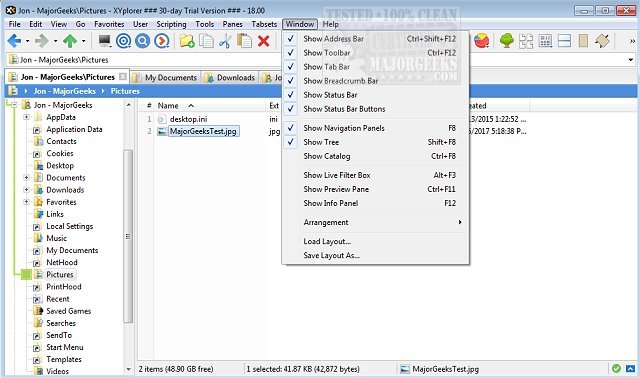
XYplorer has recently released two new versions, 28.30.0200 and 27.20.1203, enhancing its capabilities as a tabbed file manager for Windows. This software is designed to streamline file management with features such as powerful file search, zip support, and a duplicate file finder, among others.
Notably, XYplorer offers a versatile preview function and a highly customizable interface, allowing users to tailor their experience to their specific needs. Additionally, it includes an optional dual-pane layout, making it easier to manage multiple files and folders simultaneously. The software is recognized for its speed and efficiency, being lightweight and portable, which is ideal for users who require a robust file management solution without the burden of heavy applications.
Key features of XYplorer include tabbed browsing for easy navigation, dual panes for side-by-side file operations, queued file operations for smoother task management, batch renaming for file organization, and one-click previews to quickly view file contents. Users can also customize folder view settings to enhance their workflow.
In addition to its primary functionalities, XYplorer provides options to disable certain Windows Explorer features, such as Quick Access and Recent Files, and offers helpful tips for managing the File Explorer interface, including adding a Details Pane or adjusting library settings.
As XYplorer continues to evolve, it remains an innovative tool for efficient file management on Windows, appealing to both casual users and professionals who seek advanced features and customization options. Future updates are anticipated to further enrich the user experience and expand the software's capabilities
Notably, XYplorer offers a versatile preview function and a highly customizable interface, allowing users to tailor their experience to their specific needs. Additionally, it includes an optional dual-pane layout, making it easier to manage multiple files and folders simultaneously. The software is recognized for its speed and efficiency, being lightweight and portable, which is ideal for users who require a robust file management solution without the burden of heavy applications.
Key features of XYplorer include tabbed browsing for easy navigation, dual panes for side-by-side file operations, queued file operations for smoother task management, batch renaming for file organization, and one-click previews to quickly view file contents. Users can also customize folder view settings to enhance their workflow.
In addition to its primary functionalities, XYplorer provides options to disable certain Windows Explorer features, such as Quick Access and Recent Files, and offers helpful tips for managing the File Explorer interface, including adding a Details Pane or adjusting library settings.
As XYplorer continues to evolve, it remains an innovative tool for efficient file management on Windows, appealing to both casual users and professionals who seek advanced features and customization options. Future updates are anticipated to further enrich the user experience and expand the software's capabilities
XYplorer 28.30.0200 / 27.20.1203 released
XYplorer is a tabbed file manager for Windows featuring powerful file search, zip support, duplicate file finder and much more.