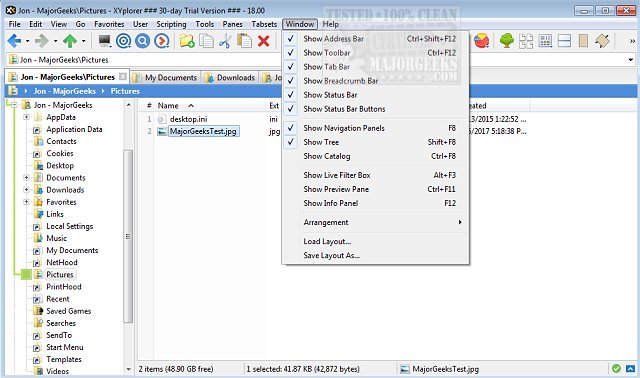
XYplorer has released two new versions, 28.10.0100 and 27.20.0706, enhancing its capabilities as a versatile tabbed file manager for Windows. With a focus on efficiency and user experience, XYplorer is equipped with features such as advanced file search, zip file support, and a duplicate file finder, making it a robust solution for file management.
In addition to these core functionalities, XYplorer offers a dynamic preview feature, extensive customization options for its interface, and an optional dual-pane layout for improved multitasking. The software is designed for speed and portability, allowing users to manage their files effectively without the bloat of traditional file managers. It supports tabbed browsing, six key navigation, queued file operations, and batch renaming, which streamline the process of organizing files.
Other notable features include one-click previews, personalized folder view settings, and various automation tools to manage recurring tasks efficiently. Users can also customize their experience by disabling Quick Access and Recent Files, adjusting the context menus, and resetting folder views to suit their preferences.
Overall, XYplorer continues to innovate in the file management space, offering a comprehensive suite of tools that cater to both casual users and professionals. The latest updates further enhance its functionality, making it an essential tool for anyone looking to improve their file management workflow on Windows
In addition to these core functionalities, XYplorer offers a dynamic preview feature, extensive customization options for its interface, and an optional dual-pane layout for improved multitasking. The software is designed for speed and portability, allowing users to manage their files effectively without the bloat of traditional file managers. It supports tabbed browsing, six key navigation, queued file operations, and batch renaming, which streamline the process of organizing files.
Other notable features include one-click previews, personalized folder view settings, and various automation tools to manage recurring tasks efficiently. Users can also customize their experience by disabling Quick Access and Recent Files, adjusting the context menus, and resetting folder views to suit their preferences.
Overall, XYplorer continues to innovate in the file management space, offering a comprehensive suite of tools that cater to both casual users and professionals. The latest updates further enhance its functionality, making it an essential tool for anyone looking to improve their file management workflow on Windows
XYplorer 28.10.0100 / 27.20.0706 released
XYplorer is a tabbed file manager for Windows featuring powerful file search, zip support, duplicate file finder and much more.