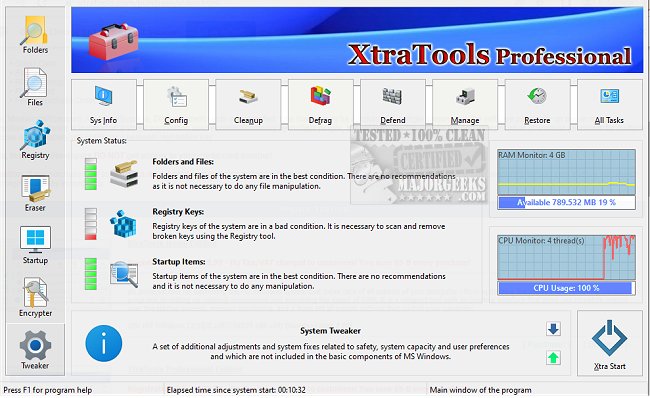
XtraTools has released version 26.3.1, a comprehensive utility suite for Windows designed to streamline system optimization, maintenance, and cleaning all within a single application. This toolset is particularly beneficial for users experiencing sluggish system performance or bloating without resorting to a full system reinstall.
The suite encompasses various functionalities, including registry tweaks, junk file cleanup, process management, and file handling. It provides a user-friendly interface for those who wish to enhance their Windows experience without delving into complex system configurations. For instance, if users notice prolonged startup times or excessive background activity, XtraTools allows them to manage autoload programs, clear temporary files, and optimize RAM usage efficiently.
Key features of XtraTools include:
- System Tweaker: Adjust hidden operating system settings for improved performance and responsiveness.
- Scan Folders: Remove temporary files and digital clutter.
- Process Monitoring: Manage or terminate resource-intensive processes.
- File Shredder: Permanently delete files to prevent recovery.
- RAM Saver: Optimize memory usage for enhanced multitasking.
- Objects Eraser: Clear recent registry traces for privacy.
Additionally, the System Tune-up module provides quick access to essential tools for managing service autoloads, task priorities, and network settings.
Pros and Cons:
Pros:
- Integrated toolkit, reducing the need for multiple applications.
- Portable version available for IT professionals.
- Real-time monitoring capabilities for processes and memory.
- Efficient junk cleanup and system trace removal.
- Compatibility with various Windows versions.
Cons:
- The user interface may appear outdated compared to contemporary alternatives.
- No free version available; only a trial is offered.
- Some features may be complex for casual users.
Geek Verdict:
XtraTools is a robust solution for those who want to clean, tune, and optimize their Windows systems without juggling multiple applications. If you find your PC underperforming, this all-in-one suite could be the remedy you need.
Extension:
As technology continues to evolve, maintaining optimal system performance is crucial for productive computing. XtraTools not only simplifies the maintenance process but also empowers users to take control of their system’s health. Future updates could focus on modernizing the interface and enhancing user accessibility, possibly through guided tooltips or tutorials for novice users. Additionally, integrating features that provide deeper insights into system performance metrics or trends could further enhance its appeal.
In the digital age, where user privacy is paramount, expanding the privacy tools within XtraTools could also attract a broader audience concerned about data security. Overall, with continuous development and user feedback, XtraTools has the potential to remain a top choice for Windows optimization
The suite encompasses various functionalities, including registry tweaks, junk file cleanup, process management, and file handling. It provides a user-friendly interface for those who wish to enhance their Windows experience without delving into complex system configurations. For instance, if users notice prolonged startup times or excessive background activity, XtraTools allows them to manage autoload programs, clear temporary files, and optimize RAM usage efficiently.
Key features of XtraTools include:
- System Tweaker: Adjust hidden operating system settings for improved performance and responsiveness.
- Scan Folders: Remove temporary files and digital clutter.
- Process Monitoring: Manage or terminate resource-intensive processes.
- File Shredder: Permanently delete files to prevent recovery.
- RAM Saver: Optimize memory usage for enhanced multitasking.
- Objects Eraser: Clear recent registry traces for privacy.
Additionally, the System Tune-up module provides quick access to essential tools for managing service autoloads, task priorities, and network settings.
Pros and Cons:
Pros:
- Integrated toolkit, reducing the need for multiple applications.
- Portable version available for IT professionals.
- Real-time monitoring capabilities for processes and memory.
- Efficient junk cleanup and system trace removal.
- Compatibility with various Windows versions.
Cons:
- The user interface may appear outdated compared to contemporary alternatives.
- No free version available; only a trial is offered.
- Some features may be complex for casual users.
Geek Verdict:
XtraTools is a robust solution for those who want to clean, tune, and optimize their Windows systems without juggling multiple applications. If you find your PC underperforming, this all-in-one suite could be the remedy you need.
Extension:
As technology continues to evolve, maintaining optimal system performance is crucial for productive computing. XtraTools not only simplifies the maintenance process but also empowers users to take control of their system’s health. Future updates could focus on modernizing the interface and enhancing user accessibility, possibly through guided tooltips or tutorials for novice users. Additionally, integrating features that provide deeper insights into system performance metrics or trends could further enhance its appeal.
In the digital age, where user privacy is paramount, expanding the privacy tools within XtraTools could also attract a broader audience concerned about data security. Overall, with continuous development and user feedback, XtraTools has the potential to remain a top choice for Windows optimization
XtraTools 26.3.1 released
XtraTools is an all-in-one Windows utility suite packed with tools designed to tweak, clean, and optimize your system, without needing five different apps.