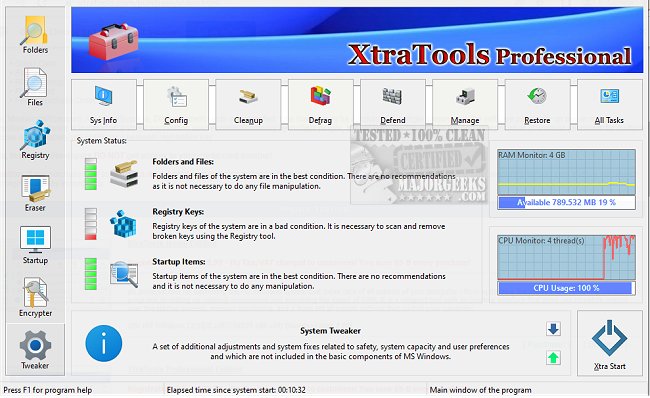
XtraTools is a comprehensive utility suite designed for Windows users seeking to enhance system performance without the hassle of managing multiple applications. This all-in-one toolkit is particularly useful for those experiencing sluggishness or bloat in their Windows operating system and who wish to avoid the drastic step of reinstalling the OS.
XtraTools consolidates a variety of essential functions into a single interface, allowing users to perform registry tweaks, clean junk files, monitor processes, and manage files efficiently. It is particularly beneficial for users looking to streamline their experience without having to navigate complex system settings.
For instance, if you are struggling with prolonged startup times or unusual background processes consuming resources, XtraTools enables you to disable unnecessary startup items, clean temporary files, and optimize RAM usage—all from one platform.
- System Tweaker: Adjust hidden operating system settings for enhanced performance and responsiveness.
- Scan Folders: Eliminate temporary files, old logs, and other unnecessary data cluttering your system.
- Process Monitoring: Manage or terminate processes that are resource-intensive or malfunctioning.
- File Shredder: Permanently delete files to ensure they cannot be recovered.
- RAM Saver: Optimize memory usage for improved multitasking.
- Objects Eraser: Clear recent registry traces to maintain privacy.
Additionally, XtraTools includes a System Tune-up module, offering quick access to tools for managing service autoloads, task priorities, and network settings for improved responsiveness.
Pros:
- Comprehensive toolkit within a single application, reducing the need for multiple utilities.
- Portable version available for technicians and administrators.
- Real-time monitoring of processes and memory usage.
- Efficient cleanup of junk files and system traces.
- Compatible with various Windows versions.
Cons:
- The interface may appear outdated compared to other modern utility suites.
- No free version available; only a trial version offered.
- Some features may be overwhelming for casual users.
XtraTools provides a powerful set of utilities for those looking to clean, tune, and optimize their Windows system. If you are tired of juggling various tools for system management, XtraTools presents a single solution that could be exactly what your sluggish PC needs.
What Does XtraTools Offer?
XtraTools consolidates a variety of essential functions into a single interface, allowing users to perform registry tweaks, clean junk files, monitor processes, and manage files efficiently. It is particularly beneficial for users looking to streamline their experience without having to navigate complex system settings.
For instance, if you are struggling with prolonged startup times or unusual background processes consuming resources, XtraTools enables you to disable unnecessary startup items, clean temporary files, and optimize RAM usage—all from one platform.
Key Features
- System Tweaker: Adjust hidden operating system settings for enhanced performance and responsiveness.
- Scan Folders: Eliminate temporary files, old logs, and other unnecessary data cluttering your system.
- Process Monitoring: Manage or terminate processes that are resource-intensive or malfunctioning.
- File Shredder: Permanently delete files to ensure they cannot be recovered.
- RAM Saver: Optimize memory usage for improved multitasking.
- Objects Eraser: Clear recent registry traces to maintain privacy.
Additionally, XtraTools includes a System Tune-up module, offering quick access to tools for managing service autoloads, task priorities, and network settings for improved responsiveness.
Pros and Cons
Pros:
- Comprehensive toolkit within a single application, reducing the need for multiple utilities.
- Portable version available for technicians and administrators.
- Real-time monitoring of processes and memory usage.
- Efficient cleanup of junk files and system traces.
- Compatible with various Windows versions.
Cons:
- The interface may appear outdated compared to other modern utility suites.
- No free version available; only a trial version offered.
- Some features may be overwhelming for casual users.
Conclusion
XtraTools provides a powerful set of utilities for those looking to clean, tune, and optimize their Windows system. If you are tired of juggling various tools for system management, XtraTools presents a single solution that could be exactly what your sluggish PC needs.
Further Resources
For more tips on optimizing your Windows experience, consider exploring guides on disabling advertising and sponsored apps, turning diagnostic data settings on or off, and managing activity history in Windows 10 and 11XtraTools 26.2.1 released
XtraTools is an all-in-one Windows utility suite packed with tools designed to tweak, clean, and optimize your system, without needing five different apps.