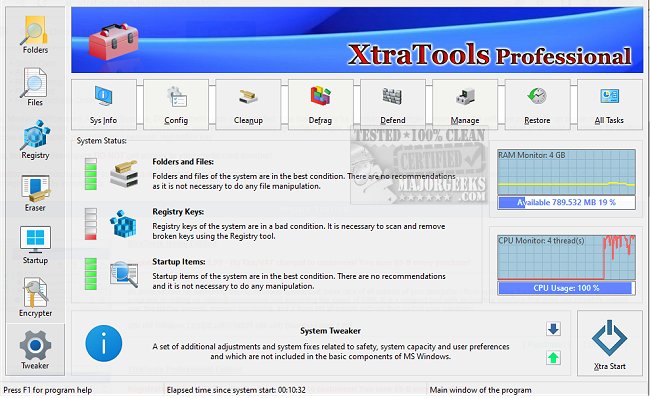
XtraTools has recently launched version 26.0.1, enhancing its reputation as an all-in-one utility suite for Windows users. This software is designed to streamline system maintenance by providing a variety of tools that allow users to tweak, clean, and optimize their systems without the need for multiple applications. It's particularly useful for individuals experiencing sluggish performance or bloated systems who wish to avoid the hassle of a full reinstallation.
Key Functionalities of XtraTools
The suite includes essential features such as:
- System Tweaker: Adjust hidden operating system settings for improved performance and responsiveness.
- Scan Folders: Automatically identify and delete temporary files, old logs, and other clutter that consumes space.
- Process Monitoring: Manage and terminate processes that may be consuming excess resources.
- File Shredder: Permanently delete files to prevent recovery.
- RAM Saver: Optimize memory usage for enhanced multitasking capabilities.
- Objects Eraser: Clear recent registry traces to maintain privacy.
Additionally, the System Tune-up module provides convenient access to tools for managing service autoloads, task priorities, and network settings to enhance overall system responsiveness.
Advantages and Disadvantages
Pros:
- Consolidates a broad range of tools into a single application, eliminating the need for multiple utilities.
- Offers a portable version suitable for technicians and administrators.
- Provides real-time monitoring capabilities for processes and memory usage.
- Quickly cleans up junk files and unnecessary system traces.
- Compatible with various Windows versions.
Cons:
- The interface may appear outdated compared to contemporary utility suites.
- No free version is available; only a trial is offered.
- Some advanced features may be overwhelming for casual users.
Conclusion
XtraTools serves as a robust toolkit for those looking to enhance their Windows experience by cleaning, tuning, and optimizing their systems. It simplifies the process of managing system performance, especially for users who prefer to have all necessary tools in one place. Users tired of juggling multiple applications may find XtraTools to be the perfect solution for rejuvenating their sluggish PCs.
Extended Features and Future Updates
In future updates, it would be beneficial for XtraTools to consider revamping its interface to align with modern design aesthetics, possibly incorporating user feedback to enhance usability. Furthermore, introducing a free version or a more extensive trial could attract a broader audience, allowing potential users to experience the benefits before committing. Expanding compatibility with emerging Windows features and maintaining performance across various hardware configurations will also be crucial in retaining user satisfaction and relevance in the utility software market
Key Functionalities of XtraTools
The suite includes essential features such as:
- System Tweaker: Adjust hidden operating system settings for improved performance and responsiveness.
- Scan Folders: Automatically identify and delete temporary files, old logs, and other clutter that consumes space.
- Process Monitoring: Manage and terminate processes that may be consuming excess resources.
- File Shredder: Permanently delete files to prevent recovery.
- RAM Saver: Optimize memory usage for enhanced multitasking capabilities.
- Objects Eraser: Clear recent registry traces to maintain privacy.
Additionally, the System Tune-up module provides convenient access to tools for managing service autoloads, task priorities, and network settings to enhance overall system responsiveness.
Advantages and Disadvantages
Pros:
- Consolidates a broad range of tools into a single application, eliminating the need for multiple utilities.
- Offers a portable version suitable for technicians and administrators.
- Provides real-time monitoring capabilities for processes and memory usage.
- Quickly cleans up junk files and unnecessary system traces.
- Compatible with various Windows versions.
Cons:
- The interface may appear outdated compared to contemporary utility suites.
- No free version is available; only a trial is offered.
- Some advanced features may be overwhelming for casual users.
Conclusion
XtraTools serves as a robust toolkit for those looking to enhance their Windows experience by cleaning, tuning, and optimizing their systems. It simplifies the process of managing system performance, especially for users who prefer to have all necessary tools in one place. Users tired of juggling multiple applications may find XtraTools to be the perfect solution for rejuvenating their sluggish PCs.
Extended Features and Future Updates
In future updates, it would be beneficial for XtraTools to consider revamping its interface to align with modern design aesthetics, possibly incorporating user feedback to enhance usability. Furthermore, introducing a free version or a more extensive trial could attract a broader audience, allowing potential users to experience the benefits before committing. Expanding compatibility with emerging Windows features and maintaining performance across various hardware configurations will also be crucial in retaining user satisfaction and relevance in the utility software market
XtraTools 26.0.1 released
XtraTools is an all-in-one Windows utility suite packed with tools designed to tweak, clean, and optimize your system, without needing five different apps.