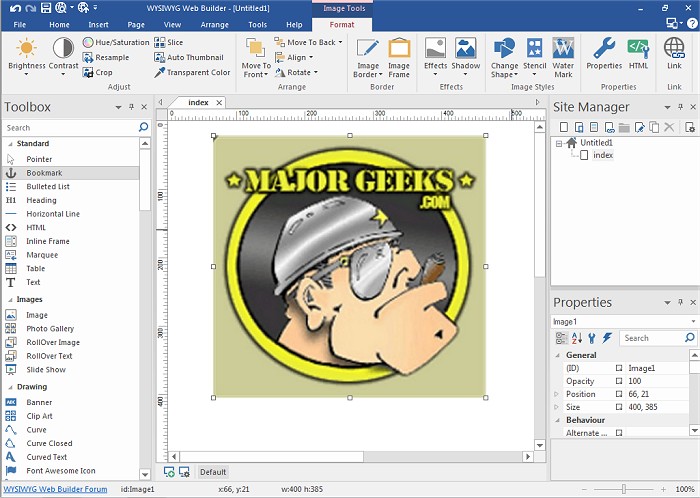
WYSIWYG Web Builder has recently released version 21.0.2, a powerful tool for creating web pages using a What-You-See-Is-What-You-Get (WYSIWYG) interface. This software allows users to design web pages visually, ensuring that the final product looks exactly as intended without needing to understand HTML coding. By simply pointing and clicking, users can generate HTML tags, drag and drop elements onto the page, and position them freely. Once completed, users can easily publish their creations to a web server using the built-in publishing tool.
This version boasts a variety of customizable features, including menus, toolbars, keyboard shortcuts, and window arrangements, providing full control over the web content and layout. Key features of WYSIWYG Web Builder include:
- A form layout object for creating interactive forms, which includes customizable actions and hidden fields.
- Support for various form elements such as edit boxes, text areas, checkboxes, radio buttons, combo boxes, and buttons.
- A Form Wizard that simplifies the process of creating forms into four easy steps, with access to a range of pre-designed forms.
- A Captcha object to help prevent spam submissions in PHP forms.
- Rich text support allowing for varied fonts, colors, links, and sizes within text objects.
- A custom HTML object for adding personalized HTML or JavaScript code.
- Support for multiple media formats including JAVA, Flash, Windows Media, YouTube, Quicktime, and Real Audio.
- The ability to publish entire websites or specific pages to a local drive or web server.
- A built-in photo gallery maker with customizable features like picture frames.
- A banner maker and support for rollover images.
As WYSIWYG Web Builder continues to evolve, users can expect ongoing enhancements and new features to further simplify web design and expand creative possibilities, making it an essential tool for both beginners and experienced web developers. With its extensive capabilities, WYSIWYG Web Builder remains a popular choice for anyone looking to create visually stunning and fully functional websites
This version boasts a variety of customizable features, including menus, toolbars, keyboard shortcuts, and window arrangements, providing full control over the web content and layout. Key features of WYSIWYG Web Builder include:
- A form layout object for creating interactive forms, which includes customizable actions and hidden fields.
- Support for various form elements such as edit boxes, text areas, checkboxes, radio buttons, combo boxes, and buttons.
- A Form Wizard that simplifies the process of creating forms into four easy steps, with access to a range of pre-designed forms.
- A Captcha object to help prevent spam submissions in PHP forms.
- Rich text support allowing for varied fonts, colors, links, and sizes within text objects.
- A custom HTML object for adding personalized HTML or JavaScript code.
- Support for multiple media formats including JAVA, Flash, Windows Media, YouTube, Quicktime, and Real Audio.
- The ability to publish entire websites or specific pages to a local drive or web server.
- A built-in photo gallery maker with customizable features like picture frames.
- A banner maker and support for rollover images.
As WYSIWYG Web Builder continues to evolve, users can expect ongoing enhancements and new features to further simplify web design and expand creative possibilities, making it an essential tool for both beginners and experienced web developers. With its extensive capabilities, WYSIWYG Web Builder remains a popular choice for anyone looking to create visually stunning and fully functional websites
WYSIWYG Web Builder 21.0.2 released
WYSIWYG Web Builder is a (What-You-See-Is-What-You-Get) program used for creating your own web pages.