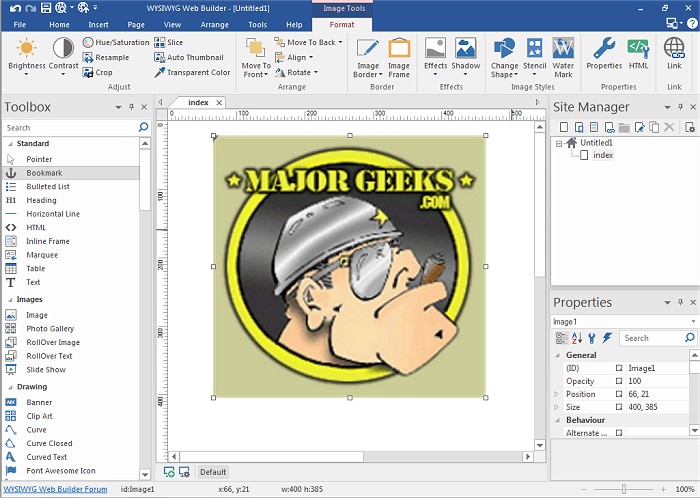
WYSIWYG Web Builder 20.4.1 has been released, offering users an intuitive way to create web pages without needing to know HTML. This "What-You-See-Is-What-You-Get" software allows designers to visually build their websites by dragging and dropping elements, ensuring that the final product appears exactly as intended. The program automatically generates HTML tags based on the user's actions, making web development accessible to everyone.
Key features of WYSIWYG Web Builder include customizable menus and toolbars, as well as the ability to easily publish completed pages to a web server using the built-in publishing tool. The software supports various form elements and includes a Form Wizard to streamline the creation of forms. Additional features include a Captcha object to prevent spam submissions, rich text support for diverse formatting, and the ability to insert custom HTML or JavaScript.
Users can also take advantage of multimedia support, including Java, Flash, and various audio and video formats, to enhance their web pages. The program includes tools for building photo galleries and banners, as well as features like rollover images. With many more functionalities, WYSIWYG Web Builder empowers users to have complete control over their web content and layout.
In extension, WYSIWYG Web Builder continues to evolve, integrating new technologies and user feedback to enhance usability. Future updates may include improved mobile responsiveness features, enhanced SEO tools, and integrations with popular web services for e-commerce and social media. As web design trends shift, WYSIWYG Web Builder aims to keep pace, ensuring that users can create modern, visually appealing websites with ease
Key features of WYSIWYG Web Builder include customizable menus and toolbars, as well as the ability to easily publish completed pages to a web server using the built-in publishing tool. The software supports various form elements and includes a Form Wizard to streamline the creation of forms. Additional features include a Captcha object to prevent spam submissions, rich text support for diverse formatting, and the ability to insert custom HTML or JavaScript.
Users can also take advantage of multimedia support, including Java, Flash, and various audio and video formats, to enhance their web pages. The program includes tools for building photo galleries and banners, as well as features like rollover images. With many more functionalities, WYSIWYG Web Builder empowers users to have complete control over their web content and layout.
In extension, WYSIWYG Web Builder continues to evolve, integrating new technologies and user feedback to enhance usability. Future updates may include improved mobile responsiveness features, enhanced SEO tools, and integrations with popular web services for e-commerce and social media. As web design trends shift, WYSIWYG Web Builder aims to keep pace, ensuring that users can create modern, visually appealing websites with ease
WYSIWYG Web Builder 20.4.1 released
WYSIWYG Web Builder is a (What-You-See-Is-What-You-Get) program used for creating your own web pages.