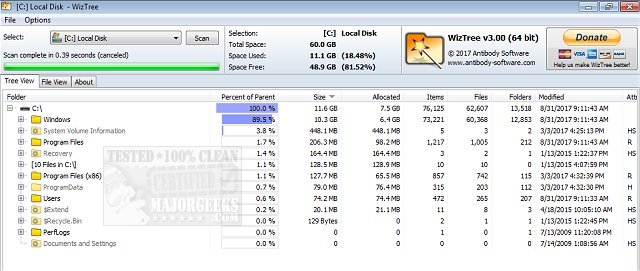
WizTree, a highly efficient disk space analyzer for Windows, has just launched its latest version, 4.31. This free and lightweight tool specializes in quickly scanning hard drives to identify which files and folders are consuming the most disk space, helping users regain control over their storage.
Why Choose WizTree?
WizTree distinguishes itself from other disk management tools by its exceptional speed. Instead of scanning files individually, it utilizes the Master File Table (MFT), which allows for a remarkably fast analysis of NTFS-formatted drives. It also extends compatibility to FAT, FAT32, network drives, and external USB storage, making it a versatile option for various data storage devices.
A standout feature of WizTree is its visual representation of storage data through a treemap view. This color-coded layout provides an intuitive overview of disk usage, allowing users to quickly identify large files, like those forgotten vacation videos occupying unnecessary space.
Key Features:
- Disk Space Management: Instantly locate large files and folders.
- Treemap Visualization: A zoomable, color-coded visual for quick understanding of data usage.
- Top 1000 Files: A leaderboard view of the largest files, making it easy to spot culprits.
- Duplicate Finder: Efficiently identifies and helps remove duplicate files.
- CSV Export: Users can export results for tracking or sharing with IT.
- Flexible Sorting & Filtering: Search files by size, type, or name, including wildcard searches.
- Batch Deletion: Directly delete large or unwanted files from the interface.
- Non-NTFS Support: Works with external storage and network drives.
Who Can Benefit from WizTree?
WizTree is ideal for a diverse range of users—from data hoarders and professional PC optimizers to casual users wanting to free up space for new applications. Its user-friendly interface and rapid scanning capabilities make it accessible even to those who may not be technologically savvy.
What's New in Version 4.31?
Recent updates to WizTree have enhanced its functionality significantly. The duplicate file detection feature has been refined for smarter redundancy removal. Additionally, improved support for high DPI displays and new filtering options ensure it meets modern user needs. The introduction of drag-and-drop functionality adds convenience to the user experience.
Performance and Cost
WizTree is renowned for its speed, being one of the fastest tools available for disk space analysis. It reads directly from the MFT, resulting in incredibly quick scans. Best of all, it remains free for personal use, while businesses can opt for supporter codes or enterprise licenses for commercial use.
Conclusion
WizTree is a powerful tool that simplifies disk space management with its swift performance and intuitive design. Whether looking to declutter your hard drive or systematically organize files, WizTree is a must-have solution. Download it today and experience the difference—because every moment spent without it is a moment wasted on tedious manual cleanup.
Donations are welcomed to support continued development.
Related Resources:
- Best Drive Cleaner Comparisons: CCleaner vs. Wise Disk Cleaner vs. PrivaZer
- How to Use Storage Sense for Automatic Junk File Deletion in Windows 10
- Cleaning Up the WinSxS Folder in Windows 10
- Understanding the $Windows.~Bt Folder and Its Deletion Potentia
Why Choose WizTree?
WizTree distinguishes itself from other disk management tools by its exceptional speed. Instead of scanning files individually, it utilizes the Master File Table (MFT), which allows for a remarkably fast analysis of NTFS-formatted drives. It also extends compatibility to FAT, FAT32, network drives, and external USB storage, making it a versatile option for various data storage devices.
A standout feature of WizTree is its visual representation of storage data through a treemap view. This color-coded layout provides an intuitive overview of disk usage, allowing users to quickly identify large files, like those forgotten vacation videos occupying unnecessary space.
Key Features:
- Disk Space Management: Instantly locate large files and folders.
- Treemap Visualization: A zoomable, color-coded visual for quick understanding of data usage.
- Top 1000 Files: A leaderboard view of the largest files, making it easy to spot culprits.
- Duplicate Finder: Efficiently identifies and helps remove duplicate files.
- CSV Export: Users can export results for tracking or sharing with IT.
- Flexible Sorting & Filtering: Search files by size, type, or name, including wildcard searches.
- Batch Deletion: Directly delete large or unwanted files from the interface.
- Non-NTFS Support: Works with external storage and network drives.
Who Can Benefit from WizTree?
WizTree is ideal for a diverse range of users—from data hoarders and professional PC optimizers to casual users wanting to free up space for new applications. Its user-friendly interface and rapid scanning capabilities make it accessible even to those who may not be technologically savvy.
What's New in Version 4.31?
Recent updates to WizTree have enhanced its functionality significantly. The duplicate file detection feature has been refined for smarter redundancy removal. Additionally, improved support for high DPI displays and new filtering options ensure it meets modern user needs. The introduction of drag-and-drop functionality adds convenience to the user experience.
Performance and Cost
WizTree is renowned for its speed, being one of the fastest tools available for disk space analysis. It reads directly from the MFT, resulting in incredibly quick scans. Best of all, it remains free for personal use, while businesses can opt for supporter codes or enterprise licenses for commercial use.
Conclusion
WizTree is a powerful tool that simplifies disk space management with its swift performance and intuitive design. Whether looking to declutter your hard drive or systematically organize files, WizTree is a must-have solution. Download it today and experience the difference—because every moment spent without it is a moment wasted on tedious manual cleanup.
Donations are welcomed to support continued development.
Related Resources:
- Best Drive Cleaner Comparisons: CCleaner vs. Wise Disk Cleaner vs. PrivaZer
- How to Use Storage Sense for Automatic Junk File Deletion in Windows 10
- Cleaning Up the WinSxS Folder in Windows 10
- Understanding the $Windows.~Bt Folder and Its Deletion Potentia
WizTree 4.31 released
WizTree is a disk space analyzer for quickly scanning your entire hard drive and showing you which files and folders are using the most disk space.