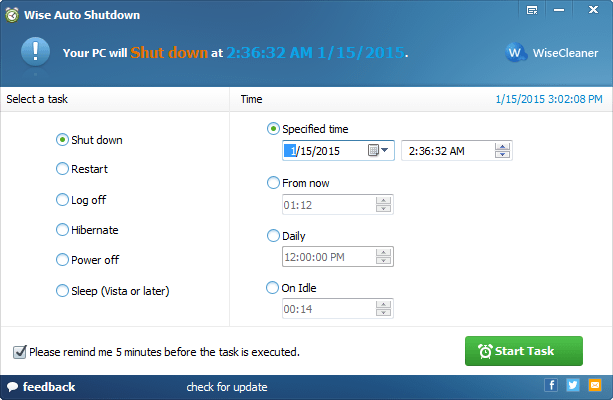
Wise Auto Shutdown version 2.1.1.112 has been released, offering a user-friendly solution for scheduling computer tasks such as shutting down, logging off, restarting, or putting the system to sleep. The application runs in the background once initiated, with easy access to the main interface via a double-click from the system tray. Notably, it provides a reminder five minutes prior to executing the scheduled task.
Key features of Wise Auto Shutdown include:
- User-Friendly Interface: The software is designed with a single main interface where all functionalities are easily accessible.
- Multi-Task Capability: Users can schedule various tasks including shutdown, restart, logoff, sleep, and turning off power.
- Flexible Scheduling Options: Tasks can be scheduled in multiple ways, such as daily, at a specific time, or after a delay.
- Timely Notifications: A prompt reminder is provided five minutes before the scheduled task is executed.
- Silent Operation: The application operates quietly in the background, with the option to view the main screen by clicking the tray icon.
In addition to Wise Auto Shutdown, users can explore similar functionalities through various methods such as utilizing PowerShell or Command Prompt for shutdown or restart commands, customizing the shutdown options in the Windows context menu, or configuring fast startup settings in Windows 10 and 11.
Furthermore, users may want to consider when to choose sleep, hibernate, or shutdown based on their usage patterns, as each option serves different needs in terms of power consumption and system readiness. With Wise Auto Shutdown, users can effortlessly manage their computer’s power functions, making it a practical tool for enhancing productivity and energy efficiency
Key features of Wise Auto Shutdown include:
- User-Friendly Interface: The software is designed with a single main interface where all functionalities are easily accessible.
- Multi-Task Capability: Users can schedule various tasks including shutdown, restart, logoff, sleep, and turning off power.
- Flexible Scheduling Options: Tasks can be scheduled in multiple ways, such as daily, at a specific time, or after a delay.
- Timely Notifications: A prompt reminder is provided five minutes before the scheduled task is executed.
- Silent Operation: The application operates quietly in the background, with the option to view the main screen by clicking the tray icon.
In addition to Wise Auto Shutdown, users can explore similar functionalities through various methods such as utilizing PowerShell or Command Prompt for shutdown or restart commands, customizing the shutdown options in the Windows context menu, or configuring fast startup settings in Windows 10 and 11.
Furthermore, users may want to consider when to choose sleep, hibernate, or shutdown based on their usage patterns, as each option serves different needs in terms of power consumption and system readiness. With Wise Auto Shutdown, users can effortlessly manage their computer’s power functions, making it a practical tool for enhancing productivity and energy efficiency
Wise Auto Shutdown 2.1.1.112 released
Wise Auto Shutdown allows you to schedule your computer to shut down, log off, restart, and sleep easily at any time.