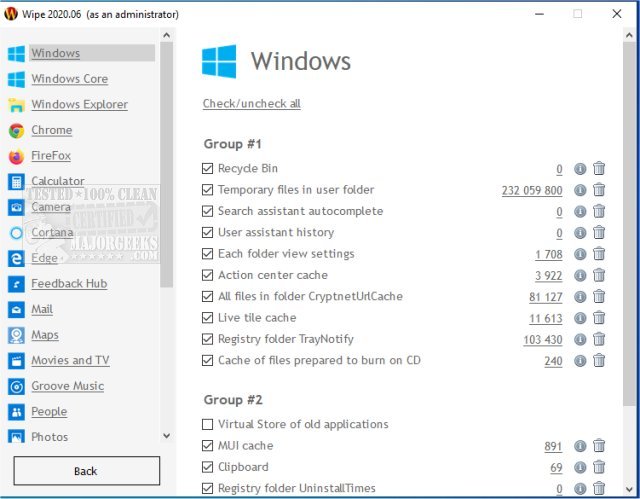
Wipe 2515 has been released as a powerful tool designed to enhance your online privacy and optimize disk space by securely deleting various types of digital clutter. This software allows users to erase browser history, cache, index.dat files, registry entries, internet cookies, autocomplete history, temporary internet files, and much more. It effectively removes traces of personal activity across different programs, including Windows, Internet Explorer, Firefox, Chrome, and Opera.
To ensure that deleted data cannot be recovered, Wipe employs several robust security methods, such as the DoD 5220.22-M method, the Gutmann method (which involves a comprehensive 35-step process), and the Russian GOST standard, among others. Users have the flexibility to customize their cleaning process by selecting specific items to remove, and they can also access detailed information regarding the locations of junk files on their computer.
Wipe is offered in both free and pro versions, catering to a range of user needs and preferences.
In addition to Wipe, users may find it helpful to explore similar tools and methods for data deletion, including understanding the differences between Quick Format and Full Format, using Diskpart's Clean Command in Windows for disk erasure, and securely deleting files in Windows 10 and 11 with PowerShell and Cipher.
In conclusion, Wipe 2515 not only helps safeguard your privacy but also contributes to improved system performance by freeing up valuable disk space. With its customizable features and strong data protection methods, it is a valuable tool for anyone looking to maintain a clean and secure computing environment
To ensure that deleted data cannot be recovered, Wipe employs several robust security methods, such as the DoD 5220.22-M method, the Gutmann method (which involves a comprehensive 35-step process), and the Russian GOST standard, among others. Users have the flexibility to customize their cleaning process by selecting specific items to remove, and they can also access detailed information regarding the locations of junk files on their computer.
Wipe is offered in both free and pro versions, catering to a range of user needs and preferences.
In addition to Wipe, users may find it helpful to explore similar tools and methods for data deletion, including understanding the differences between Quick Format and Full Format, using Diskpart's Clean Command in Windows for disk erasure, and securely deleting files in Windows 10 and 11 with PowerShell and Cipher.
In conclusion, Wipe 2515 not only helps safeguard your privacy but also contributes to improved system performance by freeing up valuable disk space. With its customizable features and strong data protection methods, it is a valuable tool for anyone looking to maintain a clean and secure computing environment
Wipe 2515 released
Wipe can protect your privacy on the internet and recover free disk space.