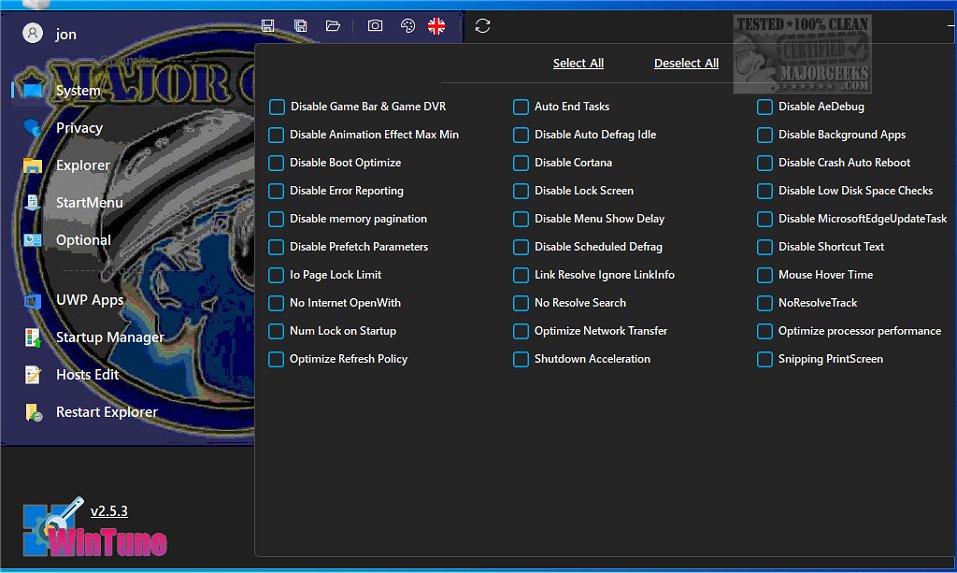
The newly released WinTune 2.8.0 is a robust tool designed to help users optimize and personalize their Windows operating system for improved performance and seamless functionality. This user-friendly application features an intuitive dashboard that allows users to navigate through various optimization options easily.
Comprehensive Optimization Tools
WinTune offers a range of functionalities categorized into nine distinct sections. Each section contains various tools aimed at enhancing different aspects of the Windows experience. Users are advised to familiarize themselves with the options available online, as the app lacks hover-over help for guidance.
System Configuration and Privacy Enhancements
The first section focuses on system configuration, providing straightforward options to customize PC settings. The privacy section empowers users to manage telemetry and data collection, including the ability to disable ads, lock screens, tips, suggestions, and web searches.
File Explorer Enhancements
WinTune improves the File Explorer experience by allowing users to disable auto-suggest and sync provider notifications, minimizing confusion during file navigation. Users can easily toggle the visibility of hidden and system files, enhancing control over their file management experience. Additionally, the app offers a feature to restart the Explorer, if necessary.
Additional Customization Options
Beyond basic tweaks, WinTune provides an assortment of additional features, enabling users to enable dark mode, disable the print spooler, turn off automatic Windows updates, and disable system restore. Users can also personalize the appearance of WinTune with custom images.
WinTune 2.8.0 stands out as a powerful optimization tool that equips users with the necessary functionalities to ensure their PCs operate smoothly and efficiently. With its focus on customization, privacy, and system performance, WinTune is an essential application for anyone looking to enhance their Windows experience.
Key Features of WinTune 2.8.0
Comprehensive Optimization Tools
WinTune offers a range of functionalities categorized into nine distinct sections. Each section contains various tools aimed at enhancing different aspects of the Windows experience. Users are advised to familiarize themselves with the options available online, as the app lacks hover-over help for guidance.
System Configuration and Privacy Enhancements
The first section focuses on system configuration, providing straightforward options to customize PC settings. The privacy section empowers users to manage telemetry and data collection, including the ability to disable ads, lock screens, tips, suggestions, and web searches.
File Explorer Enhancements
WinTune improves the File Explorer experience by allowing users to disable auto-suggest and sync provider notifications, minimizing confusion during file navigation. Users can easily toggle the visibility of hidden and system files, enhancing control over their file management experience. Additionally, the app offers a feature to restart the Explorer, if necessary.
Additional Customization Options
Beyond basic tweaks, WinTune provides an assortment of additional features, enabling users to enable dark mode, disable the print spooler, turn off automatic Windows updates, and disable system restore. Users can also personalize the appearance of WinTune with custom images.
Conclusion
WinTune 2.8.0 stands out as a powerful optimization tool that equips users with the necessary functionalities to ensure their PCs operate smoothly and efficiently. With its focus on customization, privacy, and system performance, WinTune is an essential application for anyone looking to enhance their Windows experience.
Future Developments
As technology evolves, future updates to WinTune may introduce even more features, such as enhanced automation for system tweaks, advanced analytics for performance monitoring, and integration with cloud services for backup and restoration of system configurations. Users can look forward to ongoing improvements that will continue to refine their Windows experienceWinTune 2.8.0 released
WinTune provides users with the ability to personalize their Windows operating system to enhance its performance and ensure smooth functionality.