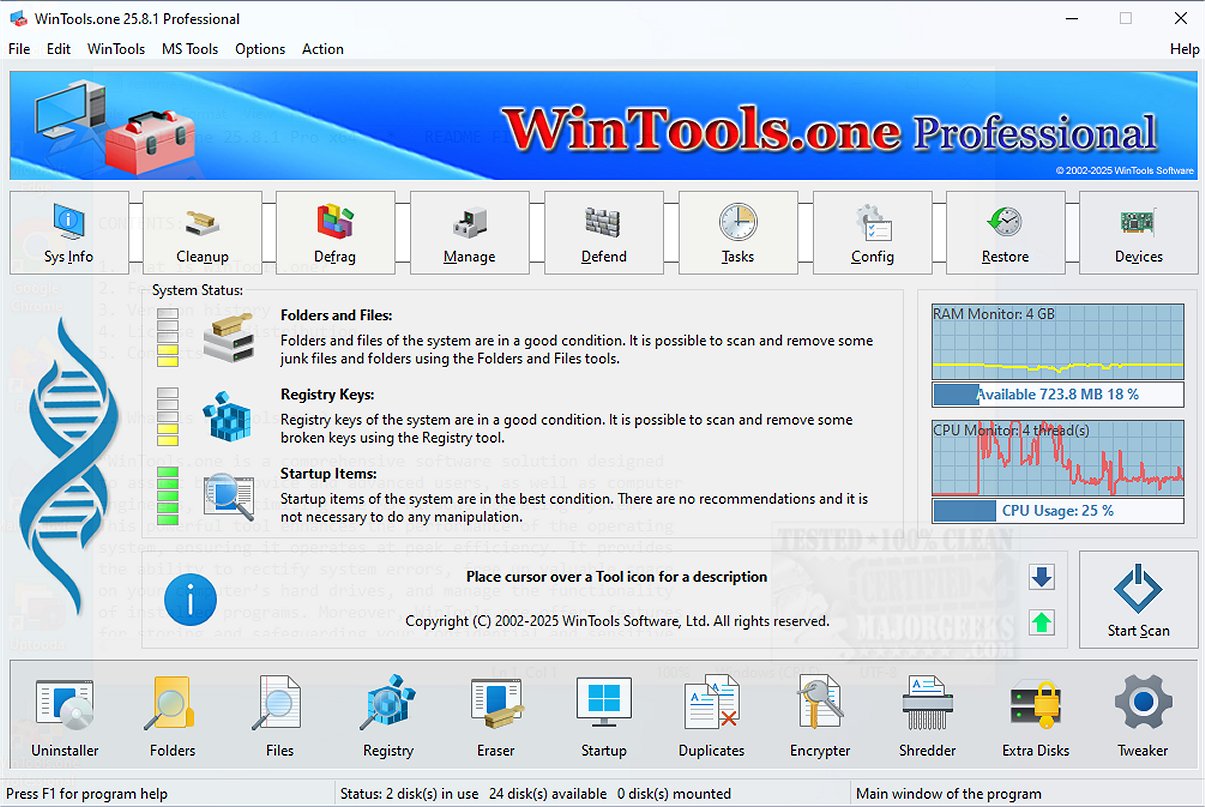
WinTools.one is a powerful system maintenance and cleanup tool designed to optimize computer performance by providing a suite of diagnostic and repair utilities. The software helps users assess their system's health, identify performance bottlenecks, and implement solutions to enhance overall functionality.
Overview of WinTools.one
WinTools.one serves as a comprehensive solution for managing essential system components such as files, folders, the system registry, and startup items. It addresses typical computer issues, frees up storage space, and contributes to a more efficient user experience.
Editions Available
The software is offered in two editions: a Home edition for casual users and a Professional edition for advanced users. The Professional edition includes all features found in the Home edition, along with additional tools such as a duplicate file manager and enhanced options within the Tweaker section.
Key Features
WinTools.one contains a variety of tools aimed at improving system performance:
- Clean Uninstaller: Safely removes unwanted applications.
- Scan Folders: Identifies unnecessary files within directories.
- Scan Files: Evaluates individual files for relevance and usefulness.
- Scan Shortcuts: Detects and fixes invalid shortcuts.
- Scan Registry: Cleans the Windows registry to optimize performance.
- Objects Eraser: Removes unwanted data securely.
- Startup Manager: Optimizes boot-up processes by managing startup items.
- Duplicate Files Finder: Helps users locate and eliminate duplicate files.
- File Encryptor and Shredder: Ensures data security and permanent deletion of sensitive files.
- Extra Disks and System Tweaker: Offers additional disk management options and system customization tools.
User Interface and Maintenance Tools
The user-friendly interface presents a primary diagnostic overview, allowing users to quickly assess the status of their system. WinTools.one provides actionable recommendations based on its analysis, which includes targeting temporary files, Windows logs, web caches, and other unnecessary data.
Built-in maintenance tools complement the diagnostic functions, ensuring that users can efficiently clean up their systems. The uninstaller, file and folder scanners, registry cleaner, and startup manager all work together to streamline system performance.
Customization and Control
One of the standout features of WinTools.one is the Tweaker section, which allows users to customize their system settings, fix network issues, manage drivers, and explore a variety of enhancements for the Windows environment.
Conclusion
In summary, WinTools.one consolidates system cleanup, file management, startup optimization, and advanced tweaking tools into a holistic solution for maintaining and improving computer performance. While the Professional edition caters to tech-savvy users seeking advanced functionalities, the Home edition provides essential features suitable for everyday users.
Future Enhancements
Looking ahead, potential updates could include more automated features for routine system maintenance, integration with cloud storage solutions for better file management, and enhanced security protocols to safeguard user data. These improvements would further solidify WinTools.one's standing as an essential tool for users looking to maintain an efficient and responsive computing experience
Overview of WinTools.one
WinTools.one serves as a comprehensive solution for managing essential system components such as files, folders, the system registry, and startup items. It addresses typical computer issues, frees up storage space, and contributes to a more efficient user experience.
Editions Available
The software is offered in two editions: a Home edition for casual users and a Professional edition for advanced users. The Professional edition includes all features found in the Home edition, along with additional tools such as a duplicate file manager and enhanced options within the Tweaker section.
Key Features
WinTools.one contains a variety of tools aimed at improving system performance:
- Clean Uninstaller: Safely removes unwanted applications.
- Scan Folders: Identifies unnecessary files within directories.
- Scan Files: Evaluates individual files for relevance and usefulness.
- Scan Shortcuts: Detects and fixes invalid shortcuts.
- Scan Registry: Cleans the Windows registry to optimize performance.
- Objects Eraser: Removes unwanted data securely.
- Startup Manager: Optimizes boot-up processes by managing startup items.
- Duplicate Files Finder: Helps users locate and eliminate duplicate files.
- File Encryptor and Shredder: Ensures data security and permanent deletion of sensitive files.
- Extra Disks and System Tweaker: Offers additional disk management options and system customization tools.
User Interface and Maintenance Tools
The user-friendly interface presents a primary diagnostic overview, allowing users to quickly assess the status of their system. WinTools.one provides actionable recommendations based on its analysis, which includes targeting temporary files, Windows logs, web caches, and other unnecessary data.
Built-in maintenance tools complement the diagnostic functions, ensuring that users can efficiently clean up their systems. The uninstaller, file and folder scanners, registry cleaner, and startup manager all work together to streamline system performance.
Customization and Control
One of the standout features of WinTools.one is the Tweaker section, which allows users to customize their system settings, fix network issues, manage drivers, and explore a variety of enhancements for the Windows environment.
Conclusion
In summary, WinTools.one consolidates system cleanup, file management, startup optimization, and advanced tweaking tools into a holistic solution for maintaining and improving computer performance. While the Professional edition caters to tech-savvy users seeking advanced functionalities, the Home edition provides essential features suitable for everyday users.
Future Enhancements
Looking ahead, potential updates could include more automated features for routine system maintenance, integration with cloud storage solutions for better file management, and enhanced security protocols to safeguard user data. These improvements would further solidify WinTools.one's standing as an essential tool for users looking to maintain an efficient and responsive computing experience
WinTools.one 26.2.1 released
WinTools.one is a comprehensive system maintenance and cleanup solution that includes a range of diagnostic tools that evaluate your computer's performance, identifying areas for improvement. Additionally, it offers effective solutions to optimize the functionality of your system, ensuring it runs smoothly.