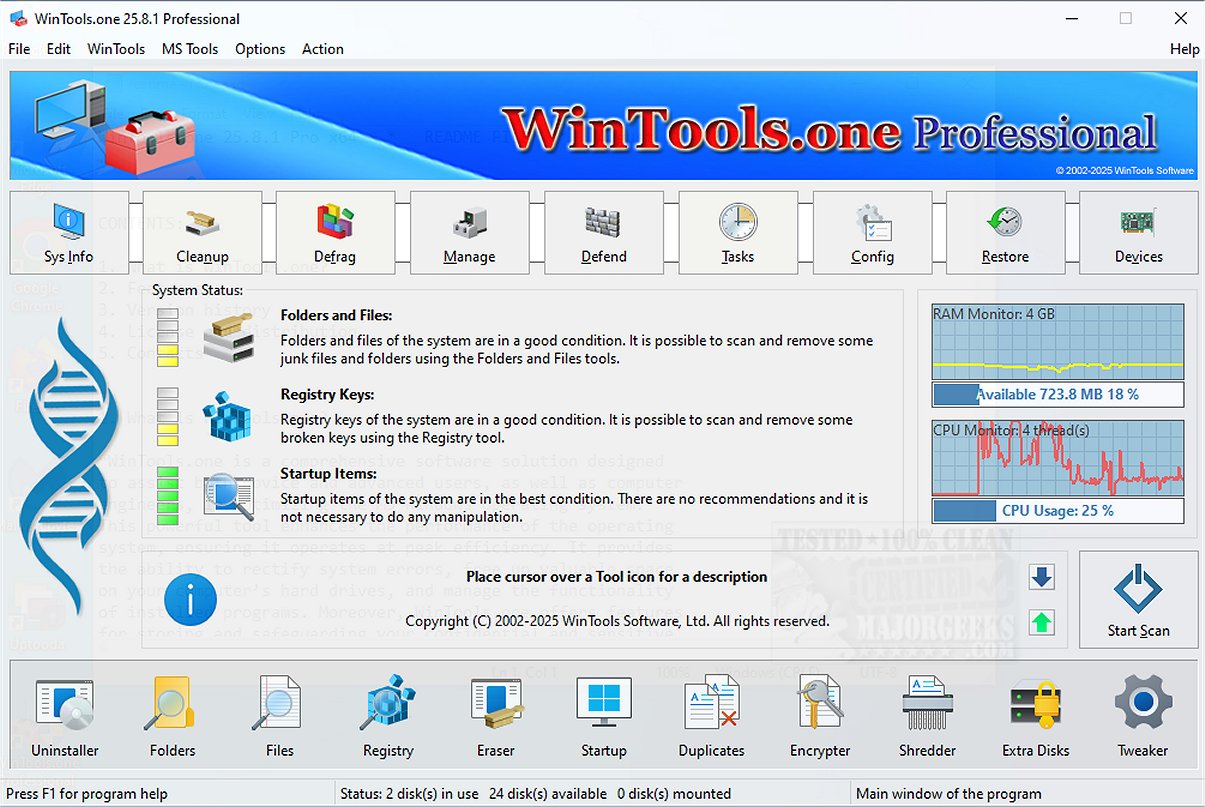
WinTools.one version 25.12.1 has been released, showcasing its role as a comprehensive solution for system maintenance and cleanup. This toolset includes a variety of diagnostic utilities designed to evaluate and enhance your computer's performance by identifying areas for improvement and providing effective optimization strategies to ensure a smooth operation.
What is WinTools.one?
WinTools.one is crafted to aid users in managing essential system components such as files, folders, the system registry, and startup items. It tackles common issues that can impede system performance, helping to free up valuable storage space and ultimately leading to a more responsive computing experience.
Editions Available
There are two distinct editions of WinTools.one: one for home users and another for advanced users. The Professional edition encompasses all features available in the Home edition while incorporating additional tools like a duplicate file manager and an expanded range of options in the Tweaker section.
Features of WinTools.one:
The software encompasses a suite of tools, including:
- Clean Uninstaller
- Folder and File Scanners
- Registry Scanner
- Objects Eraser
- Startup Manager
- Duplicate Files Manager
- File Encryptor and Shredder
- Extra Disk Management
- System Tweaker with numerous settings and fixes
User-Friendly Interface
The user interface of WinTools.one is designed to be accessible, centralizing all diagnostic features. Users can easily evaluate the status of their system components and receive actionable recommendations. With a single click, WinTools.one conducts a comprehensive analysis, targeting unnecessary data such as temporary files, Windows logs, and web caches.
Maintenance Tools
WinTools.one also boasts built-in maintenance tools, including a reliable uninstaller for unwanted applications, file and folder scanners for data elimination, and a registry scanner that enhances overall performance. The startup manager optimizes system boot times, while features like the file eraser and duplicate file manager work together to boost performance.
Customization Options
One of the standout features is the Tweaker section, which empowers users with options for system customization, network fixes, driver management, and various utilities that enhance control over the Windows operating environment.
Conclusion
In conclusion, WinTools.one amalgamates system cleanup, file management, startup optimization, and tweaking tools into a cohesive platform aimed at simplifying regular maintenance and enhancing system performance. While the Professional edition caters to advanced users with its extensive features, the Home edition remains robust enough for everyday users’ needs.
Further Learning Resources
For users seeking additional guidance, resources are available on topics such as utilizing Storage Sense to delete junk files in Windows 10/11, managing startup apps, and utilizing PowerShell to remove built-in apps from Windows 11, 10, 8, and 8.1
What is WinTools.one?
WinTools.one is crafted to aid users in managing essential system components such as files, folders, the system registry, and startup items. It tackles common issues that can impede system performance, helping to free up valuable storage space and ultimately leading to a more responsive computing experience.
Editions Available
There are two distinct editions of WinTools.one: one for home users and another for advanced users. The Professional edition encompasses all features available in the Home edition while incorporating additional tools like a duplicate file manager and an expanded range of options in the Tweaker section.
Features of WinTools.one:
The software encompasses a suite of tools, including:
- Clean Uninstaller
- Folder and File Scanners
- Registry Scanner
- Objects Eraser
- Startup Manager
- Duplicate Files Manager
- File Encryptor and Shredder
- Extra Disk Management
- System Tweaker with numerous settings and fixes
User-Friendly Interface
The user interface of WinTools.one is designed to be accessible, centralizing all diagnostic features. Users can easily evaluate the status of their system components and receive actionable recommendations. With a single click, WinTools.one conducts a comprehensive analysis, targeting unnecessary data such as temporary files, Windows logs, and web caches.
Maintenance Tools
WinTools.one also boasts built-in maintenance tools, including a reliable uninstaller for unwanted applications, file and folder scanners for data elimination, and a registry scanner that enhances overall performance. The startup manager optimizes system boot times, while features like the file eraser and duplicate file manager work together to boost performance.
Customization Options
One of the standout features is the Tweaker section, which empowers users with options for system customization, network fixes, driver management, and various utilities that enhance control over the Windows operating environment.
Conclusion
In conclusion, WinTools.one amalgamates system cleanup, file management, startup optimization, and tweaking tools into a cohesive platform aimed at simplifying regular maintenance and enhancing system performance. While the Professional edition caters to advanced users with its extensive features, the Home edition remains robust enough for everyday users’ needs.
Further Learning Resources
For users seeking additional guidance, resources are available on topics such as utilizing Storage Sense to delete junk files in Windows 10/11, managing startup apps, and utilizing PowerShell to remove built-in apps from Windows 11, 10, 8, and 8.1
WinTools.one 25.12.1 released
WinTools.one is a comprehensive system maintenance and cleanup solution that includes a range of diagnostic tools that evaluate your computer's performance, identifying areas for improvement. Additionally, it offers effective solutions to optimize the functionality of your system, ensuring it runs smoothly.