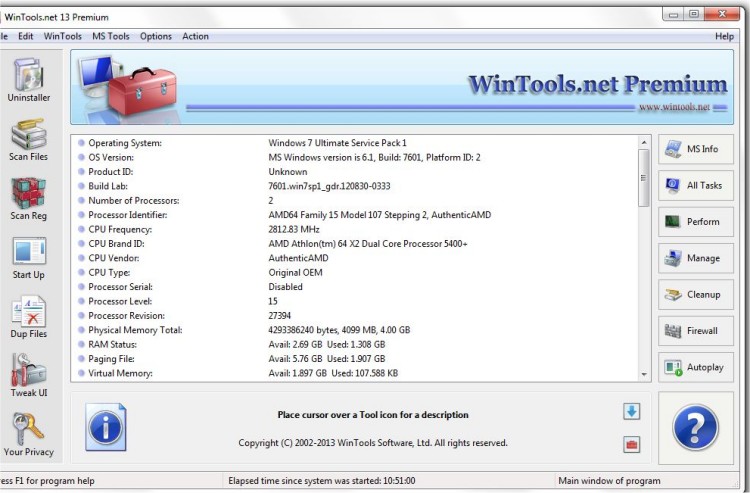
WinTools.net Professional version 26.0.1 has been released, providing users with enhanced control over various aspects of the Windows operating system. This software allows users to manage the Windows startup process, monitor memory usage, and customize desktop and system settings to better suit their preferences.
The suite includes several tools designed to improve system efficiency and user experience:
1. Clean Uninstaller: This tool accurately removes software and tracks changes made to the hard drive, Windows registry, and system files during program installations.
2. Scan Files: It periodically cleans the hard drive of obsolete files and dead references, which can slow down access time.
3. Scan Shortcuts: This tool helps in removing dead shortcuts from the Desktop, Start menu, and Application data, further optimizing drive access.
4. Scan Registry: It cleans the Windows registry of unused applications and invalid references, enhancing system speed and boot time.
5. Startup Manager: Users can monitor, add, or remove individual startup items, controlling applications that initiate during system boot.
6. Tweak UI: This feature offers additional adjustments related to safety and user preferences that are not found in the standard Windows setup.
7. Net Tweaker: A tool available in the Professional edition that optimizes data transfer and connection by modifying hidden network settings.
8. Your Privacy: A suite of privacy-focused tools to protect sensitive information, also exclusive to the Professional edition.
9. Invisible Man: This tool helps in saving private information securely, ensuring it is not stored by the system.
10. File Shredder: This feature permanently deletes files, ensuring they cannot be recovered.
11. IE Favorites: A set of tools for managing Internet Explorer Favorites, allowing for quick deletion, backup, and restoration.
12. RAM Memory Booster: This tool monitors and optimizes RAM usage to enhance overall system performance. However, users are encouraged to consider using RAM Saver Pro for more advanced optimization.
Overall, WinTools.net Professional 26.0.1 is a comprehensive suite designed for users looking to optimize their Windows experience, maintain system performance, and ensure privacy. Its tools not only streamline system management but also enhance security and efficiency.
In addition, users interested in Windows maintenance can explore related topics, such as utilizing Storage Sense to automatically delete junk files, managing startup applications in Windows 10 and 11, disabling privacy-related tasks in the Windows Task Scheduler, and removing built-in apps via PowerShell for a more personalized system setup
The suite includes several tools designed to improve system efficiency and user experience:
1. Clean Uninstaller: This tool accurately removes software and tracks changes made to the hard drive, Windows registry, and system files during program installations.
2. Scan Files: It periodically cleans the hard drive of obsolete files and dead references, which can slow down access time.
3. Scan Shortcuts: This tool helps in removing dead shortcuts from the Desktop, Start menu, and Application data, further optimizing drive access.
4. Scan Registry: It cleans the Windows registry of unused applications and invalid references, enhancing system speed and boot time.
5. Startup Manager: Users can monitor, add, or remove individual startup items, controlling applications that initiate during system boot.
6. Tweak UI: This feature offers additional adjustments related to safety and user preferences that are not found in the standard Windows setup.
7. Net Tweaker: A tool available in the Professional edition that optimizes data transfer and connection by modifying hidden network settings.
8. Your Privacy: A suite of privacy-focused tools to protect sensitive information, also exclusive to the Professional edition.
9. Invisible Man: This tool helps in saving private information securely, ensuring it is not stored by the system.
10. File Shredder: This feature permanently deletes files, ensuring they cannot be recovered.
11. IE Favorites: A set of tools for managing Internet Explorer Favorites, allowing for quick deletion, backup, and restoration.
12. RAM Memory Booster: This tool monitors and optimizes RAM usage to enhance overall system performance. However, users are encouraged to consider using RAM Saver Pro for more advanced optimization.
Overall, WinTools.net Professional 26.0.1 is a comprehensive suite designed for users looking to optimize their Windows experience, maintain system performance, and ensure privacy. Its tools not only streamline system management but also enhance security and efficiency.
In addition, users interested in Windows maintenance can explore related topics, such as utilizing Storage Sense to automatically delete junk files, managing startup applications in Windows 10 and 11, disabling privacy-related tasks in the Windows Task Scheduler, and removing built-in apps via PowerShell for a more personalized system setup
WinTools.net Professional 26.0.1 released
WinTools.net Professional puts you in control of the Windows startup process, memory monitoring and gives you the power to customize desktop and system settings to fit your needs.