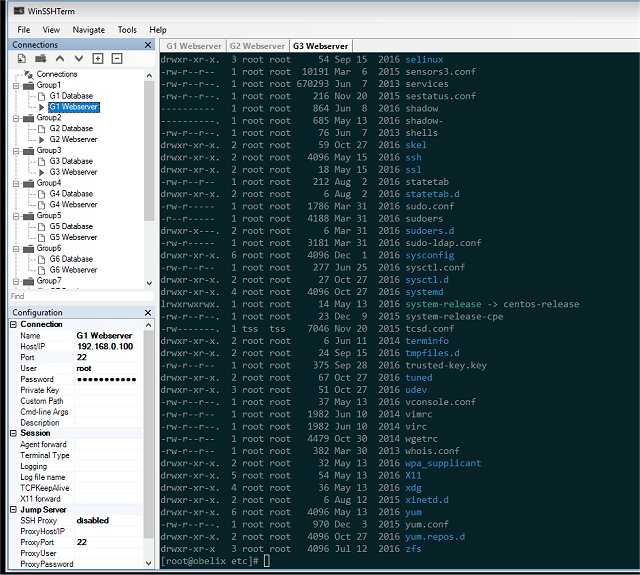
WinSSHTerm has released version 2.41.7, enhancing its functionality as a comprehensive tabbed SSH client that integrates tools like PuTTY/KiTTY, WinSCP, and VcXsrv. This application is designed to boost productivity by providing keyboard shortcuts and intelligent navigation, enabling users to efficiently manage multiple SSH sessions across various systems.
To use WinSSHTerm effectively, users must embed either PuTTY or KiTTY. For PuTTY integration, the user needs to download the 'putty.exe' executable, which will then be installed in the 'tools' directory of WinSSHTerm. Similarly, for KiTTY, users must download 'kitty.exe' to facilitate embedding. The interface is user-friendly, allowing quick access to the main view with an option to skip the installation prompt.
WinSSHTerm further enhances user experience with built-in file transfer capabilities and the ability to run X applications seamlessly. It features eye-friendly terminal color schemes designed to reduce visual strain.
Key features of WinSSHTerm include:
- Production-ready application
- Compatibility with original PuTTY/KiTTY executables
- Eye-friendly terminal color options
- Support for multiple tabs and windows
- Master password for enhanced security
- Ability to share connections with team members
- Use of template variables for efficient session management
- Customizable keyboard shortcuts
- Background coloring for different environments (e.g., PROD, DEV)
- Integration with file transfer tools (WinSCP)
- Support for X applications via VcXsrv, including copy and paste functionality
- Capability to work with SSH jump servers/bastion hosts
- Quick connection search feature
- Simple migration from other SSH clients such as PuTTY, MobaXterm, and SuperPuTTY.
In conclusion, WinSSHTerm 2.41.7 stands out as a versatile and powerful tool for developers, system administrators, and IT professionals, streamlining SSH session management while offering robust features for enhanced productivity and ease of use
To use WinSSHTerm effectively, users must embed either PuTTY or KiTTY. For PuTTY integration, the user needs to download the 'putty.exe' executable, which will then be installed in the 'tools' directory of WinSSHTerm. Similarly, for KiTTY, users must download 'kitty.exe' to facilitate embedding. The interface is user-friendly, allowing quick access to the main view with an option to skip the installation prompt.
WinSSHTerm further enhances user experience with built-in file transfer capabilities and the ability to run X applications seamlessly. It features eye-friendly terminal color schemes designed to reduce visual strain.
Key features of WinSSHTerm include:
- Production-ready application
- Compatibility with original PuTTY/KiTTY executables
- Eye-friendly terminal color options
- Support for multiple tabs and windows
- Master password for enhanced security
- Ability to share connections with team members
- Use of template variables for efficient session management
- Customizable keyboard shortcuts
- Background coloring for different environments (e.g., PROD, DEV)
- Integration with file transfer tools (WinSCP)
- Support for X applications via VcXsrv, including copy and paste functionality
- Capability to work with SSH jump servers/bastion hosts
- Quick connection search feature
- Simple migration from other SSH clients such as PuTTY, MobaXterm, and SuperPuTTY.
In conclusion, WinSSHTerm 2.41.7 stands out as a versatile and powerful tool for developers, system administrators, and IT professionals, streamlining SSH session management while offering robust features for enhanced productivity and ease of use
WinSSHTerm 2.41.7 released
WinSSHTerm is a tabbed SSH solution that combines PuTTY / KiTTY, WinSCP, and VcXsrv.