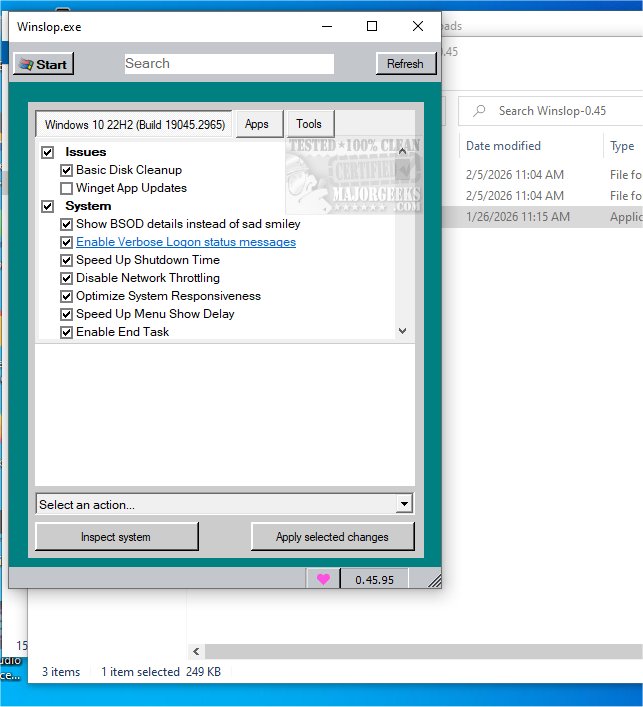
Winslop is a newly released lightweight utility for Windows, developed by the creator of Flyoobe and Crapfixer. Its primary function is to eliminate unnecessary system clutter, colloquially known as "slop," which can hinder the performance and user control of the operating system.
Understanding Slop
Slop refers to the low-value components that are often pre-installed on Windows systems. These elements not only consume valuable resources but also hinder user efficiency by limiting control over the system. Winslop is designed to tackle this issue by streamlining functionality and reducing distractions, offering users clearer and more straightforward system information.
Streamlined Functionality
Winslop operates entirely offline, without the need for cloud services, virtual assistants, or complex algorithms. This local approach ensures that users can maintain control over their systems without compromising performance or integrity. Unlike many existing maintenance tools, Winslop provides a focused and localized version of CrapFixer, allowing users to review and revert changes easily.
Key Features of Winslop
1. Offline Operation: Winslop prioritizes privacy and security, functioning without external dependencies, making it suitable for users seeking a cleaner Windows experience.
2. User Control: Changes made by Winslop require manual initiation, offering users the ability to oversee the modifications and revert them if necessary. This transparency fosters confidence in managing system adjustments.
3. Intuitive Interface: With a user-centric design, Winslop simplifies system management, making it accessible and efficient for all users.
Not Anti-AI or Windows
Winslop is not against Windows or artificial intelligence. Instead, it aims to simplify the user experience by removing unnecessary complexity. The tool provides users with insights into the changes it proposes, ensuring a clear understanding of its operations.
Geek Verdict
Winslop empowers users to eliminate bloatware, manage default telemetry settings, and streamline their systems with minimal effort. In just a few clicks, users can transform their computers into lean, responsive machines, free from unnecessary components and features.
Important Note
Users should be aware that Belim, the creator of Winslop, does not own or operate the domain "winslop.com." The current redirection to the correct GitHub repository does not guarantee security, as third-party domains can change and potentially lead to phishing or malware risks.
Conclusion
With Winslop, users can enjoy a more efficient and controlled computing experience. Its focus on privacy, user control, and simplicity makes it an essential tool for anyone looking to enhance their Windows system's performance
Understanding Slop
Slop refers to the low-value components that are often pre-installed on Windows systems. These elements not only consume valuable resources but also hinder user efficiency by limiting control over the system. Winslop is designed to tackle this issue by streamlining functionality and reducing distractions, offering users clearer and more straightforward system information.
Streamlined Functionality
Winslop operates entirely offline, without the need for cloud services, virtual assistants, or complex algorithms. This local approach ensures that users can maintain control over their systems without compromising performance or integrity. Unlike many existing maintenance tools, Winslop provides a focused and localized version of CrapFixer, allowing users to review and revert changes easily.
Key Features of Winslop
1. Offline Operation: Winslop prioritizes privacy and security, functioning without external dependencies, making it suitable for users seeking a cleaner Windows experience.
2. User Control: Changes made by Winslop require manual initiation, offering users the ability to oversee the modifications and revert them if necessary. This transparency fosters confidence in managing system adjustments.
3. Intuitive Interface: With a user-centric design, Winslop simplifies system management, making it accessible and efficient for all users.
Not Anti-AI or Windows
Winslop is not against Windows or artificial intelligence. Instead, it aims to simplify the user experience by removing unnecessary complexity. The tool provides users with insights into the changes it proposes, ensuring a clear understanding of its operations.
Geek Verdict
Winslop empowers users to eliminate bloatware, manage default telemetry settings, and streamline their systems with minimal effort. In just a few clicks, users can transform their computers into lean, responsive machines, free from unnecessary components and features.
Important Note
Users should be aware that Belim, the creator of Winslop, does not own or operate the domain "winslop.com." The current redirection to the correct GitHub repository does not guarantee security, as third-party domains can change and potentially lead to phishing or malware risks.
Conclusion
With Winslop, users can enjoy a more efficient and controlled computing experience. Its focus on privacy, user control, and simplicity makes it an essential tool for anyone looking to enhance their Windows system's performance
Winslop 0.4.5 released
Winslop is an innovative lightweight utility for Windows, developed by the creator of Flyoobe and Crapfixer. This tool is designed to eliminate unnecessary system clutter, often referred to as "slop," that can degrade your operating system's performance and reduce user control.