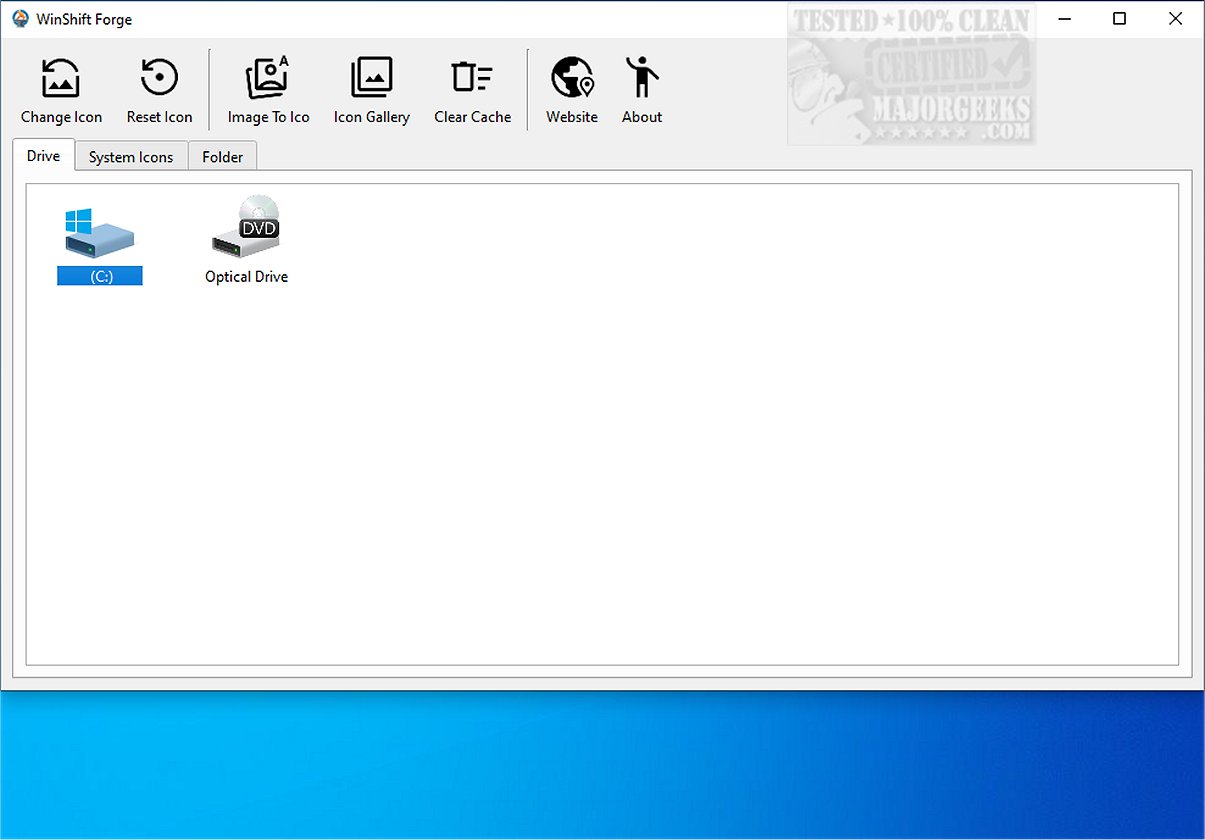
WinShift Forge is an innovative application designed to enhance the Windows user experience by allowing users to customize icons for various drives, system tools, and folders. This tool empowers users to personalize the visual elements of their operating system, making it feel more tailored to their preferences.
Key Features of WinShift Forge
1. Icon Customization: WinShift Forge provides a straightforward way to change icons for all connected drives, system applications like 'This PC,' 'Network,' and the Recycle Bin, as well as any folder on the computer. Users can easily specify the location of their folders within the app and select a suitable .ico file to replace the default icons.
2. Icon Cache Management: The tool includes a feature to clear the icon cache, ensuring that any changes made to icons are reflected instantly without needing to restart the system.
3. Basic Icon Generator: While not as sophisticated as dedicated icon editors, WinShift Forge includes a simple icon generator that converts 256x256 images into ICO files. Users can input various image formats, including JPG, PNG, and SVG, to create custom icons.
4. Pro WSL2 Distro Manager: The latest update offers a user-friendly management tool for the Windows Subsystem for Linux (WSL2), allowing users to easily add and manage different Linux distributions alongside their Windows environment.
5. System Debloat and Cleanup: Users can reclaim system resources by removing pre-installed Windows 11 applications (bloatware) such as the Game Bar and Microsoft To Do. The one-click restore feature provides a convenient way to reinstate any removed apps from a built-in library.
6. Maintenance Tools: WinShift Forge includes tools to optimize the Windows experience, such as an icon cache fix that facilitates immediate display changes without a system restart.
7. Lightweight Performance: Designed to operate efficiently in the background, WinShift Forge ensures rapid results without compromising device performance.
User Experience and Verdict
WinShift Forge stands out as a user-friendly solution for replacing default Windows icons, offering an enjoyable alternative to the traditional method of icon modification through system settings. It allows users to craft a unique aesthetic that aligns with their personal style, elevating the overall interface of Windows 11. With its blend of customization, management tools, and maintenance features, WinShift Forge is an excellent choice for anyone looking to personalize their operating system experience.
Future Enhancements and Community Feedback
As WinShift Forge continues to evolve, future updates may include more advanced icon editing features, enhanced support for various file formats, and additional customization options. User feedback is crucial for guiding the development of new features, ensuring that the application meets the diverse needs of its user base. With an increasing focus on user experience, WinShift Forge aims to remain at the forefront of desktop personalization tools.
In conclusion, WinShift Forge 0.7.0 not only simplifies the customization of icons but also contributes to a more organized and visually appealing Windows experience, making it an essential tool for users seeking to personalize their workflow
Key Features of WinShift Forge
1. Icon Customization: WinShift Forge provides a straightforward way to change icons for all connected drives, system applications like 'This PC,' 'Network,' and the Recycle Bin, as well as any folder on the computer. Users can easily specify the location of their folders within the app and select a suitable .ico file to replace the default icons.
2. Icon Cache Management: The tool includes a feature to clear the icon cache, ensuring that any changes made to icons are reflected instantly without needing to restart the system.
3. Basic Icon Generator: While not as sophisticated as dedicated icon editors, WinShift Forge includes a simple icon generator that converts 256x256 images into ICO files. Users can input various image formats, including JPG, PNG, and SVG, to create custom icons.
4. Pro WSL2 Distro Manager: The latest update offers a user-friendly management tool for the Windows Subsystem for Linux (WSL2), allowing users to easily add and manage different Linux distributions alongside their Windows environment.
5. System Debloat and Cleanup: Users can reclaim system resources by removing pre-installed Windows 11 applications (bloatware) such as the Game Bar and Microsoft To Do. The one-click restore feature provides a convenient way to reinstate any removed apps from a built-in library.
6. Maintenance Tools: WinShift Forge includes tools to optimize the Windows experience, such as an icon cache fix that facilitates immediate display changes without a system restart.
7. Lightweight Performance: Designed to operate efficiently in the background, WinShift Forge ensures rapid results without compromising device performance.
User Experience and Verdict
WinShift Forge stands out as a user-friendly solution for replacing default Windows icons, offering an enjoyable alternative to the traditional method of icon modification through system settings. It allows users to craft a unique aesthetic that aligns with their personal style, elevating the overall interface of Windows 11. With its blend of customization, management tools, and maintenance features, WinShift Forge is an excellent choice for anyone looking to personalize their operating system experience.
Future Enhancements and Community Feedback
As WinShift Forge continues to evolve, future updates may include more advanced icon editing features, enhanced support for various file formats, and additional customization options. User feedback is crucial for guiding the development of new features, ensuring that the application meets the diverse needs of its user base. With an increasing focus on user experience, WinShift Forge aims to remain at the forefront of desktop personalization tools.
In conclusion, WinShift Forge 0.7.0 not only simplifies the customization of icons but also contributes to a more organized and visually appealing Windows experience, making it an essential tool for users seeking to personalize their workflow
WinShift Forge 0.7.0 released
WinShift Forge lets you customize icons for all types of drives, system tools, and specific folders, enhancing the user experience by enabling you to tailor the visual elements of your operating system to your preferences.