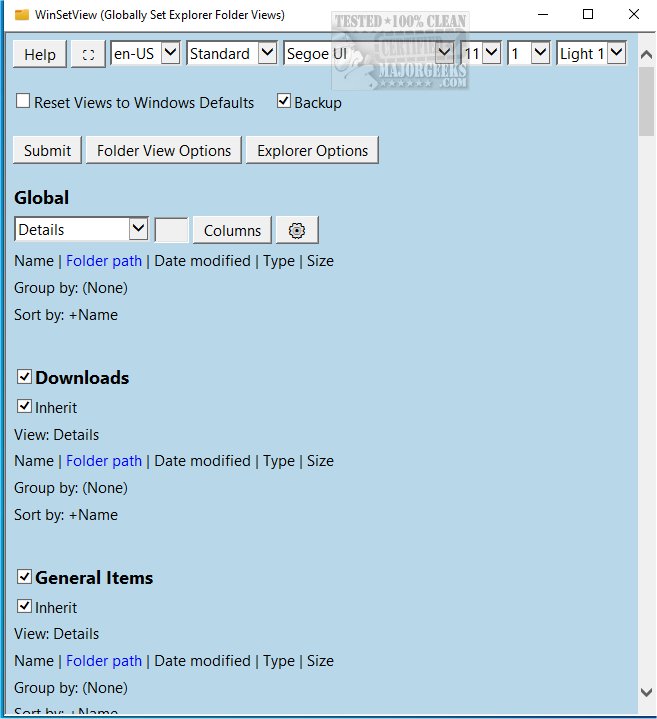
WinSetView is a powerful tool designed to customize Windows Explorer folder views globally. This latest version, 3.1.7, enhances the user experience by allowing users to set the Details View with customizable column headings that will apply consistently across all folders.
The application is user-friendly, making it easy for anyone to navigate and utilize its features. For optimal performance, it is recommended to close all running applications before launching WinSetView, as open apps may hinder the proper updating of open/save dialog views.
Key features of WinSetView include:
- User-specific Changes: All modifications are made per user and stored within the HKEY_CURRENT_USER registry hive, ensuring that no system-wide settings are altered and no elevated permissions are needed.
- Backup and Restore Functionality: Each execution of WinSetView creates a unique backup of the affected registry values, allowing users to revert to previous settings if desired. A reset option is also available, enabling users to restore all Explorer views to their original Windows default settings.
- Easy Operation: Users can easily launch WinSetView by double-clicking on WinSetView.exe to access the graphical user interface (GUI). Once selections are made, clicking submit triggers the application to pass the user's choices to WinSetView.ps1 via an INI file, which then applies the changes and restarts the Explorer to reflect the updates.
In addition to WinSetView, users can explore related topics such as how to show hidden files and folders, manage file name extensions in the context menu, add a details pane to the Explorer context menu, and discover a comprehensive list of keyboard shortcuts for Windows File Explorer.
Extension:
With the release of WinSetView 3.1.7, users can further personalize their Windows experience beyond just folder views. The ability to set a standardized view can significantly enhance productivity, especially for those managing large volumes of files. Furthermore, the backup and restore features ensure that users can experiment with different configurations without the risk of losing their preferred settings. As file management continues to evolve, tools like WinSetView are essential for users seeking efficiency and customization in their digital workspace. Future updates could potentially introduce features such as themed views or integration with cloud storage services, expanding the tool's capabilities even further
The application is user-friendly, making it easy for anyone to navigate and utilize its features. For optimal performance, it is recommended to close all running applications before launching WinSetView, as open apps may hinder the proper updating of open/save dialog views.
Key features of WinSetView include:
- User-specific Changes: All modifications are made per user and stored within the HKEY_CURRENT_USER registry hive, ensuring that no system-wide settings are altered and no elevated permissions are needed.
- Backup and Restore Functionality: Each execution of WinSetView creates a unique backup of the affected registry values, allowing users to revert to previous settings if desired. A reset option is also available, enabling users to restore all Explorer views to their original Windows default settings.
- Easy Operation: Users can easily launch WinSetView by double-clicking on WinSetView.exe to access the graphical user interface (GUI). Once selections are made, clicking submit triggers the application to pass the user's choices to WinSetView.ps1 via an INI file, which then applies the changes and restarts the Explorer to reflect the updates.
In addition to WinSetView, users can explore related topics such as how to show hidden files and folders, manage file name extensions in the context menu, add a details pane to the Explorer context menu, and discover a comprehensive list of keyboard shortcuts for Windows File Explorer.
Extension:
With the release of WinSetView 3.1.7, users can further personalize their Windows experience beyond just folder views. The ability to set a standardized view can significantly enhance productivity, especially for those managing large volumes of files. Furthermore, the backup and restore features ensure that users can experiment with different configurations without the risk of losing their preferred settings. As file management continues to evolve, tools like WinSetView are essential for users seeking efficiency and customization in their digital workspace. Future updates could potentially introduce features such as themed views or integration with cloud storage services, expanding the tool's capabilities even further
WinSetView 3.1.7 released
WinSetView allows you to set Windows Explorer folder views globally.