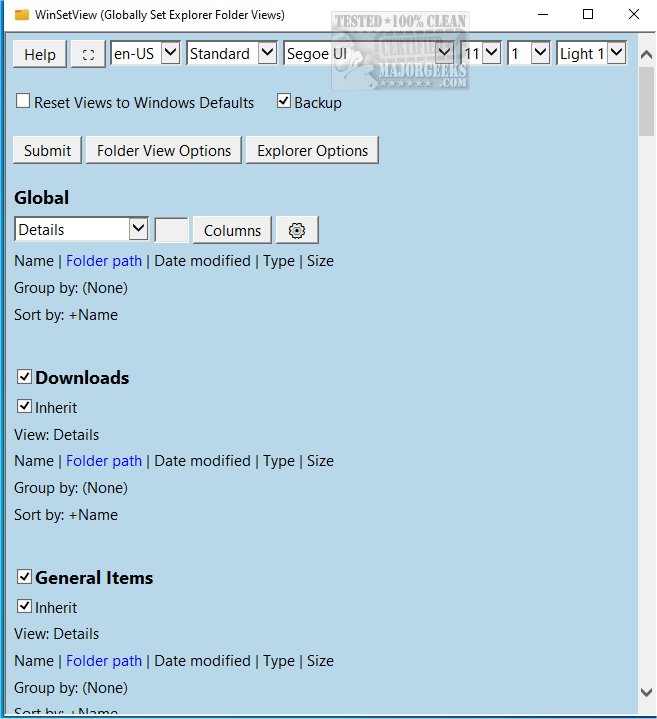
WinSetView version 3.1.6 has been released, offering users the ability to set folder views in Windows Explorer globally. This tool allows users to configure the Details View with customized column headings, which will then apply to all folders uniformly. The usage of WinSetView is straightforward; however, it is recommended to close all open applications before running the tool to ensure that any open or save dialog views are updated correctly.
The modifications made through WinSetView are user-specific and stored within the HKEY_CURRENT_USER section of the registry, meaning that it does not affect the global settings of the machine and does not require administrator privileges. Each usage of WinSetView generates a unique backup of the affected registry values, providing a restore option for users to revert to previous settings if needed. Additionally, the tool includes a feature to reset all Explorer views back to their default Windows settings.
To operate WinSetView, users need to double-click the WinSetView.exe file to launch the graphical user interface (GUI). Upon making their selections and clicking submit, the program communicates these choices via an INI file to the accompanying WinSetView.ps1 script, which executes the changes and restarts Windows Explorer for the updates to take effect.
In addition to its primary functionality, WinSetView can be accompanied by helpful resources that guide users on related tasks, such as showing hidden files, hiding file name extensions, adding a details pane to the context menu in File Explorer, and a comprehensive list of keyboard shortcuts for File Explorer.
To build upon this, future updates could introduce features such as a user-friendly wizard for first-time users, support for multiple user profiles, or advanced customization options for folder views. Enhanced documentation and video tutorials could also be beneficial for users looking to maximize the potential of WinSetView
The modifications made through WinSetView are user-specific and stored within the HKEY_CURRENT_USER section of the registry, meaning that it does not affect the global settings of the machine and does not require administrator privileges. Each usage of WinSetView generates a unique backup of the affected registry values, providing a restore option for users to revert to previous settings if needed. Additionally, the tool includes a feature to reset all Explorer views back to their default Windows settings.
To operate WinSetView, users need to double-click the WinSetView.exe file to launch the graphical user interface (GUI). Upon making their selections and clicking submit, the program communicates these choices via an INI file to the accompanying WinSetView.ps1 script, which executes the changes and restarts Windows Explorer for the updates to take effect.
In addition to its primary functionality, WinSetView can be accompanied by helpful resources that guide users on related tasks, such as showing hidden files, hiding file name extensions, adding a details pane to the context menu in File Explorer, and a comprehensive list of keyboard shortcuts for File Explorer.
To build upon this, future updates could introduce features such as a user-friendly wizard for first-time users, support for multiple user profiles, or advanced customization options for folder views. Enhanced documentation and video tutorials could also be beneficial for users looking to maximize the potential of WinSetView
WinSetView 3.1.6 released
WinSetView allows you to set Windows Explorer folder views globally.